|
HDRC Site References
|
|
Home |
|
Previous
Mods & Tips
|
|
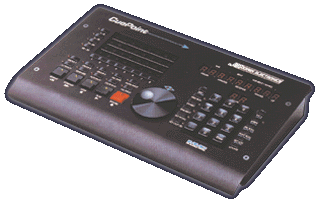
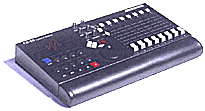
Oh, the beauty of having a great piece of gear is, all the wonderful component accessories that go along to have the complete package. Once you have an HDR, one would wonder how much expansion abilities the unit has. Lets say you have 3 HDRs with a SMPTE card on the lead unit, hard drives maxed out, 2 effects cards in the other two units, and a modular CDR for your final stage. You need one more item to complete this package before you can call yourself a studio owner......A CONTROLLER! Vestax has the MX-1 and the MX-2 controllers. These devices are all you need to finish the job of, recording and mixing. The MXs control the HDRs through MMC (MIDI machine control). This is the same way the computer mixers work (for those of you who downloaded the MP6 and MP8). The physical mixer has locate points, snapshot recall, track arming and muting, assignable knobs, 8 faders and a tape based transport control. The best way to control your HDR from your engineering chair. These devices are a smart investment as far as wear and tear on your HDR. But the question poses....... What if I can't find one? Is there an alternative? Yes, there is. JL Cooper is a company well known for their universal sync boxes and transport controllers. Personally, I think JL Cooper designed the MX-1 for Vestax (that is just a hunch). 3 units I can think of are JLCs Cue Point, CS-10 and BB3. The Cue Point is usually marketed with ADATs and it's compatibles, AKAI DRs, DA-88s, EMU Darwin's and our own HDR-8. Minus the 2 tracks it should work with HDR-6s as well but, for just transport purposes alone, get a BB3. Very simple and very affordable. The Cue Point is a bells and whistles unit though, it doesn't have faders. Its mainly for external gear record lists who need transports, track arming and SMPTE. For you all digital domain introvert's, the CS-10 is your piece. It basically looks like a generic MX-1. There are two versions CS-10 and CS-10 II which, I think one doesn't have the MMC (and that's what we need to control the HDRs). The other supports computer based hard disc recording. Visit the JLC site form the link on the options page.
These following tips were sent in from community member Robert Kishoro HDR SERIES --- various issues You may have noticed that as you "stack" hdr6 or 8s, the noise floor tends to increase. This is usually just a little bit of noticeable hum...... this seems to have to do with the Vestax grounding scheme, anyway, the practical fix--- more than other gear ive used the vestax wants to be connected to a really well grounded outlet including ANY other connected gear. So review your grounding, including cheap power strips. Next, try NOT fastening(grounding) the HDR units to your rack. Then ground a single AUX (in) channel to the rack or your mixer chassis, this has worked for me........ I may never know exactly why, your results may vary. RF BLEED You may have noticed that the HDR series emits radio frequency hash similar to a PC, Practical Fix. Same as above plus try buying two RF SELF ATTACHING CHOKES and attaching to the power lead cables/left side near transformer. If you place a unit high in a room then that's a little TV tower isn't it? FOOT SWITCH PUNCH You may have noticed that once in a great while foot switch punch in will crash the HDR series---- its switch "bounce" I suspect. For string players like me, this is not so fun... "intuitive" punching is a great feature. The good news----faster, larger drive and this disappears. Y CABLES An alternative to a previous post, simply solder a high quality 2k resistor in the hot path of each cable output TRS. Now the cables have become a simple mixer no load issues, no need to break into your machine, if you then need to connect to the dreaded RCA just buy some radio shack adapter's. Quarter inch to RCA, the output will be just a little lower but, every other device should work just fine, no filtering issues. 4k works well also, maybe a better first value. ERRATIC Check the Molex connectors, they are an older style- on the AUX board you can solder the AUX end of the cable directly to the pins.
HDR6--- OP AMP UPGRADE There are at least two versions of the HDR6 the first version cut a few less important corners but lacked some of the "monitor back" features of the second. Fortunately the first version can be modified fairly easily simply matching the hand soldered mods you see visually as differences between the two...... if this seems complicated or daunting then its best not to do it......but for anyone who cares, the original version uses op amps known as ne5532. This is a dual op amp with many great audio features, you simply replace the generic op amps with 8 pin sockets paying special attention to the direction of the chips, sockets back in same direction, right? then you need the same number of ICs plus say four extra. The new ICS will be SIGNETICS 5532AN OR 5532A will work as well, the amps are all located on the right side of the board in a line all, with the above number can/should be switched. This is not a minor difference in sound, especially by toady's standards. If your amps read 353 or something similar there is no "easy" fix for this..... 353s ARE WIDELY USED so its not a "K-Mart" device. But, its definitely not a first choice for pro gear... if you choose to change these you must change a resistor and a cap for each one, highly not recommend. The difference?
higher output, "warmer' output, no mushy phase, extended response,
more consistent response regardless of temp or load. truly digital
noise floor, extremely wide dynamic range. The signetics5532 is
made by phillips----- who invented this ic----- all others are "knockoffs".
You may find that suddenly you like the analog output of the HDR
much more than the digital, but that's partly an issue of your other
gear..... and needs...... for certain you can suddenly rely on high
quality outboard gear and go several generations this way. I personally
do not use any internal HDR effects and find no problems with outboards---many
advantages to this I find the static warning goes triple here---
the Phillips mixers ahead of these amps are very delicate....please
keep this in mind.
BREAKING
THE BARRIERS: 6GIG AND BEYOND In
addition, because of udma standards its very possible that many
newer drives will work Even the one that came with your PC or other
gear. I can only guarantee the above drive so look before you leap.
There are faster drives with better reps than Samsung so its very
likely not the only one. Robert
|