MS Excel Spreadsheet
Online Module
Lesson 3: Modifying the Appearance of a Worksheet
Check Your Progress
Activity 3
- Step 1. Create a file and enter twenty (20) names and surnames of your classmates, surname first.
- Step 2. Rename Sheet1 as "List of My Classmates" and change the sheet tab color to "Yellow".
- Step 3. Change the color of the Sheet2 tab with "Blue".
- Step 4. Change the color of the Sheet3 tab with "Red".
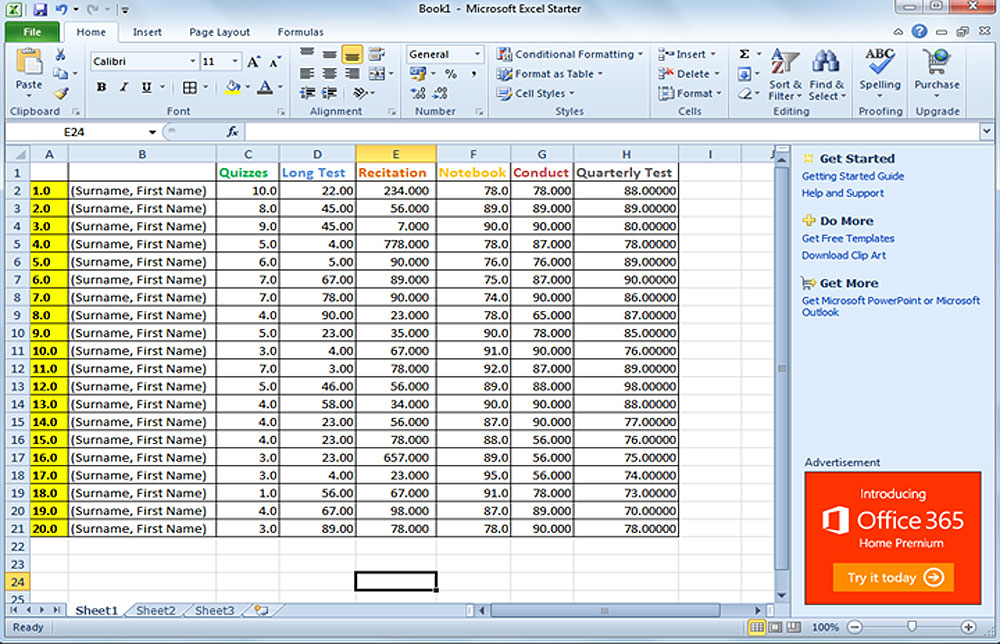
- Step 5. Enter the data on the worksheet below.
- Step 6. Format the number, using the Number Group commands.
- Step 7. Save your file with "Sample Name List" as filename.