MS Excel Spreadsheet
Online Module
Lesson 3: Modifying the Appearance of a Worksheet
Section 3.2 - Formatting Numbers
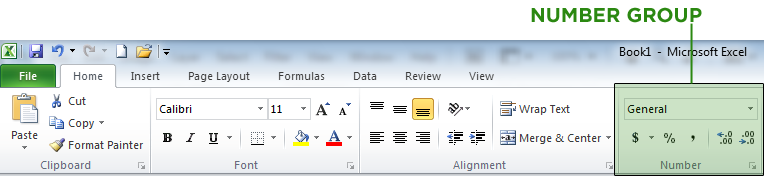
The Number Group Commands
The commands in the Number Group allow you to set the format, percentage, comma style and decimal places.
Formatting Numbers
You can format the numbers with a comma separator and decimal places.
- Step 1. Select the cell or the group of cells that you want to place comma separator.
- Step 2. Click the Home tab, go to the Number Group and click the Comma button.
- Step 3. To adjust the number of decimal places, click the Home tab, go to the Number group and click Increase Decimal or Decrease Decimal button.