MS Excel Spreadsheet
Online Module
Lesson 3: Modifying the Appearance of a Worksheet
Section 3.3 - Inserting a Row or Column into a Worksheet
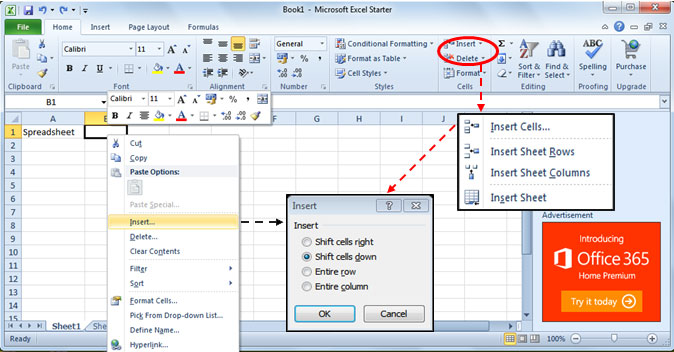
- Step 1. Place the mouse pointer on cell wherein you want to insert row or column.
- Step 2. Right click the mouse and on the Context Menu, click Insert.
- Step 3. On the Insert Dialog box, click Entire Row or Entire Column.
- Step 4. Or, click the Insert button on the Cells group and select the options on the Insert dialog box.
Section 3.4 - Deleting a Row or Column into a Worksheet
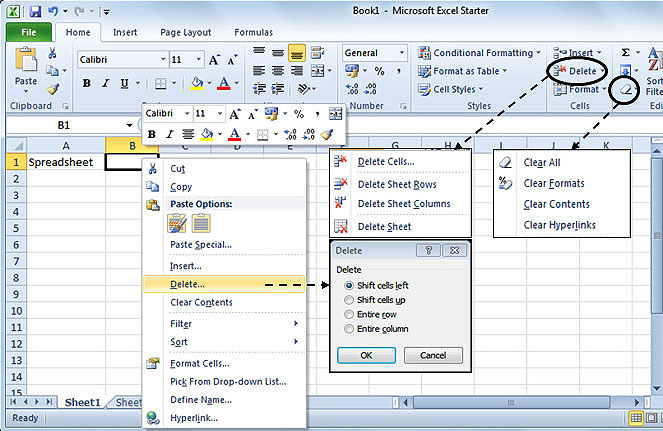
These are the simple processes on how to delete unwanted rows and column in your worksheet.
- Step 1. Place the mouse pointer on the cell where you want to delete a row or a column.
- Step 2. Right click the mouse and on the Context Menu, click Delete.
- Step 3. On the Delete dialog box, click Entire Row or Entire Column.
- Step 4. Or, click the Delete button on the Cells group and select from the list of commands.
- Step 5. To clear cell contents, click Clear Contents from the Context Menu or click Clear button from the Editing group.