12 |
Deforming Time With Time Warps |
In This Section:
|
|
Animation > Time Warps |
Describing a Time Warp Curve |
|
| |
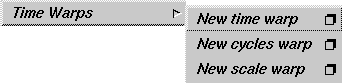
How to UseTo select a Time Warps tool, select Animation > Time Warps and click the arrow beside Time Warps to display the following menu from which you can select a tool.
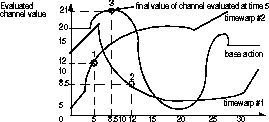
What is a time warp curve?A time warp curve is an animation curve (or an action) that is applied to a channel (the animation of a parameter of an item), and modifies the times at which the other actions in the channel are evaluated. A channel of an item is usually animated by one animation curve, the base action of the channel. If a time warp curve is applied to the channel, then the channel is now animated by two actions. The time warp action modifies how the base action of the channel is evaluated. You can apply any number of time warp curves to a channel, and each successive time warp curve modifies the timing of the curve directly below it. To see which actions and time warps are applied to a channel, use the expand channel button in the Action Window lister area (Animation > Action window). A time warp curve changes the timing of a channel by mapping the old time of an animation on the Y-axis to the new absolute time on the X-axis. Another way to look at this is that at a given time on the X-axis, the time warp curve is evaluated to a value on the Y-axis, which is a new time. This time is used as the time at which to evaluate the next action in the channel to which the time warp is applied. As seen in the following diagram, a channel is animated by a base action with the time warp curve timewarp #1 applied to the base action and the curve timewarp #2 applied to the curve timewarp #1.
In the following example, the channel is evaluated at time 5.
When you create time warp curves, they have a default out-of-range type of identity (from the Action Window's Disp Tools > show infinity menu). This means that before the first keyframe and after the last keyframe of the time warp curve, the time warp curve does not alter or warp the timing of the actions below it. | |
|
For information on use result operations, see Animation > The Action Window on page 138. |
If many time warp curves are applied to a channel, it is often difficult to fine-tune special areas of the animation in the channel. When you are satisfied with the general animation of the channel with its time warps, you can use Curve Tools > use result found in the Animation > Action window > Action Graph Editor to collapse all the time warps onto the channel's base action. A single parameter curve action is created that evaluates to the same values as the channel with all its time warps. The channel's animation is now replaced by this single resulting parameter curve action |
| Copyright © 1998, Alias|Wavefront, a division of Silicon Graphics Limited. All rights reserved. | Please send questions or comments regarding the documentation to: [email protected] |