 | Return to Home |
 | Games and Utilities |
 | Text Reader |
 | Numerical Fill-In Generator |
 | Yahtzee! |
 | Explorers Post 725 |
 | Memory |
 | Hangman |
 | Color Dialog |
 | Paint |
 | Quadratic Formula |
 | Dice Roller |
Quadratic Formula
OVERVIEW:
This Explorers session covered creating a simple Visual Basic program to solve Quadratic Equations. This program uses the Quadratic Formula to return the two roots of the second-order polynomial. The program will also state if the roots are real or imaginary (complex number). Useful to algebra and calculus students, the program is very simple to create.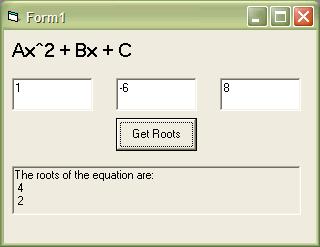
CONTROLS:
Create a Standard EXE and name the form frmQuadratic. Add the following controls to the form.Text1 - TextBox - Clear the Text property and place on the left side of the form to be used for the A value.
Text2 - TextBox - Clear the Text property and place in the middle of the form to be used for the B value.
Text3 - TextBox - Clear the Text property and place on the right side of the form to be used for the C value.
Command1 - CommandButton - Change the caption to "Get Roots".
Picture1 - PictureBox - Used for printing the roots. Make sure to adjust the height so that three lines of text can be printed.
Label1 - Label - Set the Caption to "Ax^2+Bx+C" as a reminder of the format of the text boxes.
CODE:
Private Sub Command1_Click()Dim A As Single, B As Single, C As Single
Dim Result1 As Single, Result2 As Single
Dim Imaginary As String
'Quadratic Formula:
'X = [-B +- SQRT(B^2 - 4AC)] / 2A
A = Val(Text1.Text)
B = Val(Text2.Text)
C = Val(Text3.Text)
Picture1.Cls
If A = 0 Then
Picture1.Print "Cannot divide by 0 for A."
Exit Sub
End If
If (B ^ 2 - 4 * A * C) < 0 Then
Imaginary = "IMAGINARY "
Else
Imaginary = ""
End If
Result1 = (-B + Sqr(Abs(B ^ 2 - 4 * A * C))) / (2 * A)
Result2 = (-B - Sqr(Abs(B ^ 2 - 4 * A * C))) / (2 * A)
Picture1.Print "The " & Imaginary & "roots of the equation are:"
Picture1.Print Result1
Picture1.Print Result2
End Sub