 | Return to Home |
 | Games and Utilities |
 | Text Reader |
 | Numerical Fill-In Generator |
 | Yahtzee! |
 | Explorers Post 725 |
 | Memory |
 | Hangman |
 | Color Dialog |
 | Paint |
 | Quadratic Formula |
 | Dice Roller |
Memory
OVERVIEW:
The program dynamically loads the buttons in a 6x6 grid. The program then creates 18 pairs of letters (A - R) and assigns them to the buttons randomly. When the player clicks on two of the buttons, the program will disable the buttons if they match. If they do not match, the program will give the player one second to remember the letters before hiding them again.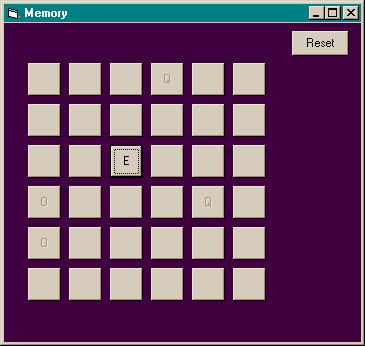
CONTROLS:
Open
Visual Basic and select Standard EXE. Name the form
frmMemory and its Caption to Memory.
Create the following controls:
cmdReset - Command Button
cmdLetter - Command Button - Set the default properties since it will be the foundation of the control array.
| Index | 0 |
| Width | 495 |
| Height | 495 |
| Top | 600 |
| Left | 360 |
CODE:
'Dimension the Button variables here so the values are retained between subroutinesDim Button1 As Integer 'Remembers the first button the player clicked, -1 if no button has been clicked
Dim Button2 As Integer 'Remembers the second button the player clicked, -1 if no button has been clicked
Private Sub cmdLetter_Click(Index As Integer)
Dim tmpTime As Single
Dim tmpI As Integer
Dim Status As Boolean
'check the buttons if one has been selected
If Button1 = -1 Then 'first button clicked
cmdLetter(Index).Caption = cmdLetter(Index).Tag 'the letter is stored in the Tag property from CreateLetters
Button1 = Index 'remember what button was clicked
Else 'second button clicked
If Index = Button1 Then Exit Sub 'safety in case the player double-clicked or tried to select the button a second time
cmdLetter(Index).Caption = cmdLetter(Index).Tag 'the letter is stored in the Tag property from CreateLetters
Button2 = Index 'remember the second button clicked
If cmdLetter(Button2).Caption = cmdLetter(Button1).Caption Then 'buttons clicked match
'if they match, disable the buttons so they cannot be clicked again
cmdLetter(Button1).Enabled = False
cmdLetter(Button2).Enabled = False
Button1 = -1: Button2 = -1 'reset buttons
'check if all buttons have been paired
'if just one of the cmdLetter buttons has not been clicked, we won't say the player won
Status = False
For tmpI = 0 To 35
If cmdLetter(tmpI).Enabled = True Then Status = True
Next tmpI
If Not Status Then
MsgBox "Congratulations, you win!"
End If
Else 'buttons do not match
'Timer - Visual Basic that returns the number of seconds that have elapsed since midnight (in hundredths of a second, thus needing the Single variable type)
'To determine if a length of time has elapsed, compare the difference between the start point and the current time
tmpTime = Timer
Screen.MousePointer = vbHourglass 'show the reader that the program is doing something by changing the mouse pointer to an hourglass
'Abs - Visual Basic function that returns the absolute value of a number or expression
'Take the absolute value of the difference because at midnight, Timer returns 0
'This way, if the program is run at midnight, the program would not be caught in an almost endless loop
Do While Abs(Timer - tmpTime) < 1 'give the player one second to look at the letters
'stops the user from clicking yet look at letters
Loop
Screen.MousePointer = vbDefault 'reset the mouse pointer to an arrow
'hide the captions of the selected cmdLetter buttons
cmdLetter(Button1).Caption = ""
cmdLetter(Button2).Caption = ""
Button1 = -1: Button2 = -1 'resets the values
End If
End If
End Sub
'this routine will create a new game by reordering the letters
Private Sub cmdReset_Click()
Call CreateLetters
End Sub
Private Sub Form_Load()
Dim tmpI As Integer
'load command buttons
Me.Show 'this will show the form immediately - useful for seeing the buttons loaded when stepping through the code using F8
'create a 6x6 grid - Index 0 of cmdLetter is already on the form
'load copies of cmdLetter(0) and position them in the grid
'use a For-Next loop to have Visual Basic perform the following code repeatedly ->
For tmpI = 1 To 35 '0 is already loaded and located where we want the array to begin
Load cmdLetter(tmpI) 'this loads the selected control
cmdLetter(tmpI).Visible = True 'when a control is loaded, it's Visible property is automatically False
'Modulus function - returns the remainder when divided by the following expression
'We create the array by creating the columns first, then the rows
cmdLetter(tmpI).Left = cmdLetter(0).Left + (120 + cmdLetter(0).Width) * (tmpI Mod 6) '120 twips are a spacer between columns
'Dividend function (\) - Returns the dividend when the number is divided by the following expression
'This will give us the row where the loaded control is moved
cmdLetter(tmpI).Top = cmdLetter(0).Top + (120 + cmdLetter(0).Height) * (tmpI \ 6) '120 twips are a spacer between rows as well
'Example: 16 / 6 = 2 Remainder 4 - Modulus would return 4 (16 Mod 6 = 4) and Dividend would return 2 (16 \ 6 = 2)
Next tmpI
'create letters
'Visual Basic function that forces the random number generator to use a new seed each time,
'thus giving new random numbers when the form is loaded
Randomize
Call CreateLetters 'this is our routine that randomizes the letters A through R
'reset values
'These variables hold the value of the cmdLetter buttons clicked
'should be -1 which means that no button has been clicked
Button1 = -1: Button2 = -1
End Sub
Sub CreateLetters()
Dim LetterStr As String
Dim tmpI As Integer
Dim tmpStr As String
Dim tmpLoc As Integer
'create string of letters
LetterStr = "ABCDEFGHIJKLMNOPQR"
LetterStr = LetterStr & LetterStr 'We want pairs of letters, so duplicate the 18 letters spelled out above
'remove a letter at random and recreate the string
'the selected letter is applied to all 36 controls, so have Start and Stop indices of 0 (first control) to 35 (last control)
For tmpI = 0 To 35
tmpStr = LetterStr 'stored the LetterStr value into a temporary string variable
'Create a random location from 1 to 36 (max value reduced by 1 each time through the loop)
'Len - Visual Basic function that returns the number of letters and spaces in a string, e.g. Len("AB DE") = 5 (4 characters, 1 space)
'Rnd - Visual Basic function that creates a random number where 0 <= # < 1, e.g. 0.432
'To create a random integer from 1 to max value, multiply Rnd by the max value
'Take the integer portion of that number (done with Int() function) and add 1
tmpLoc = Int(Rnd * Len(tmpStr)) + 1
cmdLetter(tmpI).Enabled = True 'done for cmdReset - this will reset each cmdLetter to be clickable again
cmdLetter(tmpI).Caption = "" 'hide the caption for the cmdLetter
'Mid - Visual Basic function that returns the specified number of characters from a string at the specified starting point
'Here, tmpStr is the string, tmpLoc is the random location in the string, and 1 returns the randomly selected character
'Assign the letter to the Tag property so we can show it when we want
cmdLetter(tmpI).Tag = Mid(tmpStr, tmpLoc, 1) 'e.g. Mid("ABCDE", 3, 1) = "C"
LetterStr = "" 'blank out the LetterStr because we are now going to append to this value
'take the left side of the string before the selected letter if the selected letter is not the first letter
'Left - Visual Basic function that returns the number of characters specified from the left side of the string
If tmpLoc > 1 Then
LetterStr = Left(tmpStr, tmpLoc - 1)
End If
'take the right side of the string after the selected letter if the selected letter is not the last letter
'Right - Visual Basic function that returns the number of characters specified from the right side of the string
If tmpLoc < Len(tmpStr) Then
LetterStr = LetterStr & Right(tmpStr, (Len(tmpStr) - tmpLoc))
End If
'E.g. tmpLoc = 3; tmpStr = "ABCDE", LetterStr = Left("ABCDE", 3-1) = "AB"
'LetterStr = LetterStr & Right(tmpStr, (Len("ABCDE") - 3)) = "AB" & "DE" = "ABDE"
Next tmpI
End Sub