 | Return to Home |
 | Games and Utilities |
 | Text Reader |
 | Numerical Fill-In Generator |
 | Yahtzee! |
 | Explorers Post 725 |
 | Memory |
 | Hangman |
 | Color Dialog |
 | Paint |
 | Quadratic Formula |
 | Dice Roller |
Color Dialog
OVERVIEW:
In this classroom study, we created a Color Dialog program that will give us the Visual Basic color and the Web Hexadecimal color for a particular red, green, and blue color combination. The option to make a grayscale color is also added by using the red value for all three colors. While the program is simple, it is a great tool for creating specific color schemes for our VB programs and our web sites.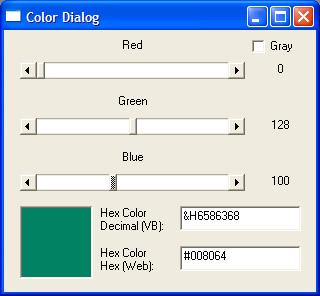
The program is designed to operate in Visual Basic 5.0 or 6.0.
CONTROLS:
Create a new Standard EXE and name the form frmColorDialog. Set the Caption to Color Dialog. Then add the following controls:scrRGB - Horizontal Scrollbar - Set the propertiess as defined in the following table. Once done, make two copies of the control. The code will use Index 0 for Red, Index 1 for Green, and Index 2 for Blue.
| Index | 0 |
| LargeChange | 5 |
| Min | 0 |
| Max | 255 |
| SmallChange | 1 |
| Value | 0 |
lblRGB - Label - Used to display the color for thee scrRGB Horizontal Scrollbar. Change the Index to 0 and resize it to the size of scrRGB. Make two copies of the control. Set the Caption of lblRGB(0) to "Red", the Caption of lblRGB(1) to "Green", and the Caption of lblRGB(2) to "Blue".
lblRGBValue - Label - Used to display the current value of the scrRGB Horizontal Scrollbar. Change the Index to 0 and make the Caption blank. Make two copies of the control and match the lblRGBValue labels to the scrRGB Horizontal Scrollbars.
chkGray - CheckBox - Set the Caption to "Gray" and leave the VValue as "0 - Unchecked".
picRGB - PictureBox - Size the color box as big as you need.
txtRGB - TextBox - Make sure the Text field is cleared and the Locked property is set to True.
txtHex - TextBox - Make sure the Text field is cleeared and the Locked property is set to True.
Label1 - Label - Size appropriately so both lines of text can be viewed. Place beside txtRGB.
Label2 - Label - Size appropriately so both lines of text can be viewed. Place beside txtHex.
CODE:
Private Sub chkGray_Click()Dim tmpI As Integer
For tmpI = 1 To 2
scrRGB(tmpI).Enabled = (chkGray.Value = 0) 'if zero, then not Grayscale -> Enable
&nbbsp; lblRGB(tmpI).Enabled = (chkGray.Value = 0)
lblRGBValue(tmpI).Enabled = (chkGray.Value = 0)
Next tmpI
If chkGray.Value = 1 Then 'grayscale
lblRGB(0).Caption = "Gray Scale"
Else
lblRGB(0).Caption = "Red"
End If
Call UpdateRGB
End Sub
Private Sub Form_Load()
Dim tmpI As Integer
'initialize form controls
For tmpI = 0 To 2 'index begins at 0
scrRGB(tmpI).Value = 0
Next tmpI
chkGray.Value = 0
Label1.Caption = "Hex Color" & vbCrLf & "Decimal (VB):"
Label2.Caption = "Hex Color" & vbCrLf & "Hex (Web):"
Call UpdateRGB
End Sub
Private Sub UpdateRGB()
Dim tmpI As Integer
Dim CombinedValue As Long
Dim HexString As String
'update the lblRGBValue using scrRGB
For tmpI = 0 To 2
lblRGBValue(tmpI).Caption = scrRGB(tmpI).Value
Next tmpI
'combine the Red, Green, and Blue values into the Hex value
If chkGray.Value = 1 Then 'grayscale
CombinedValue = RGB(scrRGB(0).Value, scrRGB(0).Value, scrRGB(0).Value)
HexString = FormatHex(scrRGB(0).Value, scrRGB(0).Value, scrRGB(0).Value)
Else 'color
CombinedValue = RGB(scrRGB(0).Value, scrRGB(1).Value, scrRGB(2).Value)
HexString = FormatHex(scrRGB(0).Value, scrRGB(1).Value, scrRGB(2).Value)
End If
txtRGB.Text = "&H" & CombinedValue
txtHex.Text = "#" & HexString 'Hex(CombinedValue)
'show the color in picRGB's BackColor
picRGB.BackColor = CombinedValue
End Sub
Private Sub scrRGB_Change(Index As Integer)
Call UpdateRGB
End Sub
Private Sub txtRGB_GotFocus()
If Len(txtRGB.Text) > 0 Then
txtRGB.SelStart = 0
txtRGB.SelLength = Len(txtRGB.Text)
End If
End Sub
Private Function FormatHex(RedValue As Integer, GreenValue As Integer, BlueValue As Integer) As String
Dim tmpI As Integer
Dim HexValues(6) As String
Dim HexStr As String
'breakdown colors
HexValues(1) = RedValue \ 16
HexValues(2) = RedValue Mod 16
HexValues(3) = GreenValue \ 16
HexValues(4) = GreenValue Mod 16
HexValues(5) = BlueValue \ 16
HexValues(6) = BlueValue Mod 16
'translate to hex
For tmpI = 1 To 6
Select Case Val(HexValues(tmpI))
Case 0 To 9
'nothing
Case 10
HexValues(tmpI) = "A"
Case 11
HexValues(tmpI) = "B"
Case 12
HexValues(tmpI) = "C"
Case 13
HexValues(tmpI) = "D"
Case 14
HexValues(tmpI) = "E"
Case 15
HexValues(tmpI) = "F"
End Select
Next tmpI
'combine string
HexStr = ""
For tmpI = 1 To 6
HexStr = HexStr & HexValues(tmpI)
Next tmpI
FormatHex = HexStr
End Function