 | Return to Home |
 | Games and Utilities |
 | Text Reader |
 | Numerical Fill-In Generator |
 | Yahtzee! |
 | Explorers Post 725 |
 | Memory |
 | Hangman |
 | Color Dialog |
 | Paint |
 | Quadratic Formula |
 | Dice Roller |
Hangman
OVERVIEW:
This meeting consisted of programming the game Hangman. The program dynamically loads the buttons in a 13x2 grid. The program then selects a word at random for the user to guess. The player has to determine the word by selecting a letter. If the player guesses incorrectly, part of the hangman will be drawn. In this version the player will lose the game after making four mistakes.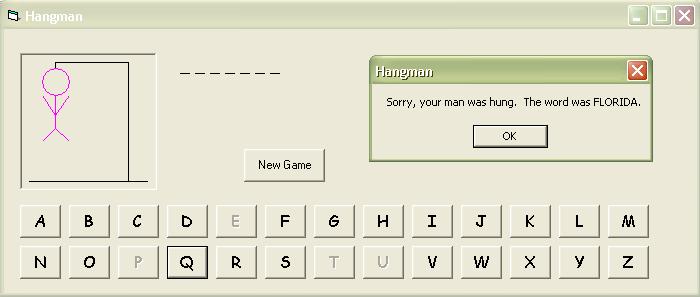
In this example, I have included the code to create the Hangman program below. Follow the instructions below to make your own version of this classic game using Visual Basic 5.0 CCE. The code has numerous comments to aid in understanding how the program works. This game can also be made as outlined in other versions of Visual Basic 5.0 and Visual Basic 6.0. This code will not work as is in Visual Basic .NET.
CONTROLS:
cmdLetter - Command Button, Index value of 0, Caption of "A", Font of Comic Sans MS 12pt Regular (your favorite font otherwise), Height value of 495, Width value of 615
cmdReset - Command Button, Caption of "New Game", adjust Height & Width to show the caption
lblWord - Label, Font of Comic Sans MS 12pt Regular (your favorite font otherwise), Height value of 375, Width value of 5535
picHangman - Picturebox, AutoRedraw value of 0, adjust Height & Width to match
Resize the form considerably to accommodate 13 buttons spaced across the form. Change the form's Caption to "Hangman". Set the KeyPreview value to "True".
CODE:
Dim SelectedWord As String
Dim StrikeTally As Integer
Dim LetterUsed(25) As Boolean
Private Sub cmdLetter_Click(Index As Integer)
cmdLetter(Index).Enabled = False
'disable the letter to prevent repeated clicks
LetterUsed(Index) = True 'we have used
this letter now
Call UpdatePuzzle(Index)
End Sub
Private Sub cmdReset_Click()
Call Reset
End Sub
Private Sub Form_KeyPress(KeyAscii As Integer)
'keypress does consider capitalization -
the 32 offset denotes the differences in the range of capitals and
lower case
If KeyAscii >= vbKeyA And
KeyAscii <= vbKeyZ Then 'uppercase
If cmdLetter(KeyAscii - vbKeyA).Enabled Then 'don't allow multiple
keypresses for that letter
Call cmdLetter_Click(KeyAscii - vbKeyA)
End If
ElseIf KeyAscii >= vbKeyA + 32
And KeyAscii <= vbKeyZ + 32 Then 'lowercase
If cmdLetter((KeyAscii - 32) - vbKeyA).Enabled Then 'don't allow
multiple keypresses for that letter
Call cmdLetter_Click((KeyAscii - 32) - vbKeyA)
End If
End If
End Sub
Private Sub Form_Load()
Dim tmpI As Integer
'load the controls on the form and
Randomize the random word selector
For tmpI = 1 To 25 'array begins with
index 0
Load cmdLetter(tmpI)
'place the letter buttons in 2 rows of 13
'left is defined as 120 twips to the left of the previous letter
cmdLetter(tmpI).Left = cmdLetter(0).Left + (tmpI Mod 13) *
(cmdLetter(0).Width + 120)
'top is defined as 120 twips below the previous row
cmdLetter(tmpI).Top = cmdLetter(0).Top + (tmpI \ 13) *
(cmdLetter(0).Height + 120)
'give the caption as the next letter in the alphabet
cmdLetter(tmpI).Caption = Chr(tmpI + vbKeyA)
Next tmpI
picHangman.Scale (0,
100)-(100, 0)
Randomize
Call Reset
End Sub
Private Sub Reset()
Dim tmpI As Integer
'reset the enabled and set a
new word
For tmpI = 0 To 25
cmdLetter(tmpI).Visible = True
cmdLetter(tmpI).Enabled = True
LetterUsed(tmpI) = False
Next tmpI
SelectedWord = ""
StrikeTally = 0
'initialize Hangman and
scaffold
Call DrawHangman
'initialize word
Call ChooseWord
'initialize word label
Call UpdatePuzzle(-1) '-1 will be the
code to tell it is initializing
End Sub
Private Sub DrawHangman()
Dim HangmanColor As Long
Dim ScaffoldColor As Long
'draw the Hangman based on
StrikeTally
picHangman.Cls
HangmanColor = vbMagenta
ScaffoldColor = vbBlack
'always draw the scaffold
picHangman.Line (5, 5)-(95, 5),
ScaffoldColor 'base
picHangman.Line (80, 5)-(80, 95),
ScaffoldColor 'post
picHangman.Line -(25, 95), ScaffoldColor
'beam
picHangman.Line -(25, 90), ScaffoldColor
'rope
'based on the StrikeTally,
draw the Hangman pieces
If StrikeTally >= 1 Then
'draw the head
picHangman.Circle (25, 80), 10, HangmanColor
End If
If StrikeTally >= 2 Then
'draw the torso
picHangman.Line (25, 70)-(25, 45), HangmanColor
End If
If StrikeTally >= 3 Then
'draw arms
picHangman.Line (25, 55)-(15, 70), HangmanColor 'left arm
picHangman.Line (25, 55)-(35, 70), HangmanColor 'right arm
End If
If StrikeTally >= 4 Then
'draw legs
picHangman.Line (25, 45)-(15, 35), HangmanColor 'left leg
picHangman.Line (25, 45)-(35, 35), HangmanColor 'right leg
End If
End Sub
Private Sub ChooseWord()
Dim WordList(10) As String
Dim WordNum As Integer
'choose a word from our list
WordList(1) = "Florida"
WordList(2) = "California"
WordList(3) = "Illinois"
WordList(4) = "Colorado"
WordList(5) = "Michigan"
WordList(6) = "Missouri"
WordList(7) = "Virginia"
WordList(8) = "New York"
WordList(9) = "Wyoming"
WordList(10) = "Delaware"
WordNum = Int(Rnd *
UBound(WordList)) + 1 'number from 1 <= x < UBound + 1
SelectedWord = UCase(WordList(WordNum))
'this way we don't have to account for capitalization differences
End Sub
Private Sub UpdatePuzzle(LetterIndex As Integer)
Dim tmpI As Integer
Dim DisplayString As String
Dim tmpL As String
Dim StillMore As Boolean
'determine if the letter was
found in the word
'initialize the current work
DisplayString = ""
StillMore = False 'initialize to say the
puzzle is finished
For tmpI = 1 To Len(SelectedWord)
tmpL = Mid(SelectedWord, tmpI, 1)
If tmpL = " " Then 'New York
DisplayString = DisplayString & " " 'spaces are given
ElseIf LetterUsed(Asc(tmpL) - vbKeyA) = True Then 'letter has been
tried and is found in the word
DisplayString = DisplayString & tmpL & " " 'add a space
separator
Else
DisplayString = DisplayString & "_ " 'add a space to separate
unknowns
StillMore = True 'more letters to solve
End If
Next tmpI
lblWord.Caption = DisplayString
'increment the StrikeTally if
the letter is not found in the SelectedWord
If LetterIndex > -1 Then 'skip
when we initialize the puzzle
If InStr(1, SelectedWord, Chr(LetterIndex + vbKeyA)) > 0 Then
'found the letter
StrikeTally = StrikeTally
Else 'did not find the letter
StrikeTally = StrikeTally + 1
Call DrawHangman 'show the user the mistake
End If
End If
'if the StrikeTally has
reached maximum (4), stop the game and give the answer
If StrikeTally = 4 Then
MsgBox "Sorry, your man was hung. The word was " & SelectedWord
& ".", , "Hangman"
For tmpI = 0 To 25
cmdLetter(tmpI).Enabled = False 'disable letters to prevent game from
continuing
Next tmpI
'if the player guessed all the letters correctly, congratulate the
player
ElseIf StillMore = False Then
MsgBox "Congratulations! You have correctly guessed the word.", ,
"Hangman"
For tmpI = 0 To 25
cmdLetter(tmpI).Enabled = False
Next tmpI
End If
End Sub