 | Return to Home |
 | Games and Utilities |
 | Text Reader |
 | Numerical Fill-In Generator |
 | Yahtzee! |
 | Explorers Post 725 |
 | Memory |
 | Hangman |
 | Color Dialog |
 | Paint |
 | Quadratic Formula |
 | Dice Roller |
Text Reader
DOWNLOAD:
Text Reader Installation (TextReaderInstallation.zip - 4.26 MB)
Merriam-Webster's IFinger Dictionary (IFingerInstall.zip V2.0.8 - 4.30 MB)
Installation Instructions (Install_Instructions.txt - 1.2 KB)
Stories (stories.zip - 1.28 MB) (See the ONLINE STORIES section below)
OVERVIEW:
The Text Reader program is a tool designed to read large online stories in Plain Text Format (*.txt) and Rich Text Format (*.rtf). Much classic literature written fifty years ago and more can be found on the Internet for free. While standard Windows� programs such as Notepad and WordPad can display these types of files, they are not intended to be used to read these long stories. These stories are equivalent to books that span as many as 1000 pages. The Text Reader is designed to display these long stories.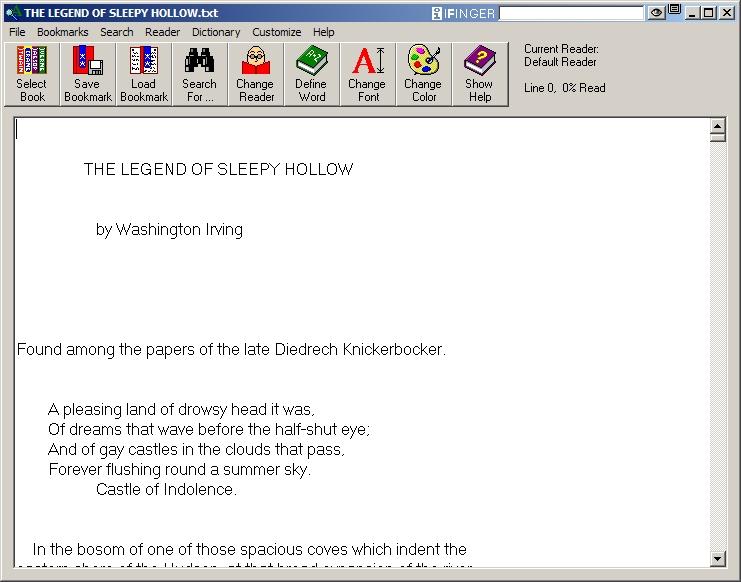
FEATURES:
- Integration with a free dictionary (IFinger) allowing for immediate definitions of many common words
- Saving up to 10 bookmarks per story, allowing the user to return to the story where he/she left off or return to a favorite point already read
- Ability to change the font size and font color for Plain Text Format (*.txt) files at any time while reading a story
- Search function to locate the first text match and subsequent matches
- Multiple readers can be added, allowing families and friends to read the same stories while keeping their bookmarks, fonts, colors, and program settings customized for each user
- The story can be advanced one screen at a time simply by pressing the spacebar. Arrow keys, Page Up / Page Down, and the mouse can also be used.
- Immediate display of the reader's current progress through the book when the cursor is moved.
- Online Help explaining program features
- Access to many online stories separated by reading level
INSTALLATION:
- Install IFinger dictionary. Install to the default directory of C:\Program Files\IFinger
- When IFinger's installation finishes, the program will be loaded. The registration screen will be launched. Click on the box to "Do not show this message again."
- Select Configure ... to change the settings. Double-Click and Automatic pop-up should be unchecked, Dock to Title Bar should be checked. Sleep should be unchecked. The Hot Key should be Ctrl-F11. Click on OK and close IFinger.
- Install Text Reader. Install to the default directory of C:\Program Files\Text Reader.
- Once the program is installed, run Text Reader. Under the File menu select Set Default Directory to the folder where the text stories have been stored.
Note: If the installation directory of IFinger is someplace else and / or the Hot Key setting is changed, then for the dictionary to operate properly in Text Reader, the Text Reader's Dictionary Settings will have to be updated.
ONLINE STORIES:
Stories written in Plain Text Format (*.TXT) and Rich Text Format (*.RTF) can be found on the Internet for free at many different sites. The stories found are generally those of classic literature by authors such as H. G. Wells, Mark Twain, and Charles Dickens. Speeches can also be found that were spoken by Abraham Lincoln, Martin Luther King, Jr., and Winston Churchill. Below are some links to a few stories collected from other sites to help start a library of your own.
The following stories are zipped together in one archive for ease of downloading. The link is available above.
A Tale of Two Cities - by Charles Dickens
The Legend of Sleepy Hollow - by Washington Irving
The War of the Worlds - by H. G. Wells
Wuthering Heights - by Emily Bronte
The Red Badge of Courage - by Stephen Crane
The Scarlet Letter - by Nathaniel Hawthorne
A Journey to the Center of the Earth - by Jules Verne
A Christmas Carol - by Charles Dickens