| 0 | layer color shall be color 7 (white) and is reserved for the creation of blocks only and should have nothing on it. |
| CL | layer colors shall be color 1 (red) for centerlines, tick marks, and stationing. |
| DEFPOINTS | layer color shall be color 7 (white) for sheet limit line [insertion point for sheet blocks], and any other entities that you need to see on your screen, yet do not want to plot out. (Even with this layer on, it will not plot) |
| DIM | layer colors shall be color 2 (yellow) [default] for dimensions, leaders, and bubbles geometry and color 3 (green) for all dimension annotation unless otherwise specified. |
| EX-* | layer colors shall be color 8 [default], 9, and 250-254 (various shades of grays) for existing conditions. (i.e. EX-EP, EX-SW, ETC.) -* shall refer to specific existing conditions only as required. |
| HATCH | layer colors shall be color 8 (grey) [default] or 2 (yellow) for all hatch patterns unless otherwise specified. |
| LOT-LINES | layer color shall be color 6 (magenta) for all property lines, excluding right-of-way. |
| PROP-* | layers shall be color 3 (green) or 4 (cyan) [default] for proposed construction. -* shall refer to specific proposed construction as required. |
| RW | layer color shall be color 5 (blue) for all right-of-way lines. |
| SHEET | layer color shall be color 1 (red) for insertion of Titleblk.dwg, Sht1.dwg, Sht2.dwg, Planpro.dwg, Typical.dwg, and general sheet items (North arrow, Engineers seal, scale bar, etc.). |
| SHEET-TXT | layer color shall be color 10 for insertion of Titlenfo.dwg, and general sheet text, Matchup.dwg, Matchdn.dwg, titles, etc. |
| STA | layer color shall be 1 (red) for all station lines, Sta_tic.dwg, and Sta_txt.dwg. |
| STREET-NAMES | layer color shall be 12 for all street names. |
| TXT-* | layers shall be color 3 (green) [default] or 1 (red) for existing callout or reference, 3 (green) for notes, and color 12 for section, detail, and misc. Titles. |
| UT-* | layers shall be color 7 (white) for existing utilities. -* shall refer to specific utility (i.e. UT-W for water). Optional as required. |
| V | layer color shall be color 1 (red) for all viewports. |
| X | layer color shall be color 7 (white) [default] for all X-reffed drawings (See Section 5.0). |
| Y | layer color shall be color 2 (yellow) for all survey points, and X-reffed survey drawings (See Section 5.0). |
| Z | layer color shall be color 9 (grey) for all photogrammetry, and X-reffed photogrammetry drawings (See Section 5.0). |
SECTION 3.6
SECTION 3.6.1
- FONTS
- For all notes, callouts, and descriptive text the following fonts are exceptable unless otherwise approved:
- ARCHITXT.SHX
- COMPLEX.SHX
- BOLD.SHX
- ROMANS.SHX
- OUTLINE.SHX
- DOT.SHX
- SIMPLEX.SHX
- Do not use AutoCADs "Standard.shx" font. NOTE: If additional fonts are used, then the font used must be included with the drawing package. (See Section 8.0, Accompanying Diskette).
SECTION 3.6.2
- TEXT HEIGHT
Text Item: Layer: Font: Plotted Obliquing Height: Angle: Project Street Name Street-names Architxt .30 15 Side Street Name Street-names Architxt .20 15 Station Text Sta Architxt .10 15 Dimension Text Dim Simplex .12 0 Existing Text Ex- Simplex .10 0 General Titles Txt Archtixt .25 0 General Notes/ Construction Notes Txt Simplex .12 0 Matchline Text Sheet-txt Use Matchup.dwg/Matchdn.dwg Street Sections Sheet Use Typical.dwg - Text style shall stay consistent throughout all plan sheets. See Section 3.6.1 Fonts.
- Callout leaders shall stay consistent throughout all plan sheets. See Section 3.4 Arrowheads.
- Construction notes and section callouts shall stay consistent throughout all plan sheets.
- Use blocks 1.dwg - 30.dwg for construction notes.
SECTION 3.6.3
- TEXT STYLE NAMES
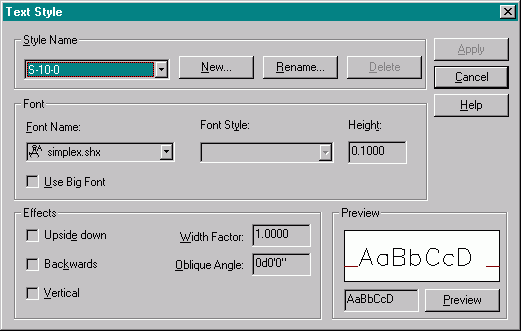
- * Represents the font that will be used for the style name
- *-00-0 Text with "0.00" text height, and an obliquing angle of "0" degrees
- *-10-0 Text with "0.10" text height, and an obliquing angle of "0" degrees
- *-12-0 Text with "0.12" text height, and an obliquing angle of "0" degrees
- *-20-15 Text with "0.20" text height, and an obliquing angle of "15" degrees
- *-400-0 Text with "4.00" text height, and an obliquing angle of "0" degrees
- *-480-15 Text with "4.80" text height, and an obliquing angle of "15" degrees
- The following choices of fonts can be used:
- A = ARCHITXT.SHX
- B = BOLD.SHX
- The following choices of fonts can be used:
- C = COMPLEX.SHX
- D = DOT.SHX
- O = OUTLINE.SHX
- RD = ROMAND.SHX
- RS = ROMANS.SHX
- S = SIMPLEX.SHX
- (Example: S-12-0 = Simplex font with "0.12" text height, and an obliquing angle of 0 degrees)
SECTION 3.7
- DIMENSION STYLES
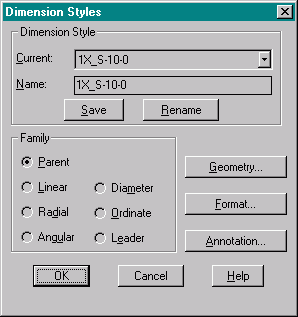
- The "DDIM" command will bring up the dialog box. Style name shall refer to overall dimension scale and text style name used for dimensions.
- Example:
- 1X_S-10-0 = dimscale of '1' and dimension text of 'S-10-0'
- 20X_S-120-0 = dimscale of '20' and dimension text of 'S-120-0'
- Save the style names.
- NOTE: Turn "DIMASO" to 1 (on) before dimensioning.
- Select "Geometry" to continue.
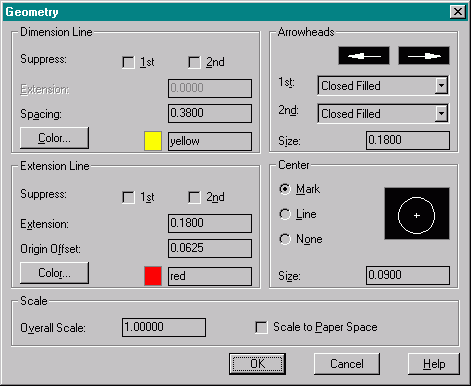
- Set the variables as shown above.
- Important! This is where the overall scale is set. Modelspace scale should be set to your expected plotting scale. Paperspace dimscale should be set to '1'.
- Set the variables as shown above.
- Select "OK" then "Format" to continue.
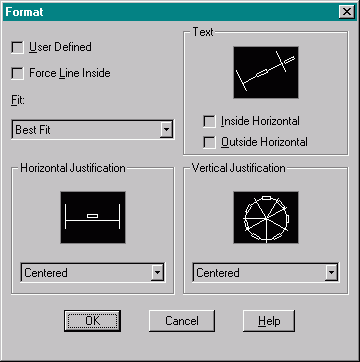
- Set the variables as shown above.
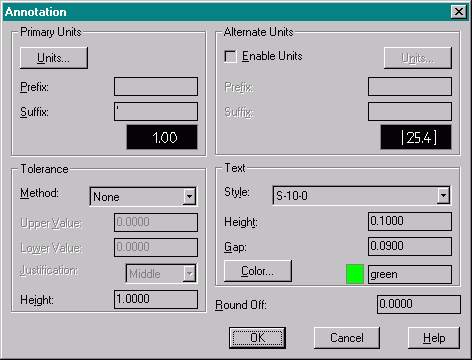
- Set the variables as shown above.
Select "OK" then "Annotation" to continue.
- Select "Units" to continue.
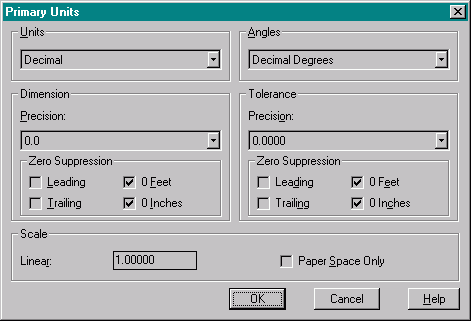
- Set the variables as shown above.
Always save the dimensions styles when exitting the ddim command.
Home | Drawing Startup | Paperspace/Modelspace | Drawing Procedures | Blocks | X-Refs | Hatching
Plotting | Accompanying Diskette | Appendix
Site Design By:
