
SECTION 7.1
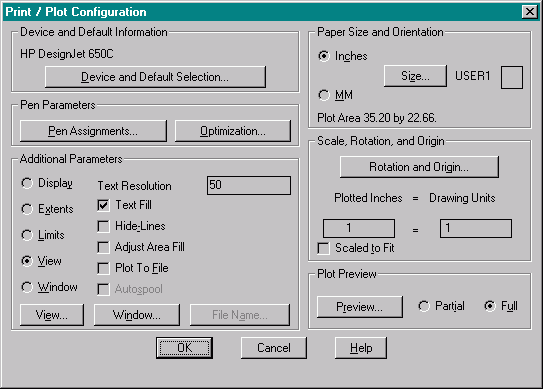
- Provide for the final drawing; an original on Mylar, a digital copy on floppy of the drawing (and "PCP" file [Plot Configuration Parameter file] R13 and earlier, "PC2" file [Plot Configuration 2 file] R14 and later), along with any other fonts, X-ref drawings, blocks, etc. that pertain to the drawing, and a "README.TXT" file for any special procedures or settings for the said drawing. (See Section 8.0, Accompanying Diskette).
- Final Mylar shall be of .04 mil or equivalent, and the plot shall be reversed so as to be on the underside of the sheet.
- Provide for the final drawing; an original on Mylar, a digital copy on floppy of the drawing (and "PCP" file [Plot Configuration Parameter file] R13 and earlier, "PC2" file [Plot Configuration 2 file] R14 and later), along with any other fonts, X-ref drawings, blocks, etc. that pertain to the drawing, and a "README.TXT" file for any special procedures or settings for the said drawing. (See Section 8.0, Accompanying Diskette).
SECTION 7.2
Plotting dimensions as set in the default "PC2" file are 35.2 x 22.66 (Include copy of the "PCP" or "PC2" file if any settings are changed from the Default file, See Section 8.0)
SECTION 7.3
PLOT VIEWS
Sheet limits shall be set and plotted by views (See Section 3.3 Views) and not by window, extents, or limits.
SECTION 7.4
PEN WIDTHS
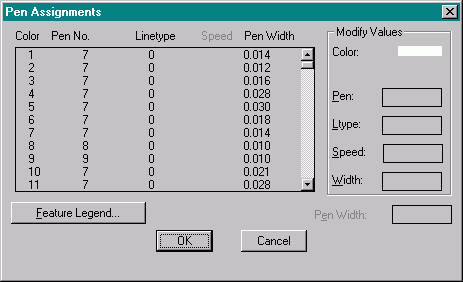
- Other Pen Settings:
- Pen-11 Color-7 Width-0.028 Pen-20 Color-7 Width-0.021
- Pen-12 Color-7 Width-0.034 Pen-21 Color-7 Width-0.006
- Pen-13 Color-7 Width-0.014 Pen-250 Color-250 Width-0.010
- Pen-14 Color-7 Width-0.012 Pen-251 Color-251 Width-0.010
- Pen-15 Color-7 Width-0.011 Pen-252 Color-252 Width-0.010
- Pen-16 Color-7 Width-0.014 Pen-253 Color-253 Width-0.010
- Pen-17 Color-7 Width-0.006 Pen-254 Color-254 Width-0.010
- Pen-18 Color-7 Width-0.007 Pen-255 Color-255 Width-0.010
- Pen-19 Color-7 Width-0.008
All other pens are set at: Color-7 Width-0.010
Download Default.PC2 file here
Home | Drawing Startup | Paperspace/Modelspace | Drawing Procedures | Blocks | X-Refs | Hatching
Plotting | Accompanying Diskette | Appendix
Site Design By:
