Helpful
Hints Instructions For Yahoo and Clients |
| |
You want to play
music on voice without using a mic, haven't got a mic or use headphones. Here
are instructions how to play music direct through your soundcard. This works
with both Yahoo and Ymlite.
You should be able
to locate your soundcard mixer from the right hand corner of the task bar usually
a speaker icon like this  if your computers soundcard has its own mixer you may have to locate a different
icon to this one holding the mouse pointer over the icons should revel what
they are for. Open the mixer, here i have shown images using the windows mixer
but it will still give you an example of how to set your mixer to play music
in the chatroom without using the mic.
if your computers soundcard has its own mixer you may have to locate a different
icon to this one holding the mouse pointer over the icons should revel what
they are for. Open the mixer, here i have shown images using the windows mixer
but it will still give you an example of how to set your mixer to play music
in the chatroom without using the mic.
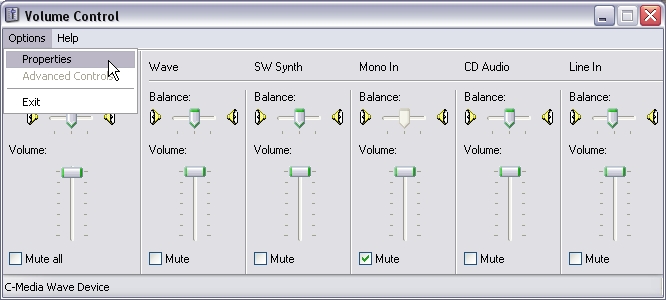 |
| Volume Control |
| Open the mixer volume control your's may look differen to this. |
| On the volume control make sure you haven't got sound muted |
| from your cd audio or wave. |
| Open the properties window. |
| |
| |
| |
| |
| |
| |
| |
|
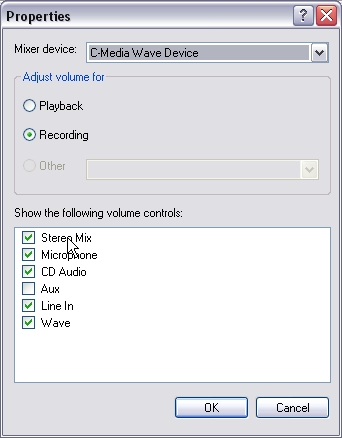 |
| Properties |
| Mixer device this is the name of your soundcard normally. |
| Tick recording, tick the other boxes also ticked in the image |
| Click Ok this will open the recording controls showing the |
| options you have selected here. |
| |
| |
| |
| |
| |
| |
| |
| |
| |
| |
| |
| |
| |
|
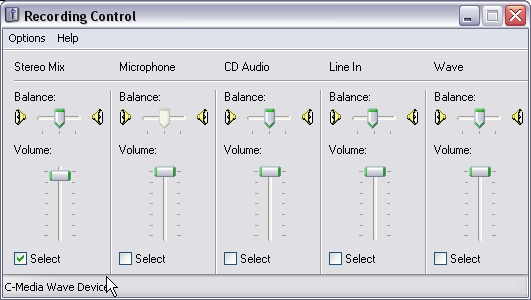 |
| Recording Control |
| I always use the stereo mix if available on the controls as this |
| enables me to also use the mic if I wish to talk on voice as well
|
| as play music direct from my computer. With stereo mix you |
| can play from music files on your computer, cd's, mic, or line in. |
| If stereo mix is not available select whichever you intend to play |
| music from if you are using cd's select cd audio. Minimize the |
| recording controls to your task bar do not close them. Play music |
| as you normally would through your chat program with no need |
| to hold the mic to the speakers. Remember each time you open |
| voice on a room or refresh voice the mixer will default back to |
| mic you have to change it back in the recording controls. |
|
Want to make your
own fancy emotes for Yahoo Messenger sick of the other ones being boot exploit
in Ytunnel well here are some brief instructions for html emotes not ASCII code.
Html emotes for
yahoo are simple and easy to make example of emote below.
hello\<b><Blue><font
face ="book antiqua"><font size ="14">Hello roomies
>:D<\<b><Blue><font face ="book antiqua"><font
size ="14">Hello %s <Blue>huggs >:D<
<b> bolds
the type in the font. <i> makes it italic. Font face is the selected font
you wish to use in the emote font size is the size you wish the font to be.
I don't use anything over "14". The \ separates the room emote from
the user emote. To emote a user %s is the user name. Remember after the %s to
again put the color you wish to use or the following text will show as default
purple. To select the color for the emote type <blue>.
Basic html colors
recognized by Yahoo are: <blue> <red> <black> <cyan>
<orange> <green> <yellow> <purple> I have found others
that have worked but do not seem to with my current messenger use the above
as a basic guide.
Open your emote_user.dat
file located in the Yahoo! folder in Programs on C drive this normally opens
in notepad. If you wish to be able to find your home made emotes in the emote
list start with a * or something of your choice.
Start your emote:
*** Hello\
Then add the html
code for bold, font, size, and color.
Type your room emote:
Hello roomies add the smiley in text if you wish as >:D< , use \ to seperate
the emotes.
Add the html code
again for bold, font, size, and color.
Type your user emote:
Hello %s
Add the html color
code again after the %s
Type the rest of
your emote: huggs >:D<
This is basic html
for emote files you can use these instructions to make your own using your own
words and idea's.
As a rule of guide:
Do not use more than two smiley's in your emotes the person you are emoting
may be using a nickname with smiley's in it if so they will show in the room
and come out in Ytunnel as possible boot exploit. I refrain from using webdings
and wingdings as these also can be picked up by Ytunnel as possible boot exploit.
If you wish instead
of typing the emote directly into your emote user file use notepad to make the
emotes when you think you have it right copy and paste it into your emote_user.dat
save the file open a private room find your emote in the list and give it a
test run.
Have fun your imagination
is the only thing stopping you.
Next: Ymlite
1
Back To: Hints
and Tips 2
