| Automatically Placed Into The Super Iggy Bin For Booting |
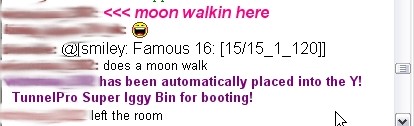
| Ever had this come up while in a chat room and it could quite likely be one of your friends. |
| This is caused by some of the emotes used in chat, and also by smileys not from booting. |
| In the example the person ignored was using the emote "moon walkin here" then used the |
| emote "does a moon walk" as seen above Ytunnels notification in normal text. |
| Using the active accessibility feature what caused this person to be placed into the iggy bin this |
| was shown to me in the room in normal text above the notification once I removed the person |
| from the Super Iggy Bin. |
| The reason this happens is because some of the emotes contain similar code and sequences |
| to a boot code also I have seen emotes containing more than 4 smiley's. |
| Smiley's as a rule of guide anything over 4 Ytunnel will consider as a boot exploit depending on |
| the smiley's used when using smiley's it is best to keep the amount used to a minimum to avoid |
| this from happening. |
| Activity Logger |
4:19:51pm: Rejected chatroom message from 'xxxxxxx12000' because it contains possible emote lag! |
| 04:20:45pm: Suspending logging of boot attempts in chatroom messages from 'xxxxxxx12000'! |
| 04:24:43pm: Rejected chatroom message from 'xxxxxx0822' because it contains possible boot exploit! |
| 05:58:31pm: Rejected chatroom message from 'xxxxxx_2302' because it contains possible boot exploit! |
| 05:58:32pm: xxxxxx_2302 has been automatically placed into the Y!TunnelPro Super Iggy Bin for booting! |
| 08:58:36pm: Rejected chatroom message from 'xxxxxxxx0' because it contains invalid escape sequence! |
| Activity Logger |
| At some time or another you'd have seen these messages appear in your Ytunnel activity |
| logger I'll attempt to give a brief description of what has happened here in each case. |
| Emote Lag: This is caused when the user enters several instances of the same emote into the |
| chat room quickly. More than 5 instances a second will show this message in the activity |
| logger. Doing this could also place the user on yahoo auto ignore in the chat room. |
| Boot Attempts: This occurs when the user doing the above keeps entering the emotes into the |
| chat room at a rate of more than 5 a second results in Ytunnel suspending them as a boot |
| attempt and they will be also unless they have stopped the activity be placed in the iggy bin. |
| Boot Exploit: This is caused from the use of emote's and smiley's. Most of the new emote's |
| are written in ASCII code the same as most boot codes are written. When a emote is |
| used that contains code similar to what a boot code would Ytunnel blocks it as possible |
| boot exploit. More than 4 smiley's will also be logged in this manner. |
| Invalid Escape Sequences: A escape sequence is known as a regular expression these are |
| used to control a lot of different things on a computer including printers. Depending on the |
| operating system the user is currently using the escape sequences are different to each if a |
| user is use to the linux operating system a lot of the escape sequences used would be invalid |
| to the windows operating system. This activity appearing can also result from typing the key |
| strokes for smiley's and making mistakes as most escape sequences begin with a \. |
| Profile Cloaking |
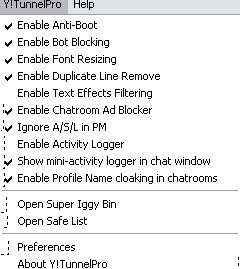
| To enable Profile Cloaking In Yahoo Chatrooms on Messenger go to Ytunnel and open the |
| drop down list tick Enable profile Name Cloaking in chatrooms. |
| Using a profile instead of your main id name will help you against being booted. This also blocks |
| your main id name and other profiles from being visible to others when using invites. |
| Cloaking is a form of hiding your main id name from the booter it being the name you are most |
| likely logged into messenger with. |
| It is still possible to be booted using a profile most boots that will effect you would disconnect |
| you from the yahoo server although it takes longer for these to work using the profile name |
| cloaking option. |
| Cloak Warning! |
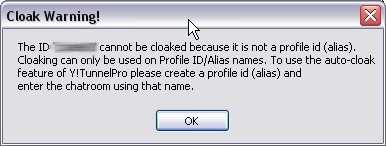
| When entering a chatroom using your main id name you will get this warning message appear |
| when the chatroom open's. Pressing OK will close this box and you enter the chatroom |
| normally but without the cloaking feature enabled. |
| To make use of the cloaking feature enter the room using a profile id name instead of your |
| main id name. |
| If you haven't got a profile make one this is easy to do and can be made similar to your main |
| id name if you require. Using a profile will not prevent your friend's from sending you private |
| messages to your main id name or prevent you from answering them. |
