Very Generic UVMapping with Wings3d (98.12)
Now it is all about 2d Texturing in a paint program. Basicly all you get it what you seen in you UV Map. You don'w want ally lines to show.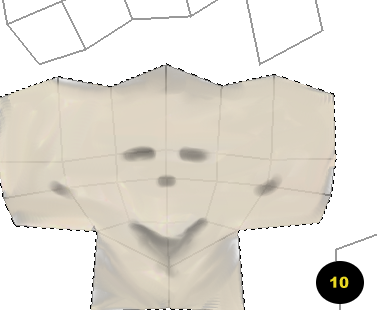
Knowing how to Paint and draw with paint a given program can really save your model. I've seen great textures placed on poor model and the looked great, and I've seen Great models with poor textures maps - and they looked terrible. Strive for great textures.
I'm not very good at texturing (yet), so I can't help you much here. ITs a good idea to use layers as I have done above, so that you can see your lines to reference where you need to draw what where, then delete your original UV Map, replacing it with your painted version.
I have a few intro Gimp videos on my web site here. For those that have never used the program. I have quite a few actually, but not the space to put them all up.