Very Generic UVMapping with Wings3d (98.12)

Deciding to take a Non-Detailed Head through the BASIC steps in UV Mapping in Wings3d. This Walk-Through will take you through the entire process of BASIC UV Mapping in Wing3d Version 98.12.
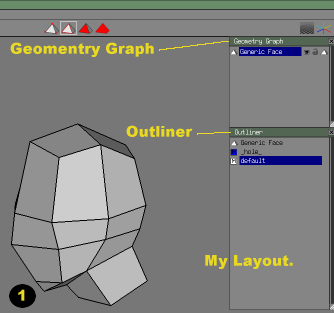
uv_01 (15K)

1. Start with YOUR MODEL. I always have my Geomentry and Outliner Window available. To UV Map you will need the OUTLINER present
(Window > Outliner) in wings.

Listed in your Outliner:

  • Your Object (Generic Face)
  • Hole Material - for "seeing-though" faces
  • Default Material - generic material apply to all initial objects

  • STEPS: 1 2 3 4 5 6 7 8 9 10 11 12 13
    Hosted by www.Geocities.ws

    1