Very Generic UVMapping with Wings3d (98.12)

Saving out our UV Map is a little busy. Each step is broken down below.
UV_09 (27K)

9.
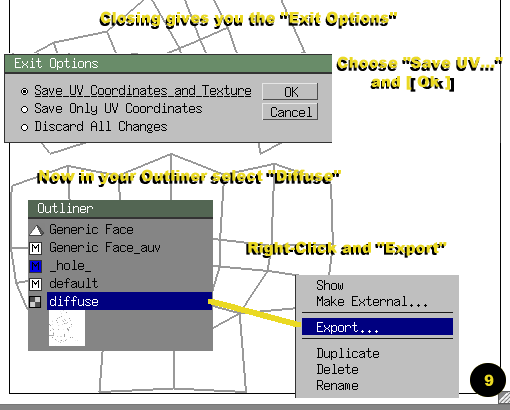
  • Close out the window by clicking on the "x" in the "AutoUV" window.
  • "Exit Options" dialog box will open up, choose "Save Uv..." and press ok.
  • Now our texture is shown in the Outliner as "Diffuse", Right Click over it and select "Export". A File Directory Dialog box should open up asking you where you want to save your image. Place it some place you can find it - you'll need it!

  • STEPS: 1 2 3 4 5 6 7 8 9 10 11 12 13
    Hosted by www.Geocities.ws

    1