
Digital Signal Processing using Matlab 5.3
     <<Home  Lab 2                 
   

Discrete time sinusoid                                                                                                                  


Exercise 1a                                                                                                                                 

Compute the following discrete time sinusoid

 y[n]=sin(0.1лn)

Where n is an integer.

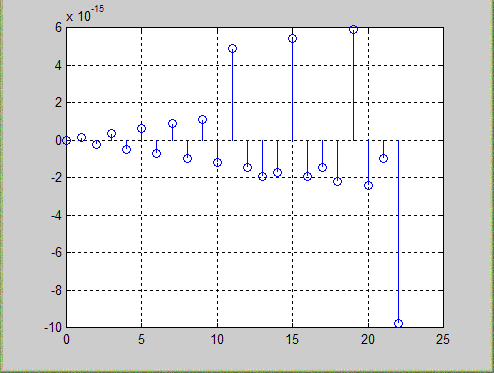
Plot the signal for 0<=n<=22 seconds. Estimate the time period of the signal.

 Solution                                                                                                                                    

    n=0:1:22;

    y=sin(0.1*pi*n);

    stem(n,y)

    grid      

 Result                                                                                                                                       


Discrete time sinusoid                                                                                                                  


Exercise 1b                                                                                                                                 

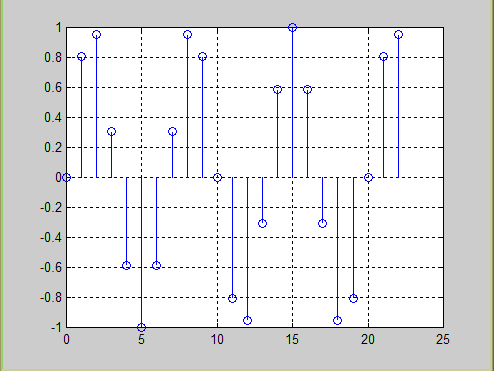
 Repeat (a) for z[n]=sin(0.3лn)

What is the difference b/w y[n] and z[n]

 Solution                                                                                                                                    

    n=0:1:22;

    z=sin(0.3*pi*n);

    stem(n,z)

    grid

Result                                                                                                                                        


Signal y[n] is expanding and z[n] is not expanding (and found symmetry in +ve and -ve direction).

Discrete time signal                                                                                                                     


Exercise 2                                                                                                                                  

 A discrete time signal x[n] is defined as

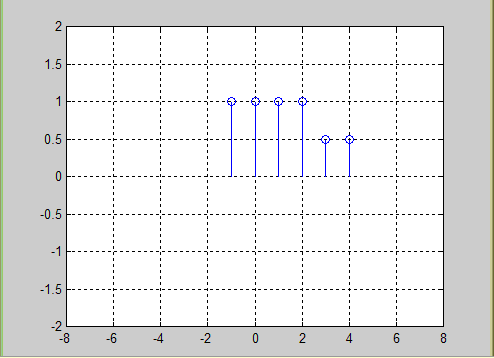
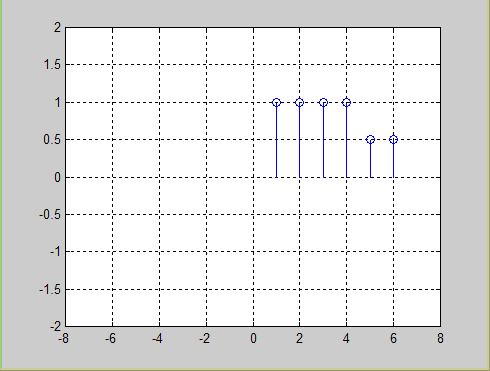
x[n] = [1 1 1 1 0.5 0.5]

sketch the following

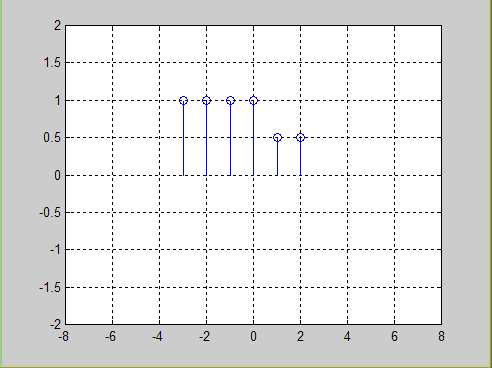
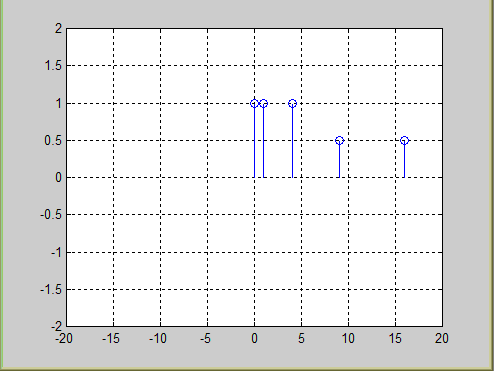
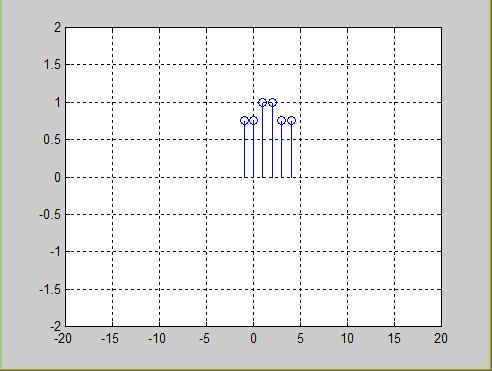
(a) x[n]  (b) x[n-2]   (c) x[n+2]  (d) x[n2]  (e) even part of x[n]

 Solution                                                                                                                                    

    % a

    t=-1:1:4;

    x = [1 1 1 1 0.5 0.5 ];

    stem(t,x)

    axis([-8 8 -2 2])

    grid on

    % b

    figure

    x = [1 1 1 1 0.5 0.5 ];

    t2 = t-2;

    stem(t2,x)

    axis([-8 8 -2 2])

    grid on

   % c

    figure

    x = [1 1 1 1 0.5 0.5 ];

    t1 = t+2;

    stem(t1,x)

    axis([-8 8 -2 2])

    grid on

    % d

    figure

    x = [1 1 1 1 0.5 0.5 ];

    t3 = t.^2;

    stem(t3,x)

    axis([-20 20 -2 2])

    grid on

    % e (even part of x[n])

    figure

    x = [1 1 1 1 0.5 0.5 ];

    x1 = [0.5 0.5 1 1 1 1 ];

    y = 1 /2 * (x+ x1) ;

    stem(t,y)

    axis([-20 20 -2 2])

    grid on

Result                                                                                                                                        

(a) x[n]


(b) x[n-2]


(c) x[n+2]


(d) x[n2]


(e) even part of x[n]


Discrete time sinusoid                                                                                                                  


Exercise 3                                                                                                                                  

 Consider the following sinusoid

x[n] = coswon

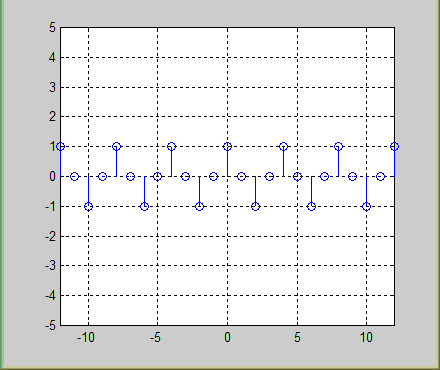
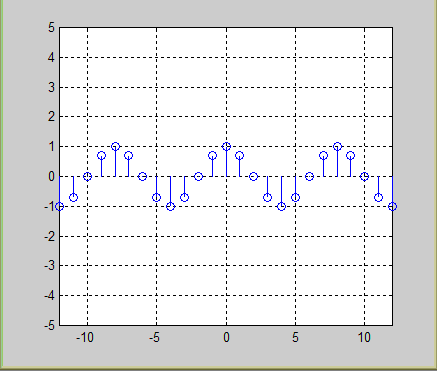
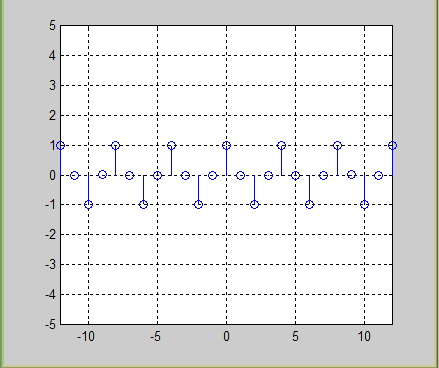
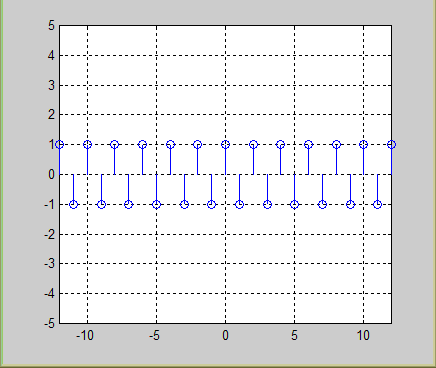
where the frequency varies from 0 to л radians per second. Plot this signal at f=1/16, 1/8, 1/4 and 1/2 Hz. Use the MATLAB function subplot. At what value of f, the highest rate of oscillation is attained. Is this result true for all discrete time sinusoids? Continuous time sinusoids?

 Solution                                                                                                                                    

    y = cos( 2 * pi * f * n );

    %plot(n,y)

    stem(n,y)

    grid on

    axis([-12 12 -5 5])


    figure

    f = 1/8;

    y1 = cos( 2 * pi * f * n );

    stem(n,y1)

    grid on

    axis([-12 12 -5 5])


    figure

    f = 1/4;

    y2 = cos( 2 * pi * f * n );

    stem(n,y2)

    grid on

    axis([-12 12 -5 5])


   figure

   f = 1/2;

   y3= cos( 2 * pi * f * n );

   stem(n,y3 )

   grid on

   axis([-12 12 -5 5])

Result                                                                                                                                        

f = 1/16


f = 1/8


f = 1/4


f = 1/2


 Highest rate of oscillation is attained at f = 1/2 (w0= л) and the result is true for all discrete time sinusoids and continuous time sinusoids.

Analog signal                                                                                                                              


Exercise 4                                                                                                                                  

 Consider the following analog signal

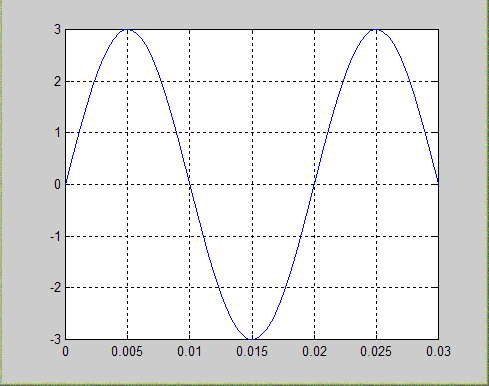
xa(t) = 3sin(100лt)

Sketch the signal xa(t) for 0<=t<=30 ms. The signal is sampled with a sampling rate Fs = 300 samples per second. Determine the time period of the discrete time signal. Sketch x[n] for 0<=t<=10.

 Solution                                                                                                                                    

    t=0:.00001:.03;

    x =3 * sin(100 * pi * t);

    plot(t,x)

    grid on

    % x[n]

    figure

    n=0:1:10;

    y =3 * sin( 2* pi * 1/6 * n);

    stem(n,y)

    grid on

Result                                                                                                                                        

Signal xa(t) for 0<=t<=30 ms.         


Signal x[n] for 0<=t<=10


Continuous  time sinusoid                                                                                                            


Exercise  5                                                                                                                                 

 Consider the following continuous time sinusoidal signal

x0(t) = sin2Ftл                -∞ < t < ∞          

The corresponding sampled signal is described by the formula

x[n] = xa[nT] = sin[2л(F/Fs)n]

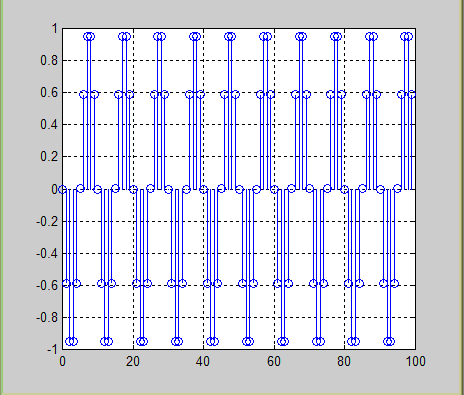
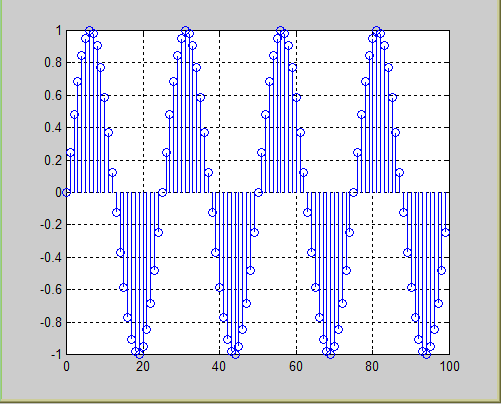
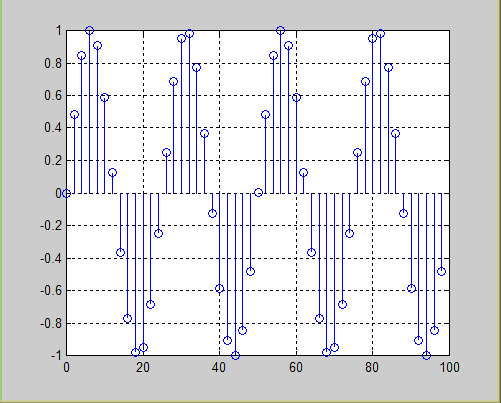
Where  Fs= 1/T is the sampling frequency. Plot the signal x[n], 0<=n<=99 for Fs=5kHz and F=0.5, 2, 3 and 4.5 kHz. Explain the similarities and differences b/w various plots.

 Solution                                                                                                                                    

     n=0:1:99;

     fs = 5;

     f=0.5;

     x = sin( 2 * pi * (f/fs) * n );

     stem(n,x);

     grid


     figure

     fs = 5;

     f=2;

     x1 = sin( 2 * pi * (f/fs) * n );

     stem(n,x1);

     grid


      figure

      fs = 5;

      f=3;

      x2 = sin( 2 * pi * (f/fs) * n );

      stem(n,x2);

      grid


      figure

      fs = 5;

      f=4.5;

      x3 = sin( 2 * pi * (f/fs) * n );

     stem(n,x3);

     grid

Result                                                                                                                                        

for F=0.5


for F=2


for F=3


for F=4.5


Continuous  time sinusoid                                                                                                            


Exercise  5a                                                                                                                                

 Suppose that F=2 kHz and Fs =50 kHz

(i) Plot the signal x[n]. What is the frequency of the signal x[n]?

(ii) Plot the signal y[n] created by taking the even numbered samples of x[n]. Is this a sinusoidal signal? Why? If yes, what is its frequency?

 Solution                                                                                                                                    

     n=0:1:99;

     fs = 50;

     f=2;

     x = sin( 2 * pi * (f/fs) * n );

     stem(n,x)

     grid


     figure

     n=0:2:99;

     fs = 50;

     f=2;

     y = sin( 2 * pi * (f/fs) * n );

     stem(n,y)

     grid

Result                                                                                                                                        

x[n]


y[n]


 HELP                                                                                                                                       

 AXIS                                                                                                                                        


AXIS Control axis scaling and appearance.
AXIS([XMIN XMAX YMIN YMAX]) sets scaling for the x- and y-axes on the current plot.
AXIS([XMIN XMAX YMIN YMAX ZMIN ZMAX]) sets the scaling for the x-, y- and z-axes on the current 3-D plot.
V = AXIS returns a row vector containing the scaling for the current plot. If the current view is 2-D, V has four
components; if it is 3-D, V has six components.

AXIS AUTO returns the axis scaling to its default, automatic mode where, for each dimension, 'nice' limits are chosen based on the extents of all line, surface, patch, and image children. AXIS MANUAL freezes the scaling at the current limits, so that if HOLD is turned on, subsequent plots will use the same limits.
AXIS TIGHT sets the axis limits to the range of the data.
AXIS FILL sets the axis limits and Plot Box Aspect Ratio so that the axis fills the position rectangle. This option only has an effect if Plot Box Aspect Ratio Mode or Data Aspect Ratio Mode are manual.

AXIS IJ puts MATLAB into its "matrix" axes mode. The coordinate system origin is at the upper left corner. The i axis is vertical and is numbered from top to bottom. The j axis is horizontal and is numbered from left to right. AXIS XY puts MATLAB into its default "Cartesian" axes mode. The coordinate system origin is at the lower left corner. The x axis is horizontal and is numbered from left to right. The y axis is vertical and is numbered from bottom to top.

AXIS EQUAL sets the aspect ratio so that equal tick mark increments on the x-,y- and z-axis are equal in size. This makes SPHERE(25) look like a sphere, instead of an ellipsoid. AXIS IMAGE is the same as AXIS EQUAL except that the plot box fits tightly around the data. AXIS SQUARE makes the current axis box square in size.
AXIS NORMAL restores the current axis box to full size and removes any restrictions on the scaling of the units. This undoes the effects of AXIS SQUARE and AXIS EQUAL. AXIS VIS3D freezes aspect ratio properties to enable rotation of 3-D objects and overrides stretch-to-fill.

AXIS OFF turns off all axis labeling, tick marks and background.
AXIS ON turns axis labeling, tick marks and background back on.

 FIGURE                                                                                                                                    

 FIGURE Create figure window.
FIGURE, by itself, creates a new figure window, and returns its handle.

FIGURE(H) makes H the current figure, forces it to become visible, and raises it above all other figures on the screen. If Figure H does not exist, and H is an integer, a new figure is created with handle H.

GCF returns the handle to the current figure.

Execute GET(H) to see a list of figure properties and their current values. Execute SET(H) to see a list of figure
properties and their possible values.


DSP Lab 1   DSP Lab2   DSP Lab 3   DSP Lab4   DSP Lab 5   DSP Lab 6   DSP Lab7  DSP Lab8  DSP Lab9  DSP Lab10   DSP Lab 11  Other material


                                                                                                                   <<Home
  
Ziauddin Siddiqui, B02ME CSN 07, Mehran University Of Engineering & Technology
Jamshoro, Sindh.
Email. [email protected]

1