 |
|
 |
|
Advert Here |
 |
| Welcome to the help page for Radcliffe Online's viewers and members. Here we aim to answer all your questions about using Radcliffe Onlines interactive group that is hosted on Yahoo Groups. If this page does not answer your question then please dont hesitate to post your question through the 'Contact Us' page. |
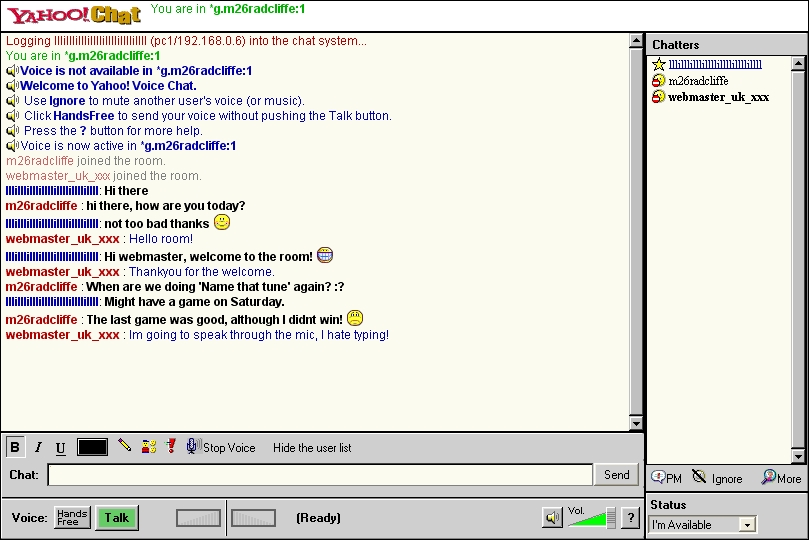
| Chatters List-Shows the people who are in the room. The person with the sound symbol next to their name is transmitting audio. |
| Text entry area-The area where you enter your text, when you have entered it press enter or click send to send. |
| Transmit/Talk button-Click on this to transmit your audio into the room.You will be heard by all the chatters in the chatroom. |
| Text area-This is where your sent text or any persons text will show. |
| Inbound & outbound audio level-This level moves with the amount of audio being transmitted,if your transmitting be careful not to go into the red as your voice will be distorted to the other people in the room. |
| Mute button-Clicking this mutes and unmutes the sound you are recieving. |
| The chatroom was a great feature, why Yahoo groups had to remove it was anybody's guess. Further questions This help page does not cover all aspects of the Yahoo Group or its features. If you would like to know more please send e-mail by filling in the e-form on the 'Contact Us' page. |
| General F.A.Q's Q: Why has Radcliffe Online moved its group over to Yahoo Groups? A: Radcliffe Online is always trying to impove its service for the members. We decided to move to Yahoo because they offered a far superier service compaired to MSN. Yahoo provides 30 MB webspace for photos, 20 MB webspace for files, a calender and voice chatroom. Q: Why when I try to log onto this, (the main website), get the error message "Sorry, this site is temporarily unavailable!"? A: The reason is because we dont pay for webhosting, therefor if the site is getting too many hits, our webhost - Geocities - take our site offline for around 45 minutes. If members are finding this a problem they should add our Yahoo group to their favourites as well as the website. |
| Q: The weather icon on the homepage says its raining in Radcliffe, but outside its sunny, why is this? A: The icon on the homepage is powered by 'The Weather Channel', it indicates the weather outlook 2 hours ahead, so if there is going to be any change in the weather, the icon will indicate this. Q: Why are Radcliffe Online so strict with the member rules? A: We dont mean to be like this but we have to show that we keep the group in order. If Yahoo start checking the content on the group and find that the members are doing what they want without any moderation from the management, then we could have the group closed down. Q: How much does it cost to join the Yahoo Group? A: Nothing! Yahoo Groups and all the features within it are totally free. Q: Can I still go on the voice chatroom with no microphone? A: Yes, but you wont be able to transmit your voice into the chatroom, however you can still listen in and use text to reply to people. Q: How can I make contact with the managers/moderators? A: Easy, just click on the 'Contact Us' page and fill out the e-form. The 'Contact Us' page has two e-forms, one for general issues and the other is for reporting technical problems such as broken links etc. Members wishing to contact Radcliffe Online regarding abusive members should click on the 'Complaints' page Q: What can non members do on the Yahoo Group? A: Non members can view the messageboard, links page and calender. They can also send messages to appear on the messageboard by sending e-mail to [email protected] . However, the messages sent using this method are moderated and have to be approved by the group managers, so it could take up to 24 hours for these messages to appear. Therefor it is easier and better for all regulars to become members and have access to all the groups features. |
|
 |
| Obtaining a Yahoo ID Joining Yahoo Groups is easy! If you havent already got a Yahoo ID you will need to register for one and link it to any email addresses you wish to use for Radcliffe Online Yahoo! Groups. 1~ Click HERE to register for a Yahoo ID. (The Yahoo! ID you choose must be unique. It does not need to match your email address, personal name or anything else, it is just a nickname). 2~ Complete the registration form and click on Submit This Form. 3~ You should receive an email confirming your registration. Make sure to record your Yahoo! ID and password. You will need these to sign into Yahoo! Groups. 4~ The Yahoo ID dose not restrict you to Radcliffe Online, it gives you access to many other features like an extra e-mail address, Yahoo Chat, Yahoo Games and much, much more. Joining Radcliffe Online's Yahoo Group 1~ Ok, now you have got the Yahoo ID and your password you are nearly a member. Go to the homepage of our Yahoo Group and click the 'Join This Group' - a blue button near the top of the page. 2~ Set your membership preferences. When you join, you can choose a profile you'd like to display to the group, select the email address at which you'd like to receive group messages, choose how you receive group messages, and more. You can always change these settings at a later date. 3~ Radcliffe Online has a moderated membership policy, meaning that it can take up to 24 hours to become a member as the moderators need to approve your application. This is to help prevent spammers joining the group. 4~ Go to the e-mail you registered with and click the 'verify this e-mail address' link and your ready to go. |
 |
 |
|
|
|
|
|
| The Internet (Radcliffe Online) |
| Cheryl from Heywood |
| Jim from Australia |
| Norma from Radcliffe |
| John from Florida |
| Dave from Radcliffe |
| Tracey from New Zealand |
 |
|
|
|
|
|
| As the simple diagram shows, the power of Radcliffe Online is there for current and former Radcliffe residents to communicate from any corner of the globe through our Yahoo group! Getting started Now you have become a member and signed into Yahoo you are ready to join in. Most people tend to start off by posting a message onto the messageboard. Posting a message onto the messageboard Click Post, type the subject in the top box, write your message in the lower one, then click Send Message. In general, messages are delivered almost immediately. Occasionally there are delays of a few minutes or hours due to high-volume traffic or scheduled system downtime. Viewing the groups photo's Click on 'Photos', then click on the album you want to view, when you see the picture you want to view in thumbnail format, click the picture. Uploading photos onto the photo albums Click on 'Create Album', you will be asked to name the album. Name it then click 'Add Photos'. To upload from your computer, click on the Browse button and find the image you want to upload. Once you find it, double-click on it or right click on it and then left click 'Select'. Click the Upload button. There may be some delay or lag time while your item is being sent to us, depending on the size of the file and the speed of your web connection. Multiple Photos works just like the Single Photo option, but you can upload as many as six pictures at once. Files Radcliffe Online provides files which it shares with members as shareware. MIDI files, Text documents and other useful files are avaibible for you to download. To download or view a file go to 'Files', then click on the file to open it. To save files, right click. then choose 'save target as', then choose where you want to put the file. Chatroom Unfortunatly, Yahoo Group's withdrew the onboard chatroom facility back in 2006. There is talk of it returning, whether it will have text and voice like it did is another question. Anyway, heres a screenshot of what it looked like! |
 |
 |
|
|
|
|
|
|
|