NEWSGROUPS
(NETSCAPE)
You can reply to a
newsgroup in several different ways. With the
message to which you want to reply visible in the
message window:
- If you want
to reply only to the sender of the
message, click and hold down the Reply
button and select To Sender Only from the
drop-down menu.
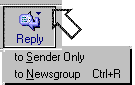
- If you want
to reply only to the newsgroup in
which you read the message, click and
hold down the Reply button and select To
Newsgroup Only from the drop-down menu.
- If you want
to reply to just the Sender and the
Newsgroup in which you read the
message, click and hold down the Reply
All button, and select To Sender and All
Recipients from the drop-down menu.
- If you want
to reply to the Sender, the Newsgroup,
and any other people and other groups who
received the message, click and hold
down the Reply All button, and select To
Sender and Newsgroup from the drop-down
menu.
Select and
delete any irrelevant parts of the
message, leaving only the text to which
you are responding.
Type your
response in the Message window.
Click Send,
and the message will be sent via email to
the parties you selected.
(information
provided courtesy of Netscape)
|