

USENET (THE NEWSGROUPS)

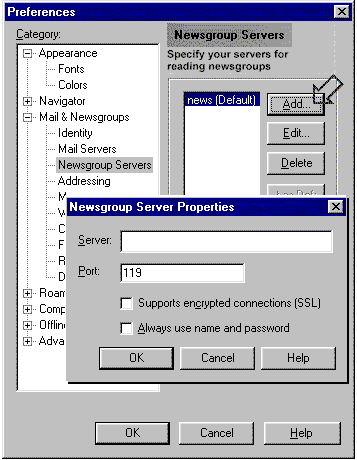
You can set up your newsgroup access information in the Setup Wizard the first time you start Communicator. Or, you can follow these steps to add the information at any time:

  1. Ask your Internet service provider or systems administrator for the following information:
    • name of the news server (it should look like this: news.server.com)
    • port number of the news server (a number such as 135)
  2. From the Communicator menu bar, choose Edit, Preferences. The Preferences dialog box will appear.
  3. In the Category box at the left of the Preferences dialog box, click Mail and Newsgroups, then click News Servers. The News Servers panel of the dialog box will move to the front.

NEXT...

(information provided courtesy of Netscape)


 • HOME
 • INDEX PAGE
 • QUICK WEB LINKS
 • WEB DESIGN
 • Browsing Introduction
 • Search Engines
 • Keyboard Shortcuts
 • Computer Viruses
 • The Lovebug Virus
 • What Is A Trojan Horse?
 • What Is Netbus?
 • MP3 Music
 • Real Audio
 • Web TV
 • Watching Videos
 • IRC Chat
 • ICQ Chat
 • Newsgroups
 • Compression & Archiving
 • Internet Pornography
 • Objectionable in NZ
 • Filtering Software
 • Email Stationery
 • Contact Details
 • EMAIL ME
Hosted by www.Geocities.ws

1