HOW TO TURN THE CAMERA ON
The power switch for the camera
is located on the top of the camera at the very top right corner.
To turn the camera on, gently rotate the switch clockwise. You
will see the word "off" (located at the bottom of the switch) move to
the left, and the word "on" will center itself above the index
mark. You will feel it click into place.
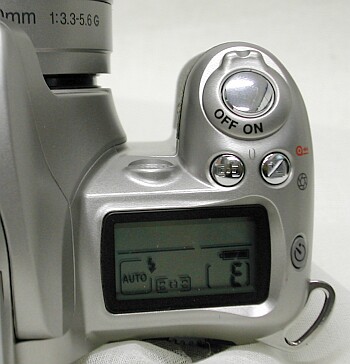 The power switch here is
in the on position
photo from http://www.jjmehta.com/indepth/nikon_f55_all.htm.
|
To turn the camera
off:
- Simply rotate the power switch counter-clockwise to turn it off. The word "off" will now be centered above the index mark and nothing will appear in the viewfinder or the LCD screen.
- Simply rotate the power switch counter-clockwise to turn it off. The word "off" will now be centered above the index mark and nothing will appear in the viewfinder or the LCD screen.