HOW THE AUTO FOCUS WORKS
To change the focus area:
- Press the focus area button while rotating the command dial.
- You will see on the LCD screen where the area of focus is changing to as you rotate the dial (while still holding down the focus area button).
- This option is useful if your subject is not centered in the viewfinder but instead is off to one side or the other. It can also be useful if you will be taking a picture while holding the camera vertically (rather than the normal way - horizontally). If you wish to focus at the top or bottom of the viewfinder (instead of in the center), this feature will come in handy.
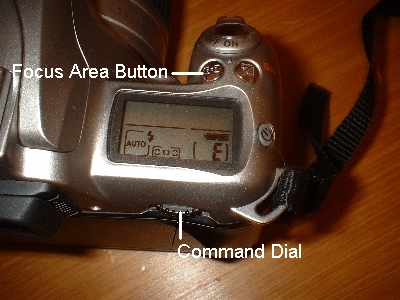
When taking a picture you press
the shutter release button to actually take the picture. When
this button is just lightly pressed, the camera automatically starts to
focus on the subject located closest to any of the three focus areas in
the viewfinder. When the subject is in focus, a dot will appear
at the bottom, left hand side of the viewfinder (to the left of the
focus brackets). If the camera is
unable to focus on your subject, the
dot will blink in the
viewfinder. When this occurs, changing the focus areas may help
the camera to focus what you would like to focus on.
photo from
http://www.jjmehta.com/indepth/nikon_f55_all.htm
To change the focus area:
- Press the focus area button while rotating the command dial.
- You will see on the LCD screen where the area of focus is changing to as you rotate the dial (while still holding down the focus area button).
- This option is useful if your subject is not centered in the viewfinder but instead is off to one side or the other. It can also be useful if you will be taking a picture while holding the camera vertically (rather than the normal way - horizontally). If you wish to focus at the top or bottom of the viewfinder (instead of in the center), this feature will come in handy.