HOW TO LOAD THE
FILM
To load film into the camera:
- Turn the power switch on, and open the ccamera back by sliding the camera back realease lever down.
- Take your roll of film. A roll of film has one end that is mainly flat, and the other end has a raised circular lip in the center.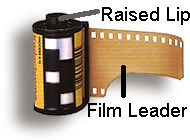 Take the end with the raised lip and point it down.
- With the back of the camera open, look oon the left side. You will see a space just big enough for the roll of film to fit in.
- Put the bottom of the roll of film in fiirst because there is a special area for the raised lip to fit into.
- After the raised lip is in, you should bbe able to easily push the top of the cartridge into place.
- While holding the cartridge down with onne hand, pull the film leader (the piece of film sticking out of the cartridge) to the right side of the camera. At the very bottom, right-hand side of the back of the camera is a red mark, the index mark. This is the point that you want the end of the film leader to meet.
- There is also another lip along the sidee of the film cartridge where the film leader comes out. Push this down and to the right until it stops and the lip is resting on the back of the camera.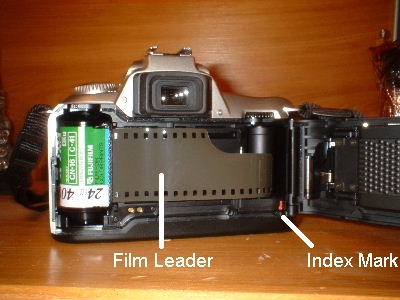
- You should now be able to gently close tthe back of the camera until you hear it snap closed.
- The film will automatically begin to advvance. (A mechanism in the camera unwinds the film and winds it up on another spool on the other side of the camera. The film advances when the spools experience a net torque in the same direction. They turn because of a battery operated motor. After being unwound, the film advances just enough to bring a fresh region behind the lens. A gear measures the film as it moves and stops the advancing process when the next fresh region of film is reached.)
- If the film was loaded and advanced corrrectly, a shutter sound will be let out, very similar to a picture being taken. No picture has actually been taken, though.
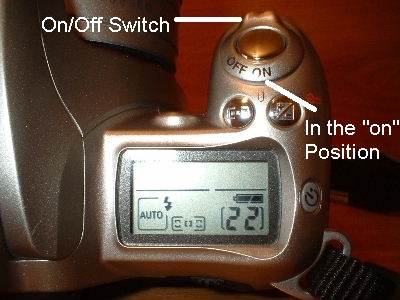
- The number of exposures (pictures) you hhave available to take can be located on the LCD screen (on the top of the camera at the right side). The number at the bottom right of this screen is the number of exposures remaining.
To take the film out of the camera:
- When you have reached the end of your rooll of film, the film will automatically rewind
- After the film is finished rewinding (yoou will no longer hear the noticeable hum of the rewinding), open the camera back by sliding the camera back realease lever down.
- You should simply be able to remove the film carttridge from the camera.
- To load another roll of film, follow thee directions above (To load film into the camera), or simply close the back of the camera if you will not be loading another roll in at that time.
- If the camera had been turned off after the film had been rewound, but the film cartridge had not been romoved, "E" will appear in the LCD screen where the exposure number should be and will continue to blink The film cartridge can be removed at this time.
- Turn the power switch on, and open the ccamera back by sliding the camera back realease lever down.
- Take your roll of film. A roll of film has one end that is mainly flat, and the other end has a raised circular lip in the center.
Take the end with the raised lip and point it down.- With the back of the camera open, look oon the left side. You will see a space just big enough for the roll of film to fit in.
- Put the bottom of the roll of film in fiirst because there is a special area for the raised lip to fit into.
- After the raised lip is in, you should bbe able to easily push the top of the cartridge into place.
- While holding the cartridge down with onne hand, pull the film leader (the piece of film sticking out of the cartridge) to the right side of the camera. At the very bottom, right-hand side of the back of the camera is a red mark, the index mark. This is the point that you want the end of the film leader to meet.
- There is also another lip along the sidee of the film cartridge where the film leader comes out. Push this down and to the right until it stops and the lip is resting on the back of the camera.
- You should now be able to gently close tthe back of the camera until you hear it snap closed.
- The film will automatically begin to advvance. (A mechanism in the camera unwinds the film and winds it up on another spool on the other side of the camera. The film advances when the spools experience a net torque in the same direction. They turn because of a battery operated motor. After being unwound, the film advances just enough to bring a fresh region behind the lens. A gear measures the film as it moves and stops the advancing process when the next fresh region of film is reached.)
- If the film was loaded and advanced corrrectly, a shutter sound will be let out, very similar to a picture being taken. No picture has actually been taken, though.
- The number of exposures (pictures) you hhave available to take can be located on the LCD screen (on the top of the camera at the right side). The number at the bottom right of this screen is the number of exposures remaining.
- When you have reached the end of your rooll of film, the film will automatically rewind
- After the film is finished rewinding (yoou will no longer hear the noticeable hum of the rewinding), open the camera back by sliding the camera back realease lever down.
- You should simply be able to remove the film carttridge from the camera.
- To load another roll of film, follow thee directions above (To load film into the camera), or simply close the back of the camera if you will not be loading another roll in at that time.
- If the camera had been turned off after the film had been rewound, but the film cartridge had not been romoved, "E" will appear in the LCD screen where the exposure number should be and will continue to blink The film cartridge can be removed at this time.