HOW THE FLASH
WORKS
When taking a picture, if the
subject is backlit,
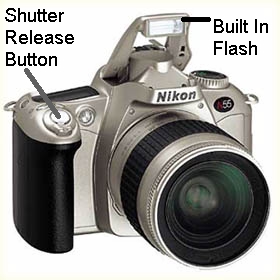
the built in flash
will automatically pop up when
the shutter release button is lightly pressed down (not pressed down
all the way). When the flash is ready to fire, a lightening like
symbol will appear in the viewfinder on the bottom, right hand
side. 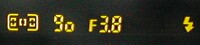 Once you
see that symbol, you can compose, focus, and take
the picture by fully depressing the shutter release button.
Depending on the shooting conditions, the flash can illuminate objects
up to 28 feet away.
Once you
see that symbol, you can compose, focus, and take
the picture by fully depressing the shutter release button.
Depending on the shooting conditions, the flash can illuminate objects
up to 28 feet away.
Taking a picture with out the flash in dark conditions:
- If you wish to take a picture with out the flash in conditions where it would normally automatically be used, simply close the flash (just by pressing it back down into its original position) while lightly pressing the shutter release button (not pressing it down completely).
- As long as the shutter release button is kept lightly pressed, the flash will be canceled for any following pictures as well. Once you have removed you finger from the shutter release button, the flash will pop up again and begin to charge when the shutter release button is pressed again.
Once you
see that symbol, you can compose, focus, and take
the picture by fully depressing the shutter release button.
Depending on the shooting conditions, the flash can illuminate objects
up to 28 feet away.Taking a picture with out the flash in dark conditions:
- If you wish to take a picture with out the flash in conditions where it would normally automatically be used, simply close the flash (just by pressing it back down into its original position) while lightly pressing the shutter release button (not pressing it down completely).
- As long as the shutter release button is kept lightly pressed, the flash will be canceled for any following pictures as well. Once you have removed you finger from the shutter release button, the flash will pop up again and begin to charge when the shutter release button is pressed again.