|
|
3
|
Exporting Operations
|
|
In this Section:
Exporting Alias Files to CAD Formats
|
|
|
|
|
|
|
For more information on
using the File > Save and
File > Save as choices, see
the Basic Tools in Alias book.
|
The File > Save and File > Save as choices let you store Alias wireframe scene information to a selected disk file either in the default Alias Wire format, or in another supported format.
To store wireframe scene information in a different format from the default Alias Wire file format:
-
1
-
Select File > Save as-
 . The Save All Options window appears. . The Save All Options window appears.
|
|
The selections available
depend on the Alias options
you have purchased.
|
-
2
-
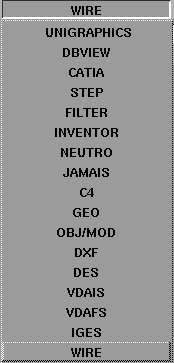
Click on the button next to the File Format field. A menu appears listing the formats available to you.
-
See the following summary to find out where to access
information on the various CAD options.
-
3
-
When you enter suitable values, click the Save button at the bottom of the Save Options
window.
Definitions
The following terms are used throughout this section:
High Degree
Curves or surfaces that are higher than degree 3 in either parametric direction. Such objects may exist as a result of data transfer from other systems.
Non- rational
Curves or surfaces on which the weight of all CVs are equal to a weight value of 1.
Rational
Curves or surfaces on which some CVs have weight values less than or greater than 1.
|
|
|
Save Options
|
|
|
|
|
|
|
|
Notes
- For those options described in the Basic Tools in Alias manual, see the table in the section "Saving Files".
- Purchasable options include:
- The DES, VDAIS, VDAFS file formats are available in SurfaceStudio and AutoStudio and are purchasable options for other Alias products.
- The IGES and JAMA-IS file formats are available in SurfaceStudio and AutoStudio and are purchasable options for other Alias products.
- The C4 and CATIA file formats are purchasable options.
ISO10303 is a standard for exchange of product information. The standard is organized into a set of Application Protocols (AP). There are 2 APs that are supported in this release these being ISO10303-203 (Configuration Controlled Design) conformance classes 1-4, and ISO10303-214 (Core Data for Automotive Mechanical Design Process) conformance classes 1-2. The import and export of this data is supported via ISO10303-21 Physical file exchange.
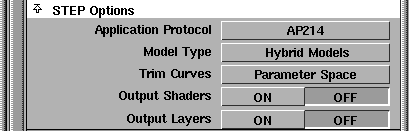
Application Protocol
-
- Select either AP214 or AP203 to output the desired STEP file. The default is AP214.
Model Type
-
- The user can save the model and all the geometry in an Alias Stage, into a STEP
product. This is performed by choosing the Hybrid Models
option (the default).
-
- If, because of contractual or system limitations on the receiving side, a Hybrid model cannot be used, you can select single model representations, as explained in the following table.
|
Any Alias Geometry
|
Hybrid Models
|
|
Alias Shells (Closed)
|
G5 BREP Solids
|
|
Alias Shells (Closed/Open)
|
G3 Manifold Shells
|
|
Alias Surface
|
G2 Wireframe Models
|
|
Alias Curves
|
G2 Wireframe Models
|
-
- Note that there is an inherent loss of information outputting an Alias Shell as a wireframe. Also note that if the Alias model is a set of trimmed surfaces; the model cannot be output as a BREP
Solid.
Trim Curves
-
- Valid when outputting Hybrid Models and G2 Surface Models, this option allows you to output either 2D or 3D trimming curves.
-
- The default is Parameter Space Trimming.
STEP Header Information
-
- Allows you to attach configuration data to your STEP file.
|
|
IGES (Initial Graphics
Exchange Specification) is a
data exchange format
between CAD/CAM
systems.
|
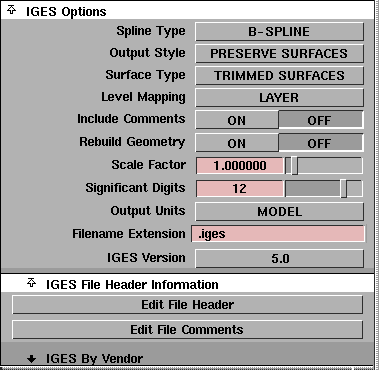
When storing an IGES
file, the following options are available:
|
|
For more information on
IGES see page 49
|
Tips
- Spline Type, Output Style, Surface Type, and Rebuild Geometry are automatically set to the appropriate values when you select a specific vendor from the vendor list. See the description of the By Vendor window for more information.
-
To temporarily override any or all three settings for a
vendor, select the vendor first and then set the options. See
Common File Format Descriptions page 44 for more
information on the By Vendor window.
Spline Type
-
- Determines the types of curves and surfaces to be created in the IGES
file: either B-spline or parametric.
- If you select B-SPLINE, curves are written as NURBS curves (entity 126) and surfaces as NURBS surfaces (entity 128).
- If you select PARAMETRIC, curves are written as parametric curves (entity 112) and surfaces as parametric surfaces (entity 114). The default is B-SPLINE.
Note that the PARAMETRIC options for IGES
do not support high degree or rational geometry. When using this option, any high degree and/or rational geometry is automatically rebuilt to be at most cubic and non-rational.
Output Style
-
- Lets you preserve surfaces or convert them to curves for some drafting packages. If you choose CONVERT TO CURVES to convert surfaces to curves and have set the patch precision to a number greater than the default, all isoparms are stored in the file. The default is PRESERVE SURFACES.
Surface Type
-
- Determines whether trimmed surfaces are written as trimmed or bounded. The default is TRIMMED SURFACES.
- If you select TRIMMED SURFACES
, trimmed surfaces are written as trimmed surface entities (entity 144) and trim curves are written as curve on surface entities (entity 142) in the IGES
file.
- If you select BOUNDED SURFACES, trimmed surfaces are written as bounded surface entities (entity 143) and trim curves as boundary entities (entity 141) in the IGES file.
Level Mapping
-
- Determines whether Alias layer or set information is exported as IGES Level information and can be recognized by each IGES entity.
- If you select LAYERS
, Alias Layers Number
information is exported. Alias SET
information is ignored (that is, it is not exported).
- If you select SET
, Alias Set
information is exported. Alias Multi-sets
information are exported as IGES (type 406, form 1) Property entity definition levels. Alias Layer
information is ignored (that is, it is not exported).
Include Comments
-
- Determines whether or not comments entered in the Edit File Comments
section (found in the IGES File Header Information
window) are included in the exported file. The default is OFF
.
-
- See File Header Information page 46 for details.
Rebuild Geometry
-
- Modifies your models so that all curves and surfaces are compatible with CAD systems or neutral file formats that cannot fully support NURBS geometry by:
- reducing high degree curves and surfaces to degree 3
- making non rational curves and surfaces where rational ones existed before
-
When set OFF (the default), the degree of the resulting
curve on surface does not change, nor do the weights on
the CVs.
-
When set ON, the resulting curve or surface is forced to be
at most degree three, with the weight of all CVs equal to a
value of 1.
-
For example, if your model contains curves or surfaces
that are rational (with some weights that are not equal to
1.0) or high degree (higher than cubic or bi-cubic), then it
is sampled at a number of checkpoints and the data is fit
with a cubic or bi-cubic, non-rational curve or surface.
Knots are inserted until the fit is within the specified
tolerance.
Rebuild Tolerance
-
- Use the slider to adjust the values so that the resulting curve or surface is guaranteed to be within the specified tolerance distance from the original curve or surface. 0.01 is the default value.
Scale Factor
-
- Lets you save the wire model at a scale other than it was constructed. 1.0 is the default value.
Significant Digits
-
- The number of significant digits for coordinate data in the exported file can be specified in this field. The minimum number is 1 and the maximum number is 15.
Output Units
-
- Lets you choose any of the data unit types supported by the IGES standard, including miles, feet, inches, mils, microinches, kilometers, meters, centimeters, millimeters, and microns. The exported coordinate data is converted from the current linear units set in Alias to the units selected here.
-
- An additional choice is available called MODEL
, which keeps the output units in the exported file the same as the linear units in Alias.
Filename Extension
-
- Some receiving systems require that CAD files have a specific filename extension before they can be recognized. The filename extension specified here is automatically appended to the filename of the exported file. The default is .iges.
IGES Version
-
- Use the items in this menu to set the IGES version number in the exported IGES file to 5.0 for systems that require it. The default is IGES version 5.0 or 5.3.
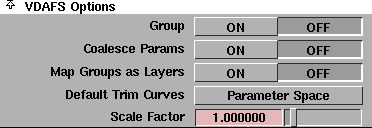
Alias supports VDAFS version 2.0.
>
Export Layers
-
- D
etermines whether or not Alias Layers
map to VDAFS
groups. The Alias Layer Number
is mapped to the group name. The default is OFF
.
-
- For example, a layer number of 1 would map to a group name of Layer 001.
Include Comments
-
- Determines whether or not comments entered in the Edit File Comments
section (found in the VDAFS
File Header Information
window) are included in the exported file. The default is OFF
. See File Header Information for details.
Rebuild Geometry
-
- Modifies your models so that all curves and surfaces are compatible with CAD systems or neutral file formats that cannot fully support NURBS geometry by:
- reducing high degree curves and surfaces to degree 3
- making non rational curves and surfaces where rational ones existed before
-
When Rebuild Surface is set ON, the resulting curve or
surface is forced to be at most degree three, with the
weight of all CVs equal to a value of 1.
-
For example, if your model contains curves or surfaces
that are rational (with some weights that are not equal to
1.0) or high degree (higher than cubic or bi-cubic), then it
is sampled at a number of checkpoints and the data is fit
with a cubic or bi-cubic, non-rational curve or surface.
Knots are inserted until the fit is within the specified
tolerance.
>
|
Note:
|
When Rebuild Geometry is set OFF
, rational geometry is
automatically rebuilt to be non-rational because the VDAFS
format supports high degree geometry but not rational
geometry.
|
Rebuild Tolerance
-
- Use the slider to adjust the values so that the resulting curve or surface is guaranteed to be within the specified tolerance distance from the original curve or surface.
Scale Factor
-
- Lets you save the wire model at a scale other than it was constructed. 1.0 is the default value.
Filename Extension
-
- Some receiving systems require that CAD files have a specific filename extension before they can be recognized. The filename extension specified here is automatically appended to the filename of the exported file.
-
- The default is .vda
.
>
|
Note:
|
There is no Output Units option for VDAFS because
coordinate data exported to VDAFS files is always in
millimeters, regardless of the linear units set in Alias. This is
a requirement of the VDAFS standard.
|
|
|
VDAIS
format is a subset of
the IGES standard.
|
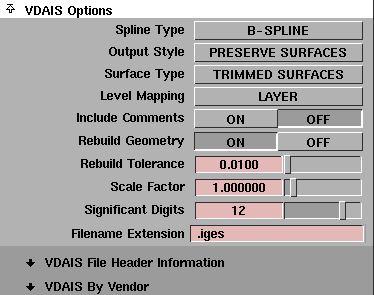
>
Spline Type
-
- Lets you choose between B-spline or parametric forms of curves and surfaces to be created in the VDAIS file.
- For B-SPLINE, curves are written as NURBS curves (entity 126) in VDAIS and surfaces as NURBS surfaces (entity 128). This is the default.
- For PARAMETRIC, curves are written as parametric curves (entity 112) and surfaces as parametric surfaces (entity 114).
-
-
-
- The PARAMETRIC option does not support high degree or rational geometry. When using this option, any high degree and/or rational geometry is automatically rebuilt to be, at most, cubic and non-rational.
Output Style
-
- Converts surfaces to curves for some drafting packages. If you choose to convert surfaces to curves and have set the patch precision to a number greater than the default, all isoparms are stored in the file.
-
- The default is PRESERVE SURFACES.
Surface Type
-
- Determines whether trimmed surfaces are written as trimmed or bounded. The default is TRIMMED SURFACES.
-
- For TRIMMED SURFACES, trimmed surfaces in the modeler are written as trimmed surface entities (entity 144) and (trim) surface curves are written as curve on surface entities (entity 142) in the VDAIS file.
Level Mapping
-
- Determines the type of Alias information exported as VDAIS Level information.
-
- For LAYER
, Alias Layer number
information associated to each entity is exported as IGES
Level information in the Directory Entry of this VDAIS entity in (field number 5). In this case, Alias SET
information is ignored and not exported to VDAIS
.
-
- For SET
, Alias Set information is exported as IGES Level information. If an Alias Set is given a name of the form LEVEL<n>, where <n> is an IGES level number and greater than 0, then the corresponding VDAIS entity for each member of the Alias Set is assigned to level<n> in the VDAIS file.
-
- For example, the VDAIS entities corresponding to each member of the set LEVEL42 are assigned to level 42 in the VDAIS file. Alias Multi-sets information is exported as VDAIS (type 406, form 1) Property entity definition levels. If an Alias object is a member of several multi-sets that conform to this naming convention, then the VDAIS file contains a Property Entity 406 form 1 (Definition Levels) listing the VDAIS levels to which the corresponding entity belongs. In this case, Alias Layer information is ignored and not exported to VDAIS.
Include Comments
-
- Determines whether or not comments entered in the Edit File Comments
section (found in the VDAIS File Header Information
window) are included in the exported file. The default is OFF
. See File Header Information page 46 for details.
Rebuild Geometry
-
- When set OFF (the default), the degree of the resulting surface and the weights on the CVs do not change.
-
- When set ON, models are updated so that all curves and surfaces are compatible with CAD systems or neutral file formats that cannot fully support NURBS geometry by:
- Reducing high degree curves and surfaces to degree 3.
- Making non rational curves and surfaces where rational ones existed before.
-
-
-
- The resulting curve or surface is forced to be at most degree 3, with the weight of all CVs equal to a value of 1.0.
-
- For example, if your model contains curves or surfaces that are rational (with some weights that are not equal to 1.0) or high degree (higher than cubic or bi-cubic), then it is sampled at a number of checkpoints and the data is fit with a cubic or bi-cubic, non-rational curve or surface. Knots are inserted until the fit is within the specified tolerance.
Rebuild Tolerance
-
- Lets you adjust tolerances so that the resulting curve or surface is guaranteed to be within the specified tolerance distance from the original curve or surface.
Scale Factor
-
- Lets you save the wire model at a scale other than it was constructed. 1.0 is the default value.
Significant Digits
-
- Lets you specify the number of significant digits for coordinate data in the exported file. The minimum number is 1 and the maximum number is 15.
Filename Extension
-
- Some receiving systems require that CAD files have a specific filename extension before they can be recognized. This filename extension specified is automatically appended to the filename of the exported file. The default is
.iges.
>
|
Note:
|
There is no Output Units option for VDAIS because
coordinate data exported to VDAIS files are always in
millimeters, regardless of the linear units set in Alias. This is
a requirement of the VDAIS standard.
|
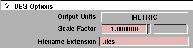
Output Units
-
- Lets you store a DES file with either METRIC or IMPERIAL (miles, feet, inches) units of measure.
Scale Factor
-
- Lets you save the wire model at a scale other than the scale at which it was constructed. The default is 1.0.
Filename Extension
-
- Some receiving systems require that CAD files have a specific filename extension before they can be recognized. This filename extension specified is automatically appended to the filename of the exported file. The default is .
des.

>
Output Style
-
- Choose to preserve surfaces or (depending on your drafting packages) convert them to curves.
-
- If you choose to convert surfaces to curves and have set the patch precision to a number greater than the default, all isoparms are stored in the file.
-
- The default is PRESERVE SURFACES.
Include Comments
-
- Determines whether or not comments entered in the Edit File Comments
section (found in the C4
File Header Information
window) are included in the exported file. The default is OFF. See File Header Information page 46 for details.
Rebuild Geometry
-
- When set OFF (default is OFF) the degree of the resulting surface and the weights on the CVs do not change.
-
- When set ON, your models are modified so that all curves and surfaces are compatible with CAD systems or neutral file formats that cannot fully support NURBS and/or high degree geometry by:
- Reducing high degree curves and surfaces to degree 3.
- Making non rational curves and surfaces where rational ones existed before.
-
- When set ON, the resulting curve or surface is forced to be at most degree 3, with the weight of all control vertices equal to a value of 1.0.
-
- For example, if your model contains curves or surfaces that are rational (with some weights that are not equal to 1.0) or high degree (higher than cubic or bi-cubic), then it is sampled at a number of checkpoints and the data is fit with a cubic or bi-cubic, non-rational curve or surface. Knots are inserted until the fit is within the specified tolerance.
Rebuild Tolerance
-
- Lets you adjust the tolerance so that the resulting curve or surface is guaranteed to be within the specified tolerance distance from the original curve or surface.
Scale Factor
-
- Lets you save the wire model at a scale other than it was constructed. 1.0 is the default value.
Significant Digits
-
- The number of significant digits for coordinate data in the exported file can be specified in this field. The minimum number is 1 and the maximum number is 15.
Output Units
-
- Lets you choose either millimeters or inches as the data units used for exported coordinate data. The exported coordinate data is converted from the current linear units set in Alias to the selected units. MILLIMETERS is the default.
-
- The C4
standard allows only inches and millimeters, so these are the only two choices available.
>
|
Note:
|
The C4
standard requires the file extension of a C4
conforming file to be .c4x. This file extension is
automatically appended to the filename of the exported file
|
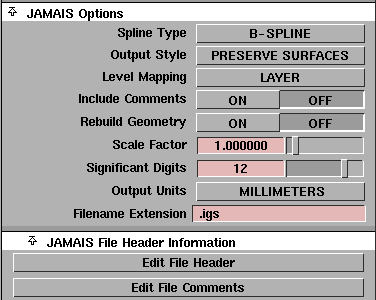
See IGES Options on page 41 for details on the JAMA-IS options.
For details on the JAMA-IS File Header Information
, see File Header Information (IGES, VDAFS, VDAIS, C4, JAMA-IS) on page 56.
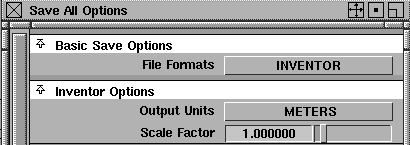
Output Units
-
- Click to the right of the heading to display the menu from which you can choose any of the data unit types supported by the INVENTOR
standard. These include miles, feet, inches, mils, microinches, kilometers, meters, centimeters, millimeters, and microns. METERS
is the default.
-
- The exported coordinate data is converted from the current linear units set in Alias to the selected units.
Scale Factor
-
- Changes the size of models stored in Inventor
file format as you save the file.
Common File Format Descriptions
By Vendor Window (IGES and VDAIS)
To choose the specific software product to which you are transferring your model, first choose the file format (either IGES or VDAIS), then click and hold on the arrow beside "format" By Vendor. The By Vendor window is displayed.
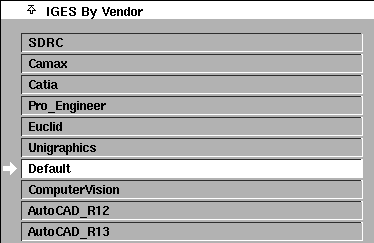
When you choose a specific vendor, your output file is customized to optimize data exchange for the target system. The data exchange parameters (output environment variables) are modified. The active vendor is highlighted.
You can also change the values of the environment variables for a specific vendor by bringing up the $ALIAS_LOCATION/IGES.config directory and editing the desired ASCII file.
The following shows an example of a vendor file.
Vendor Configuration File	         # AutoCAD Release 12

# 0-1   polyline or b-spline trim curve output.

setenv IGES_OUT_BS_TRIM           0

# 0-1   polyline or parametric trim curve output.

setenv IGES_OUT_PAR_TRIM          0

# 1-15  the number of digits of precision.

setenv IGES_OUT_PRECISION        10

# 0-999 surface patch limit.

setenv IGES_OUT_MAX_SPANS         0

# 0-999 trimmed surface patch limit.

setenv IGES_OUT_MAX_TRIM          0

# 0-2  For Trimmed Parametric Surface (144/142) output:

#      0 = output both model space and 2D parametric trim curves.

#      1 = output 2D parametric trim curves only.

#      2 = output model space trim curves only.

setenv IGES_OUT_2D_TRIM           0

# 0-1  For Bounded Surface (143/141) output:

#      0 = output model space curves only.

#      1 = output both model space and 2D parametric trim curves.

setenv IGES_OUT_2D_BOUNDARY       1

# 0-1  convert splines to polygonal geometry.

setenv IGES_OUT_POLY              1

# 0-1  output all surfaces as trimmed surfaces.

setenv IGES_OUT_SURF_AS_TRIM      0

# 0-1  output Alias instances as duplicated and transformed geometry.

setenv IGES_OUT_INSTANCE_COPIES   1

# 0-1  Spline entity type:

#      0 = Rational B-Spline Curve/Surface (126/128).

#      1 = Parametric Spline Curve/Surface (112/114).

setenv IGES_OUT_SPLINE_TYPE 	  1

# 0-1  Output multi-span linear spline curve (polyline) as:

#      0 = Copious Data (106).

#      1 = Rational B-Spline curve (126) or Parametric Spline curve (112).

setenv IGES_OUT_POLYLINE_TYPE     0

# 0-1  Surface output style: 0 (PRESERVE SURFACES) or 1 (CONVERT TO CURVES).

setenv IGES_OUT_OUTPUT_STYLE      0

# 0-1  Trimmed surface entity type:

#      0 = output Trimmed Parametric Surface (144).

#      1 = output Bounded Surface 			 (143).

setenv IGES_OUT_SURFACE_TYPE      0

# 0-1  Rebuild Geometry option: 0 (OFF) or 1 (ON).

setenv IGES_OUT_REBUILD_GEOMETRY  0

# 0-1  Output montone 2D trim curves: 0 (OFF) or 1 (ON).

setenv IGES_OUT_MONOTONE_2D_TRIM  0

# 0-1  Degree raise all 2D trim curves to cubic (1) or not (0).

setenv IGES_OUT_CUBIC_2D_TRIM     0

# 0-1  Output linear 2D trim curves that lie on surface boundaries as:

#      0 = Line Entity (110).

#      1 = Rational B-Spline curve (126) or Parametric Spline curve (112).

setenv IGES_OUT_LINEAR_2D_TRIM    0

# 0-3 Preferred Curve on Surface representation (PREF flag of IGES entity 142):

#     (0 = Unspecified; 1 = S o B (2D); 2 = C (3D); 3 = 2D and 3D are equally

#     preferred).

setenv IGES_OUT_CONS_PREF 		  1

# 0-1 Output Analytic IGES entities if possible. These entities include

#     Circular Arc Entity 100, Conic Arc Entity 104,Unbounded Plane Entity 108,

#     Line Entity 110, Surface of Revolution Entity 120, Transformation Matrix

#     Entity 124.

#     (0 = OFF; 1 = ON)

setenv IGES_OUT_ANALYTICS 		  1

# 0-3 Output degenerate model space trim curves.

#     (0 = None; 1 = Poles only; 2 = Seams only; 3 Poles and Seams).

setenv IGES_OUT_DEGEN_TRIM 		  2

# 6 or 8 IGES Version to output.

#     (6 = IGES V4.0; 11 = IGES V5.3)  No other values are supported.

setenv IGES_OUT_VERSION 		  8

# Output Units.

#     1 = INCHES            6 = METERS          11 = MICROINCHES

#     2 = MILLIMETERS       7 = KILOMETERS

#     3 = MODEL             8 = MILS

#     4 = FEET              9 = MICRONS

#     5 = MILES            10 = CENTIMETERS

#

#     No other units supported.

#     If set to 3 (i.e. MODEL) then the linear units set in the Alias Modeler

#     will be used.

#

setenv IGES_OUT_UNITS 		  1

# File extension used for output file.

# First character of specified extension must be '.'.

setenv IGES_OUT_FILE_EXT 	   .igs
You can create new vendor files or remove files (except the default) and the By Vendor window is updated accordingly.
>
|
Note:
|
The system does not recognize a vendor file without an
appropriate header. Create a new vendor file by copying,
renaming, and modifying an existing one.
|
|
|
An appropriate header has the text "Vendor Configuration
File" followed by a number sign (#) and the vendor's name.
It is important to note that the placement of the vendor's
name must follow the space after the number sign (#) on the
first line.
|
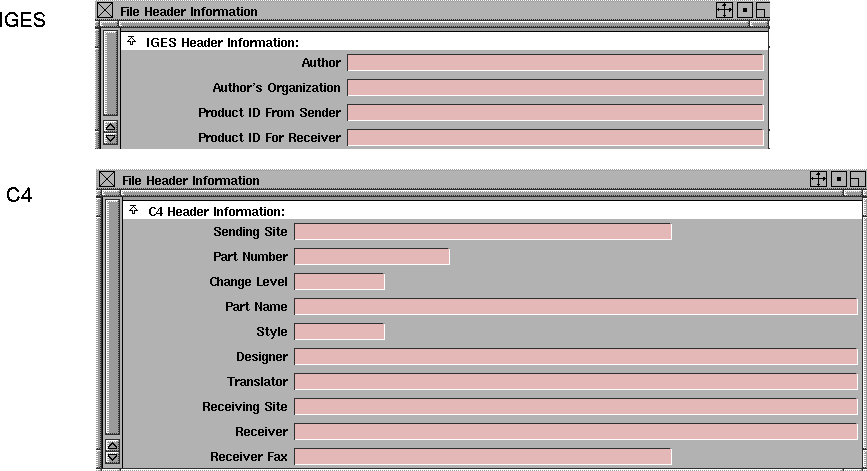
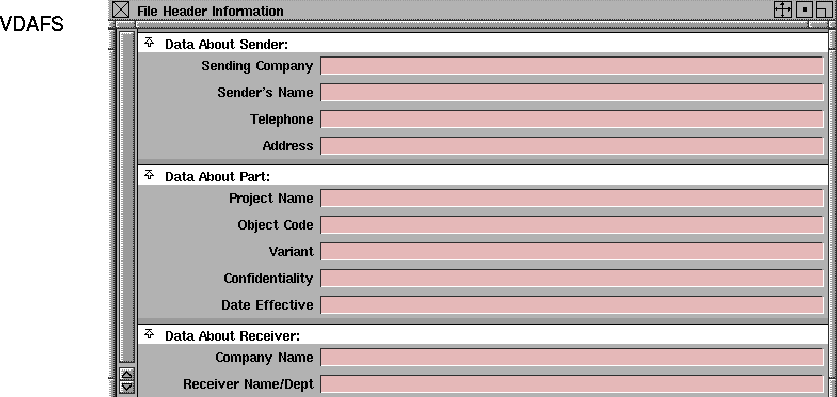
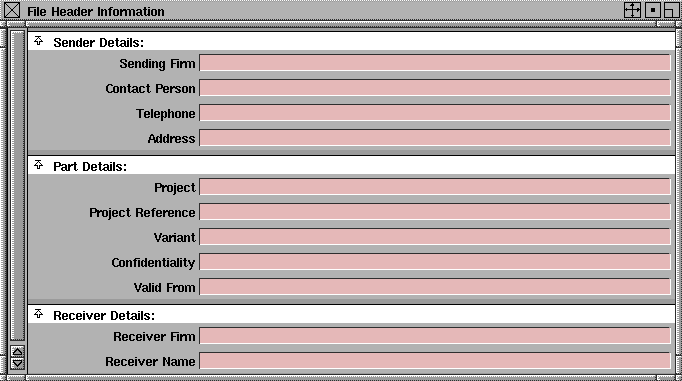
File Header Information (IGES, VDAFS, VDAIS, C4, JAMA-IS)
If you select the IGES, VDAFS, VDAIS, C4,
or JAMA-IS
file formats, the Save Options window expands to display the following:

Edit File Header
-
- When you click on this field, a File Header Information
menu is displayed with fields specific to the file format you've chosen. Use these fields to communicate information about the model being exported and the sender and receiver of the data. This information is exported in the file header of the file.
-
- These fields are optional.
|
|
|
|
|
|
|
|
| |

|
| |
|
| |
|
|
| |

|
|
Edit File Comments
-
- When you click in this field, an editor window is displayed where you can type comments specific to the file you are saving. This editor window can be specified in the Editor Options
section of the Alias Preferences
window (Preferences > User Options > Alias preferences).
More about IGES
Alias faces are stored as IGES trimmed or bounded surfaces according to the Surface Type options you select. For a face to be stored in IGES file format, the curves that comprise the face must meet the following requirements:
- All curves must lie in the same plane.
- The curves cannot intersect or touch each other.
Alias will not store a face that is not planar. An error message is displayed and that object is ignored. If a face contains curves which intersect, the curves are output as separate IGES trimmed or bounded surfaces.
|
|

|
If a face contains curves that are not all contained within an outer curve, as in an exclamation point, the face is output as separate IGES trimmed or bounded surfaces.
Alias Sets and IGES Levels
Alias set information is only exported in files for IGES, VDAIS, or JAMA-IS, if the option
Level Mapping
is set to
SET.
If an Alias set is given a name of the form of LEVEL<n>, where <n> is an IGES level number (and greater than 0), then the corresponding IGES entity for each member of the Alias set is assigned to level<n> in the IGES file. For example, the IGES entities corresponding to each member of the set LEVEL245 is assigned to level 245 in the IGES file.
If an Alias object is a member of several multisets that conform to this naming convention, then the IGES file contains a Property Entity 406 form 1 (Definition Levels) listing the IGES levels to which the corresponding entity belongs.
ASCII IGES
IGES format files that are output by the translator contain a fixed record length of 80 ASCII characters, followed by a linefeed character. The IGES translator saves ASCII IGES format files. Binary IGES files are not supported.
The Alias system supports a subset of version 5.0 IGES. The following table shows how Alias entities are converted to IGES entities.
Mapping of Alias Entities to IGES Entities
>
|
Note:
|
A transformation matrix is output for each simple closed
planar curve that doesn't lie in the xy plane
|
.
|
Alias Entity
|
Type
|
Form
|
Entity Name
|
|---|
|
arc
|
100
|
0
|
circular arc
|
|
line arc
|
102
|
0
|
composite curve
|
|
b-spline curve (conic)
|
104
|
1,2,3
|
conic arc
|
|
plane
|
108
|
0
|
plane
|
|
b-spline surface (exact revolve)
|
120
|
0
|
surface of revolution
|
|
polyline
|
106
106
|
12
63
|
copious data
simple closed planar curve
|
|
polyset (one polygon)
|
106
124
|
63
0
|
simple closed planar curve
transformation matrix
|
|
polyset (with more than one polygon)
|
106
124
402
|
63
0
7
|
simple closed planar curve
transformation matrix
associativity instance
|
|
single segment polyline
|
110
|
0
|
line
|
|
b-spline curve
|
112
|
0
|
parametric curve
|
|
b-spline surface
|
114
|
0
|
parametric surface
|
|
single control vertex
|
116
|
0
|
point
|
|
b-spline curve
|
126
|
0
|
b-spline curve
|
|
b-spline surface
|
128
|
0
|
b-spline surface
|
|
trim curve
|
141
|
0
|
boundary entity
|
|
trim curve
|
142
|
0
|
curve on surface
|
|
trimmed surface
|
143
|
0
|
bounded surface
|
|
trimmed surface
|
144
|
0
|
trimmed surface
|
|
face
|
141
|
0
|
boundary entity
|
|
face
|
142
|
0
|
curve on surface
|
|
face
|
143
|
0
|
bounded surface
|
|
face
|
144
|
0
|
trimmed surface
|
|
group
|
402
|
7
|
associativity instance
|
|
multi sets
|
406
|
1
|
property-definition levels
|
IGES/VDAIS Output Environment Variables
This table summarizes IGES output environment variables. More detailed descriptions follow.
Note that these environment variables can only be set from within an IGES or VDAIS Vendor file.
|
Variable
|
Default
|
Range
|
Description
|
|---|
|
IGES_OUT_BS_TRIM
|
0
|
0-1
|
Specifies copious data or b-spline trim curve output.
|
|
IGES_OUT_PAR_TRIM
|
0
|
0-1
|
Specifies copious data or parametric spline trim curve output.
|
|
IGES_OUT_PRECISION
|
12
|
1-15
|
Specifies the number of digits of precision for double precision values.
|
|
IGES_OUT_MAX_SPANS
|
0
|
0-999
|
Reports surfaces exceeding this limit for the number of patches.
|
|
IGES_OUT_MAX_TRIM
|
0
|
0-999
|
Reports trimmed surfaces exceeding this limit for the number of patches.
|
|
IGES_OUT_2D_TRIM
|
0
|
0-2
|
Specifies the output of model space and 2D parametric trim curves for Trimmed Surfaces (144/142).
|
|
IGES_OUT_2D_BOUNDARY
|
1
|
0-1
|
Specifies the output of both model and parameter space boundaries for Bounded Surface output (143/141).
|
|
IGES_OUT_POLY
|
0
|
0-1
|
Specifies the conversion of splines to polygonal geometry.
|
|
IGES_OUT_SURF_AS_TRIM
|
0
|
0-1
|
Specifies whether or not all surfaces are output as trimmed surfaces
|
|
IGES_OUT_INSTANCE_COPIES
|
1
|
0-1
|
Specifies whether or not Alias instances are written out.
|
|
IGES_OUT_SPLINE_TYPE
|
0
|
0-1
|
Specifies output spline type
0 = B-spline (126/128)
1 = Parametric (112/114)
|
|
IGES_OUT_POLYLINE_TYPE
|
0
|
0-1
|
Specifies IGES entity type of multi-span linear spline curve (polyline).
|
|
IGES_OUT_OUTPUT_STYLE
|
0
|
0-1
|
Specifies surface output style
0 = Preserve surfaces
1 = Convert to curves
|
|
IGES_OUT_SURFACE_TYPE
|
0
|
0-1
|
Specifies trimmed surface entity type:
0 = Trimmed surface (142/144)
1 = Bounded surface (141/143
|
|
IGES_OUT_REBUILD_GEOMETRY
|
0
|
0-1
|
Specifies whether or not high degree or rational geometry is to be rebuilt to degree 3 and non-rational
|
|
IGES_OUT_MONOTONE_2D_TRIM
|
0
|
0-1
|
Specifies output of parameter space trim curves in monotone increasing/decreasing pieces.
|
|
IGES_OUT_CUBIC_2D_TRIM
|
0
|
0-1
|
Specifies the degree raising of parameter space trim curves from degree 1 and 2 to degree 3.
0=Do not Degree Raise
1=Degree Raise
|
|
IGES_OUT_LINEAR_2D_TRIM
|
0
|
0-1
|
Specifies IGES entity type to use for linear parameter space trim curves the lie on surface boundaries.
0=Line (110)
1=Rational Bspline (126) or Parametric Spline (112)
|
|
IGES_OUT_CONS_PREF
|
1
|
0-3
|
Specifies the value of the "PREF" flag to be used for IGES entity type 142 Curve on a Parametric Surface.
|
|
IGES_OUT_ANALYTICS
|
1
|
0-1
|
Enables the output of IGES analytic type entities (e.g. 100 Circular Arc).
|
|
IGES_OUT_DEGEN_TRIM
|
2
|
0-3
|
Enables removal of degenerate model space trim curves.
|
|
IGES_OUT_VERSION
|
8
|
6,8,11
|
Specifies IGES version of output file.
|
|
IGES_OUT_UNITS
|
3
|
1-11
|
Specifies the units of measure to be used in the output file.
1=IN, 2=MM, 3=MODEL, 4=FT, 5=MILES, 6=M, 7=KM, 8=MILS, 9=MICRONS, 10=CM, 11=MICROINCHES
|
|
IGES_OUT_FILE_EXT
|
.iges
|
.<ext>
|
Specifies the file extension for the output file.
|
IGES/VDAIS Output Environment Variables Definitions
IGES_OUT_BS_TRIM - Linear Trim Curve Output
-
- When the Spline Type option is set to B-SPLINE, this variable controls the type of IGES entity used for multi-span linear (that is, polyline) trim curves.
-
- When set to 1, linear trim curves are output as IGES entity type 106 form 12 Copious Data. When set to 0, linear trim curves are output as IGES entity type 126 Rational B-spline Curves.
IGES_OUT_PAR_TRIM - Linear Trim Curve Output
-
- When the Spline Type option is set to Parametric, this variable controls the type of IGES entity used for multi-span linear (that is, polyline) trim curves. When set to 1, linear trim curves are output as IGES entity type 106 form 12 Copious Data. When set to 0, linear trim curves are output as IGES entity type 114 Parametric Spline Curves.
IGES_OUT_PRECISION - Double Precision Significant Digits
-
- Changes the number of digits of double precision stored in IGES or VDAIS files produced by Alias. The default is 12 digits of precision, but can be changed to any number between 1 and 15.
IGES_OUT_2D_TRIM
-
- Setting this variable to 1 specifies the output of 2D parametric trim curves only. The default of 0 outputs both 2D and 3D trim curves. Setting this value to 2 specifies the output of model space trim curves only.
IGES_OUT_2D_BOUNDARY
-
- When set to 1, both 3D model space and 2D parametric space boundary curves are output if the Surface Type option has been set to BOUNDED SURFACE. When set to 0, only model space boundary curves are saved in the IGES or VDAIS file.
IGES_OUT_MAX_SPANS
-
- This variable specifies the limit for the maximum number of patches for a single surface. The number of patches in U multiplied by the number of patches in V must be less than or equal to the defined value n for any surface. Surfaces that exceed this limit are stored, but reported in the logfile in the following format:
-
- WARNING! The object <object name> contains <n > patches.
-
- Maximum allowable patches is defined as <m >.
-
- To keep surfaces within the patch limit, return to the modeler, pick the entity by name and detach it to produce an acceptable object. The default of 0 outputs no message.
IGES_OUT_MAX_TRIM
-
- This variable specifies the limit for the maximum number of trimmed patches for a single surface. The number of patches in U multiplied by the number of patches in V must be less than or equal to the defined value n for any surface.
-
- The surface is stored "as is" and a warning message appears in the logfile.
-
- WARNING! The trimmed object <object name> contains <n > trimmed patches.
-
- Maximum allowable trimmed patches is defined as <m >.
-
- To solve this problem, return to the modeler, pick the entity by name and detach it to produce an acceptable object. The default 0 outputs no message.
IGES_OUT_POLY
-
- This variable produces polygon data from arbitrary degree curves and surfaces for the IGES or VDAIS format.
-
- When set to 1 and used in conjunction with the CONVERT TO CURVES option:
- All curves and surface isoparms higher than degree 1 are converted to linear curves and output as IGES entities 106, copious data form 12.
-
When set to 1 and used in conjunction with the PRESERVE
SURFACE option:
- All curves higher than degree 1 are converted to linear curves and output as IGES entities 106, copious data form 12.
|
|
See NURBS Modeling in
Alias for a description of
Object Edit > Patch
precision.
|
- Surfaces higher than degree 1 are converted to linear b-spline surfaces and output to IGES entities 128, b-spline surface or 114 parametric surface. The linear mesh is defined by the surface isoparms, and the density of the mesh is controlled using Object Edit > Patch precision.
IGES_OUT_SURF_AS_TRIM
-
- Setting this variable to 1 causes all untrimmed surfaces to be output as trimmed surfaces. The default of 0 produces no change in surface output.
IGES_OUT_INSTANCE_COPIES
-
- With the default of 1, Alias instances are output as transformed copies of the geometry that they instance. When set to 0, Alias instances are not stored.
IGES_OUT_SPLINE_TYPE
-
- With the default of 0, Alias spline curves are output as IGES entity 126 and all spline surfaces are output as IGES entity 128. When set to 1, spline curves and surfaces are output as IGES Parametric entities, 112 and 114 respectively. The value of this variable is reflected in the IGES or VDAIS Spline Type option. Setting IGES_OUT_BS_TRIM=1 overrides this variable for trim curves, and setting IGES_OUT_POLY=1 overrides this variable for all curves.
IGES_OUT_POLYLINE_TYPE
-
- With the default of 0, multi-span linear spline curves (polylines) are output as copious data IGES entities (106), and when set to 1, as IGES entity Rational B-spline curve (126), or parametric spline curve (112), according to the value of the IGES_OUT_SPLINE_TYPE or the IGES/VDAIS Output Style option.
IGES_OUT_OUTPUT_STYLE
-
- When set to 1, surfaces are converted to curves. With the default of 0, surfaces are preserved in the IGES or VDAIS file. The value of this variable is reflected in the IGES or VDAIS Output Style option.
IGES_OUT_SURFACE_TYPE
-
- With the default of 0, Alias trimmed surfaces are written as IGES entity 144 and curves on surface are written as IGES entity 142.
-
- When set to 1, trimmed surfaces are written as IGES Bounded Surface entities (143), and curves on surface are written as IGES Boundary entities (141). The value of this variable is reflected in the IGES or VDAIS Surface Type option.
IGES_OUT_REBUILD_GEOMETRY
-
- When set to 1, high degree or rational geometry is rebuilt to be of degree 3 and non-rational.
-
- With the default of 0, no rebuild is done. The value of this variable is reflected in the IGES or VDAIS Rebuild Geometry option.
IGES_OUT_MONOTONE_2D_TRIM
-
- This variable controls the output of 2D parametric space trim curves. When set to 1, 2D parametric space trim curves are output in monotone increasing/decreasing pieces. When set to 0, these trim curves are output whole.
IGES_OUT_CUBIC_2D_TRIM
-
- When set to 1, all 2D parametric space trim curves are degree raised to cubic if necessary. When set to 0, these trim curves may be of degree 1, 2 or 3.
IGES_OUT_LINEAR_2D_TRIM
-
- When set to 0, linear 2D parametric space trim curves that lie on a natural surface boundary are output as IGES entity type 110 Line. When set to 1, these curves are output as linear b-splines in the form of IGES entity type 126 Rational B-Spline Curve, or IGES entity type 112 parametric spline curve, according to the value of the IGES_OUT_SPLINE_TYPE or the
IGES/VDAIS Spline Type option.
IGES_OUT_CONS_PREF
-
- Controls the value of the "PREF" flag (preferred representation in sending system) of IGES entity type 142 Curve on a Parametric Surface. Some receiving systems require a specific value for this field. The set of values for this variable correspond to the valid range of values for the "PREF" flag.
-
- The values are: 0 = Unspecified; 1 = 2D parameter space curve; 2 = Model Space Curve; 3 = Both 3D and 2D curves equally preferred.
IGES_OUT_ANALYTICS
-
- Controls the output of IGES analytic type entities: 100 Circular Arc, 104 Conic Arc, 102 unbounded, 108 Plane, 110 Line, and 120 Surface of Revolution.
-
- When set to 1, lines, arcs, and unbounded line-arcs constructed using some of the Curve
functions, or lines, arcs, and unbounded curves previously retrieved via IGES, are output as IGES entity 110 Line, 100 Circular Arc, 124 transformation matrix, and 102 Composite Curve respectively. Conic arcs previously retrieved via IGES and represented in Alias as B-splines are output as IGES entity 104 Conic Arc if unmodified in Alias.
|
|
For more on Surfaces >
Revolve, see NURBS
Modeling in Alias.
|
-
- Planes and surfaces of revolution previously retrieved via IGES or created by using the Exact option in the Revolve Options box (Surfaces > Revolve-) and unmodified in Alias, are output as IGES entity 108 unbounded Plane and entity 120 Surface of Revolution, respectively.
-
- When set to 0, all lines, arcs, and unbounded line-arcs and surfaces are output based on the Spline Type option setting.
IGES_OUT_DEGEN_TRIM
-
- When set to 0, degenerate 3D model space trim curves (that occur at the poles and seams of periodic geometry) are removed from trim boundaries before these boundaries are output to IGES or VDAIS.
-
- When set to 1, degenerate 3D model space trim curves are not removed (0=none, 1=poles, 2=seams, 3=poles and seams).
IGES_OUT_VERSION
-
- This variable controls the version of IGES used for the output file. When set to "6," the output file conforms to IGES V4.0. When set to 8, the output file conforms to IGES V5.0. When set to 11, the output file comforms to IGES v5.3. No other versions of IGES are supported on output (this parameter is not applicable for VDAIS). For VDAIS files, this variable always has a value of 6.
IGES_OUT_UNITS
-
- This variable controls the units of measure used for the model in the output file.The valid ranges of values for units are:
|
Value
|
Unit
|
Value
|
Unit
|
|---|
|
1
|
Inches
|
7
|
Kilometers
|
|
2
|
Millimeters
|
8
|
Mils
|
|
3
|
Model
|
9
|
Microns
|
|
4
|
Feet
|
10
|
Centimeters
|
|
5
|
Miles
|
11
|
Microinches
|
|
6
|
Meters
|
|
|
-
- No other units are supported. If set to 3, then the linear units set in the Alias Modeler are used. For VDAIS compatibility, this parameter is ignored since the units must be millimeters.
IGES_OUT_FILE_EXT
-
- This variable specifies what the file extension of the output file will be. It can be set as anything valid for UNIX, but the value must begin with a '.'. For example, some systems require ".igs". If the value is invalid or not present, the default ".iges" is used.
The translator automatically creates a logfile using a user-defined filename with a default filename extension.
When storing format files, the default filename extensions are as follows:
For IGES:
-
- .alias2iges (filename.alias2iges)
For VDAIS:
-
- .alias2vdais (filename.alias2vdais)
For C4:
-
- .alias2c4x (filename.alias2c4x)
For JAMA-IS:
-
- .alias2jamais (filename.alias2jamais)
The following example shows a sample logfile, part.alias2iges, produced after storing the IGES file part.igs.
--- Alias IGES PREPROCESSOR REPORT ---
Translation summary of file:
/usr/u/bclinton/user_data/demo/wire/part.igs
Comments
********
Alias Studio version 8.5 IGES version 5.0
Comments that you enter via "IGES File Header Options - Edit File"
will be reproduced here in this report, as well as being included in
the Start Section of the IGES file.
System Information
*******************
|
Sending System:
|
Alias Studio-Version6.0
|
|
Preprocessor Version:
|
8.5
|
|
IGES Version:
|
5.0
|
|
Target System:
|
pro_engineer
|
Product Information
*********************
|
Product ID from Sender:
|
Air Force One
|
|
Product ID for Receiver:
|
AF1
|
|
Model Space Scale:
|
1.000000
|
|
Units:
|
INCH
|
|
Number of Line Thickness Gradations:
|
1
|
|
Width of Thickest Line:
|
0.003937 INCH
|
|
Time File Generated:
|
970820.162312
|
|
Model Space Tolerance:
|
0.000394
|
|
Approximate Maximum Coordinate Value:
|
44.425251915748
|
|
Drafting Standard Code:
|
0
|
|
Author:
|
Bill Clinton
|
|
Author's Organization:
|
White House CAD Inc.
|
|
Time Created or Last Modified:
|
970820.162312
|
Configuration Parameters
************************
|
Parameter
|
Value
|
|
IGES_OUT_VERSION
|
8
|
|
IGES Version Number
|
IGES Version 5.0
|
|
IGES_OUT_UNITS
|
1 (user over-ride)
|
|
Output Units
|
Inches
|
|
IGES_OUT_SPLINE_TYPE
|
0
|
|
Curve/Surface Spline Type
|
Rational B-Spline Curve/Surface (126/128)
|
|
IGES_OUT_OUTPUT_STYLE
|
0
|
|
Surface Output Style
|
Surfaces preserved
|
|
IGES_OUT_POLY
|
0
|
|
Linearize spline geometry
|
NO
|
|
IGES_OUT_POLYLINE_TYPE
|
0
|
|
Linear Spline Curve Type
|
Copious Data (106)
|
|
IGES_OUT_SURFACE_TYPE
|
0
|
|
Trimmed Surface Type
|
Trimmed Parametric Surface (144)
|
|
IGES_OUT_PRECISION
|
12
|
|
Real Number Precision
|
Output 12 digits to right of decimal
|
|
IGES_OUT_MAX_SPANS
|
0
|
|
Surface Patch Limit
|
NO LIMIT
|
|
IGES_OUT_MAX_TRIM
|
0
|
|
Trimmed Surface Patch Limit
|
NO LIMIT
|
|
IGES_OUT_2D_TRIM
|
1
|
|
Trimmed Surface Trim Curves
|
Parameter space curves only
|
|
IGES_OUT_2D_BOUNDARY
|
1
|
|
Bounded Surface Boundaries
|
N/A for Trimmed Surface (144)
|
|
IGES_OUT_INSTANCE_COPIES
|
1
|
|
Instanced Geometry
|
Duplicated/transformed
|
|
IGES_OUT_MONOTONE_2D_TRIM
|
0
|
|
Monotone Parameter Space Trim Curves
|
NO
|
|
IGES_OUT_CUBIC_2D_TRIM
|
0
|
|
Degree of Parameter Space Trim Curves
|
Quadratic and Linear
|
|
IGES_OUT_LINEAR_2D_TRIM
|
0
|
|
Linear Parameter Space Trim Curve Type
|
Line (110)
|
|
IGES_OUT_CONS_PREF
|
1
|
|
Curve on Surface Preference
|
Parameter space preferred
|
|
IGES_OUT_DEGEN_TRIM
|
2
|
|
Degenerate Model Space Trim Curves
|
May exist
|
|
IGES_OUT_REBUILD_GEOMETRY
|
0
|
|
Rebuild high-degree/rational splines
|
NO
|
|
IGES_OUT_ANALYTICS
|
1
|
|
Output IGES Analytic Entities
|
YES
|
|
IGES_OUT_SURF_AS_TRIM
|
0
|
|
All Surfaces As Trimmed/Bounded
|
NO
|
|
IGES_OUT_BS_TRIM
|
0
|
|
Trim/Boundary Curve Type
|
Rational B-Spline Curve (126)
|
|
IGES_OUT_PAR_TRIM
|
N/A
|
|
IGES_OUT_FILE_EXT
|
.igs
|
|
File Extension
|
.igs
|
Alias Entities Processed
************************
|
Alias Entity Name
|
Count
|
|
Line
|
1
|
|
Control Vertex
|
25
|
|
Trimmed Surface
|
18
|
|
B-Spline Surface
|
1
|
|
B-Spline Curve
|
4
|
|
-----------------
|
--
|
|
Total:
|
49
|
Alias Entities Skipped
**********************
None.
IGES Entities Created
*********************
|
Entity
|
Form Type
|
Description Number
|
Count
|
|
102
|
0
|
Composite Curve
|
18
|
|
110
|
0
|
Line
|
37
|
|
106
|
0
|
Point
|
25
|
|
126
|
0
|
Rational B-Spline Curve
|
39
|
|
128
|
0
|
Rational B-Spline Surface
|
19
|
|
142
|
0
|
Curve on Parametric Surface
|
18
|
|
144
|
0
|
Trimmed Parametric Surface
|
18
|
|
----
|
--
|
----------------------
|
---
|
|
|
|
Total:
|
174
|
Elapsed time (hh:mm:ss): 00:00:03
***************************** End of Log File **************************
|


