|
For more information on the
pick state of the layers, see
Introduction to Layers on
page 235.
|
Purpose
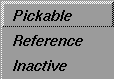
To set the attributes for a layer, or set of layers, as either Pickable, Reference, or Inactive.
Menu Choices
|
|
|
Pickable
-
- You can snap to and pick all the objects on a pickable layer. This is the default state of a layer.
Reference
-
- When you set the layer to Reference, you cannot pick the objects in it, but you can snap to them. The objects appear in the reference layer color (a warm grey-brown).
Inactive
-
- You cannot snap to or pick the objects on this layer. If you disable a layer in this manner, none of the layer attributes apply and the objects appear in the inactive layer color (a pale blue).
>
|
Note:
|
If a reference or inactive layer is made a creation layer, it
temporarily becomes a pickable
layer.
|
How to Use
-
1
-
Select the layer or layers for which you want to set the attributes.
-
2
-
Select Layers > Set State.
-
3
-
Select either
Pickable,
Reference,
or Inactive
from the Set State menu.
>
|
Note:
|
You can also set these attributes for a layer using the pull-
down menu for the layer(s) in the Layers Bar. See The Layers
Bar on page 251 for more information.
|
|


