You can type in a word of a Phrase .
Enable Invisible ,it prevents people that are not on the same channel as you ,from checking what Room(s) you're in
Installation and Configuration Walkthrough
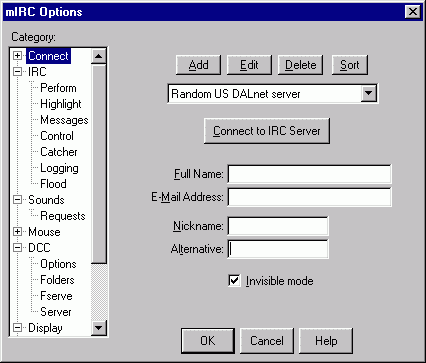
After Installing mIRC and running it for the first time , the setup window will popup .
|
Do not enter your Real name or personal e-mail Address You can type in a word of a Phrase . Enable Invisible ,it prevents people that are not on the same channel as you ,from checking what Room(s) you're in |
Click on the + next to Connect to expand the options . Then goto Local Info .
Next goto Identd
enable skip MOTD on connect .
Under In active window enable Notices,Whois and Invites
Goto Flood , enable Flood protection . Leave the settings as is
Next goto Sounds , Requests
Next Problem are the /run and /dll locks . /run lock will cause problems when installing
Happy Chatting
Fine tuning mIRC
A lot of people experience DCC problems due to the fact that mIRC defaults the setup to Local Host and Server ,
which in return can end up in 'Unable to connect' failure during DCC Send or Chat attempts .
Set it to Local Host and Normal .
There's no need to enable Ident Server .
User ID : type in a word i.e. carpool
Leave System and Port settings as they are
Show Ident Request and Enable when only connecting are no real necessity either .
Click on + next to IRC
If for any reason you wish to check the server motd on a later date just type /motd after connecting .
Enable rejoin channel when kicked , rejoin channels on connect
enable accept sound requests
uncheck listen for !Nick file request , send !nick file as private message
mIRC version 5.6 + have several new annoying features that can cause confusion.
One being it blocking certain filetypes from being accepted through a DCC
The feature can be disabled under DCC , Folders uncheck Ignore file types .
certain Addons i.e. SPR Jukebox .
Goto General , Locks and uncheck the /run lock.
After all this is done , go back to the Connect Tab , choose a server and connect .
At times it can take several tries to get on a specific server .
Note for mIRC 5.71+ Users:
The dcc fileignore is set to block the most common files send on Irc.
Goto DCC , Options , Folders and change the ingored Filetypes to:
*.exe,*.com,*.bat,*.dll,*.ini,*.js,*.shs
mIRC scripting
IRC Abbreviations
Nickserv Commands
Chanserv Commands
| Addons | Awards | Chanserv | Friends | Irc Safety | Links |
| Main | Mirc Help | Nickserv | Poetry Hut | SPR Jukebox |