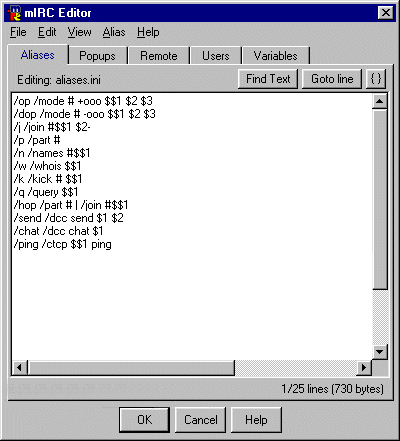
Anything from word combos to using just the F keys.
|
Aliase section is what makes it possible to shorten command lines Anything from word combos to using just the F keys. |
As you can see in this window for example to do a whois on someone
instead of typing /whois nickname you just type /w nickname
The following are some examples of what you can do
| /f2 /me $$?="enter action" | Instead of typing /me all the time you just press F2 and a window will pop up where you can type your message into |
| /nick /msg nickserv identify yourpass | By typing /nick you will save yourself from having tp type up the full nickserv ID command |
| /chan /msg chanserv op $chan $me | This command will msg chanserv to op you in whichever channel you type /chan |
| /F3 /nick newnickname | A simple way to change to whatever nickname you put in by pressing F3 |
| /time /say $time(HH:nn:ss) $asctime(dddd*mmmm*dd*yyyy) | Type /time and it will display time and date |
Remotes Section
 |
Here is where it gets tricky with automated commands running in the background The examples shown here will block any of the listed ctcp commands used on you by another user |
Most frequent question is when people join a channel:
How do you type so fast to say hello
A simple autogreet gets that job done:
| on 1!:JOIN:#channelname:/msg $chan Hello $nick |
You can add sound to this as well:
| on 1!:JOIN:#channelname:/msg $chan Hello $nick | /splay $mircdir $+ sounds\filename.wav |
If you get bored with the greet just saying Hello , then you can modify it to a random greet
With this you need to creat a .txt file first with Notepad Each greet will have to be on a separate line.
Hello
Hi
Hey
The .txt file has to be under c:\mirc for this to work
| on 1!:JOIN:#channelname:/msg $chan $read $mircdir\filename.txt $nick |
| on 1!:JOIN:#:/msg ... etc |
The there are text triggers , where a certain word can be set to execute a command
A common one of those triggers are the Swearguards
| on 1:TEXT:*dork*:#:if ($nick isop $chan) { halt } | /kick $chan $nick You're outta here!!! |
But of course there are also less violent uses for the on text command
| on 1:TEXT:dcc:#:/dcc send $nick c:\path\filename.extension |
Remotes can also listen for Notices and auto-response back
| on 1:notice:*This nick*:*:{ if ($nick == NickServ) msg nickserv identify yourpass } } |
This will send your password back to Nickserv when prompted
And for those people that are worried ... every Network is configured to make it impossible for anyone to
use the nicknames: Nickserv , Chanserv , Memoserv etc in case you worry about
someone stealing your password.
| on 1:deop:#: { if ($opnick == $me) { /msg nickserv identify yourpass | /msg chanserv op $chan $me } } |
In this case , when someone deops you in a channel that you have aop/sop status at
your mirc will auto Identify and ask Chanserv to op yourself
For DalNet users this will need to be modified to:
| on 1:deop:#: { if ($opnick == $me) { /nickserv identify yourpass | /chanserv op $chan $me } } |
Well these are just a few examples of what you can do with mIRC
Best way to learn is by your own mistakes not by using some pre-defined mega script
in which you probably won't know what is what until you learn some more about commands,events,identifiers and such
mIRC Fine Tuning
IRC Abbreviations
Nickserv Commands
Chanserv Commands
| Addons | Awards | Chanserv | Friends | Irc Safety | Links |
| Main | Mirc Help | Nickserv | Poetry Hut | SPR Jukebox |