| |||
|---|---|---|---|
| | | | | Lesson 1 Lesson 2 Lesson 3 Lesson 4 Lesson 5 Lesson 6 Lesson 7 Lesson 8 Lesson 9 Lesson 10 |
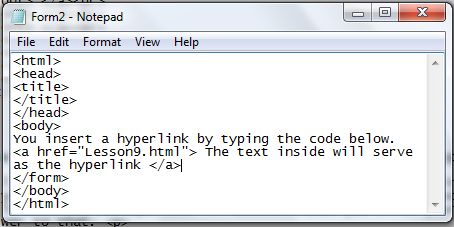
 This lesson tackles about hyperlink and links within a page. Before we start, you should need to know what is a hyperlink, first. A hyperlink is a text and when you click that text, it will redirect you to another page. Notice that hyperlinks in the past chapters? I commonly used "here" and when you clicked it, you go into another html. That is also the concept I used in the tabs home, tutorials, excercises and about us above. That is also the concept used in Facebook, when you click your friend's name and you go into his/her profile, hyperlink is the answer to that. Here is the code how.
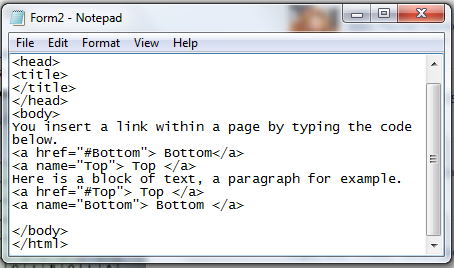
Did you notice that in Wikipedia, there is an outline before the long paragraphs? When you click one of those, it will redirect you to which part you clicked. Also in my site, in lesson 7, I also used "here" as the link but it didn't redirect you to another page, it just redirected you to the upper part of the lesson since that is where the definition of the attribute name. Observe the codes below.
Lesson 9 is done! Are you ready to move to the next lesson? Click here to move on to the next lesson. |