Shortcut: Alt-V
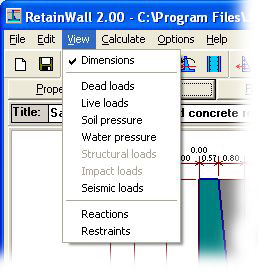
View menu contains the following sub menus.
Dimensions Allows you to view and change the wall dimensions in the drawing
window. Shortcut: Alt-V Alt-M.
Dead loads Allows you to view the dead loads in the drawing window. Shortcut:
Alt-V
Alt-D.
Live loads Allows you to view the live loads in the drawing window. Shortcut:
Alt-V
Alt-L.
Soil pressure Allows you to view the active soil pressures in the drawing window. Shortcut: Alt-V Alt-S.
Water pressure Allows you to view the water pressures in the drawing window. Shortcut:
Alt-V Alt-W.
Structural loads Allows you to view the structural loads in the drawing window. Shortcut:
Alt-V Alt-T.
Impact loads Allows you to view the impact loads in the drawing window. Shortcut:
Alt-V
Alt-I.
Seismic loads Allows you to view the seismic loads and pressures in the drawing window. Shortcut: Alt-V Alt-E.
Reactions Allows you to view the base reactions in the drawing window. Shortcut:
Alt-V Alt-R.
Restraints Allows you to view the sliding restraints in the drawing
window. Shortcut:
Alt-V Alt-A.
See also: