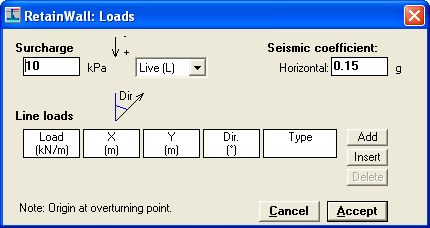
Loads on the wall, earth and water are specified through Edit > Loads menu, Loads button or
clicking  on the Toolbar. The
following window will be shown.
on the Toolbar. The
following window will be shown.
The following loads can be specified.
Surcharge
A distributed vertical surcharge load on the upper earth surface can be specified by inputting
the load in the number box, positive number for downward load and negative number for
upward load. The type of surcharge load can be specified by selecting the selection box.
Surcharge load is normally a live or dead load but other type of loads can also be specified.
Seismic coefficient
A horizontal seismic coefficient can be specified by inputting the coefficient (in g - acceleration
of gravity) in the number box. The the direction of seismic load is assumed leftward. The
seismic coefficient will be applied in the wall mass, earth pressure and water pressure.
The number box is disabled if the seismic option through Options > Seismic menu or Seismic option frame command is disabled.
Line loads
Additional line load applied on the wall may also be specified. Click the "Add" button to add
the loads. The required load parameters are as follows.
1. Load value - The value of the load.
2. X - the horizontal position of the load measured from the origin point, positive is rightward
from the point.
3. Y - the vertical position of the load measured from the origin point, positive is upward from
the point.
4. Direction - The direction of the load in degree, measured clockwise from the upward
direction.
5. Type - The type of the load.
Origin point is a point located at the lower-left corner of the toe of the wall.
The parameters are inputted by filling in or changing the values on the number box, or
selecting the load type on the selection box.
To add another load, press the "Add" button. The load will be put on the bottom of the table.
To insert a load between rows, put the cursor on the lower row and press "Insert" button. To
delete a load, put the cursor on the load and press "Delete" button.
 button or "Esc" keyboard key are used to discard all changes.
  button or "Enter" keyboard key are used to accept all changes.
See also: