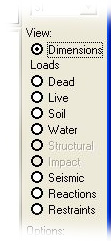
View frame commands allows you to select or change options to view in the drawing window.
The following views can be selected.
Dimensions Allows you to view and change the wall dimensions in the drawing window. Menu: View > Dimensions.
Dead loads Allows you to view the dead loads in the drawing window. Menu: View >
Dead loads.
Live loads Allows you to view the live loads in the drawing window. Menu: View >
Live loads.
Soil pressure Allows you to view the active soil pressures in the drawing window. Menu: View > Soil pressure.
Water pressure Allows you to view the water pressures in the drawing window. Menu: View > Water pressure.
Structural loads Allows you to view the structural loads in the drawing window. Menu: View
> Structural loads.
Impact loads Allows you to view the impact loads in the drawing window. Menu: View >
Impact loads.
Seismic loads Allows you to view the seismic loads and pressures in the drawing window. Menu: View > Seismic loads.
Reactions Allows you to view the base reactions in the drawing window. Menu: View
> Reactions.
Restraints Allows you to view the sliding restraints in the drawing window. Menu: View > Restraints.
Some load/pressure view commands are disabled if the loads/pressures are not specified.
See also: