Face


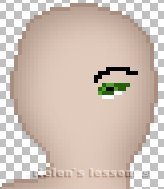
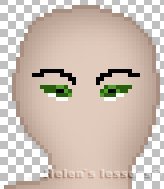
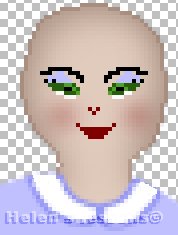
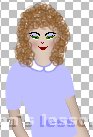
Face can be drawn by "arithmetic" method at sufficient magnification, i.e. I simply paint pixels of eyes,  eyebrows, nose and mouth (see pictures). From time to time you should look at your image of actual size (1:1) to check the result.


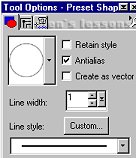
 1. Open you file with the ready basebody. Magnify it by 3-4 times. Add new layer "eye". Choose Paint Brush with settings:
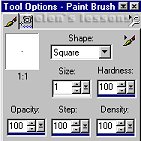
 

Foreground Color - your choice (gradations of green, blue, brown + black and white)

Draw the right eye and eyebrow  - like in the picture. Look at your image 1:1.


As soon as you are satisfied with the result: Layers/Duplicate. Image/Mirror.

Turn off visibility of the bottom layer and merge "eye" and "Copy of eye" layers. Rename it as "eyes". 


2. Add new layer "nose". With Paint Brush tool (the same settings, Foreground Color - #800000) draw the nose and lips (see picture below).  


3. Add new layer "cheeks". With Preset Shapes tool (Foreground and Background Color - #800000) draw the small circle on one cheek. 

Effects/Blur/Gaussian Blur - Radius=2,8.


4. Layers/Duplicate. Layers/Mirror

Turn off visibility of the bottom layer. Layers/Merge Visible. Rename the merged layer as "face". 


5. You can save the "face" separately as a tube and use it for other images. To do it: 

-go to layer "face"

- Edit/Copy. Edit/Paste as New Image

File/Export/Picture Tube


6. You can also put on make-up (on the separate layer). Its color spectrum will depend on colors of clothes. For example:


Let your imagination run away with you...


Basebody 1 - 2 | Hair | Face | Clothes


PSP Tutorials


Home


Optimized for resolution 800 õ 600, Internet Explorer 5.0

Graphic and Design Country City © Copyright 2002


Hosted by www.Geocities.ws

1