Tutorials
Weight Maps
Alternative Methods
of using Bones and WMaps
Advanced IK Setup
Set Driven Key Basics
Assigning Motion Capture
Customizing Lightwave
Lightwave Basics

Gallery

Links
Flay
VisualFX Pro
The Lightwave Mailing List
Lightwave Tutorials on the Web
About me
There are plenty of tutorials out there on setting IK chains for feet and legs, so I'm going to focus on setting up IK chains for the rest of a humanoid character. The inspiration for this tutorial came from watching a movie of a Japanese game for the Playstation 2 that put you behind a camera taking pictures of, what else, girls! The game let you pose the girls however you wanted by using a very intuitive yet complex IK system. What I ended up with was a pretty simple setup that gave me an immense amount of control using only a few Goal objects. Before we start, check out these two movies (IKTest1.avi and IKTest2.avi) over in the Gallery section. These 2 movies demonstrate how you can animate the character by simply moving around a Null or 2.
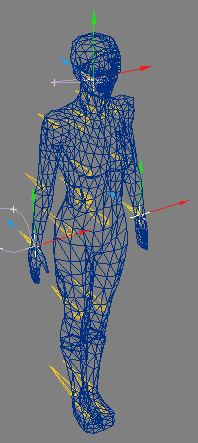
For this tutorial, I'll be using the same scene used in the Alternate Methods of using Bones and WMaps tutorial. Here's a pic (Figure 1) of the final setup with the Goals highlighted.
 Figure
1
Figure
1
There's really nothing THAT advanced about this setup. If you already know how to setup IK chains, you'll find that it's pretty easy. Basically what we're gonna do is instead of terminating the IK Chains at the shoulders or Neck, we're going to let them extend all the way down the spine to the Center of Mass and let the Nulls fight over the Spine.
First thing to is check the "Unaffected By IK Of Descendants" option for the Center of Mass Bone (ideally you should have the base of the spine and hips attached to different Bones so you can rotate the spine and hips independent of each other), which is usually at the base of the Spine.
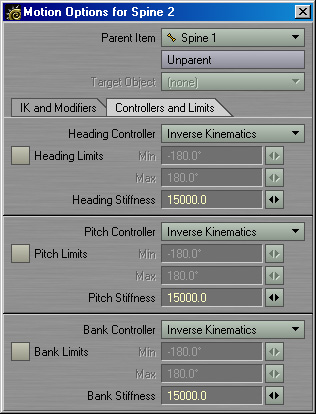
Next, we need to go to each bone and change the relevant Controllers for Heading, Pitch, and Bank to Inverse Kinematics found under the Motion Options (default keyboard shortcut is "m"). For now just set everything to IK.
 Figure
2
Figure
2
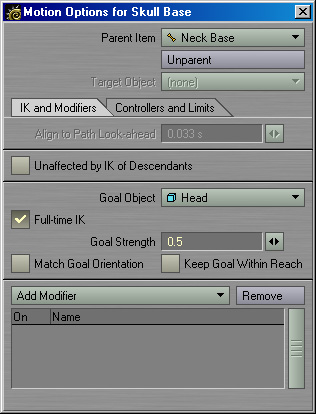
Now we need assign the Goal objects (I'm assuming you've already created Null objects, if not, make 3 Nulls, one for each Wrist and one for the Head). Goto the Bone that controls the base of the skull, not the base of the neck, and assign the Head Null as its Goal.
 Figure
3
Figure
3
Do the same thing for the Right and Left Wrists. Note: Leave all values for Goal Strength and Stiffness at their default values for now, we'll start tweaking them soon.
OK, make sure that Full-Time IK is ON for the Head and Wrists and Enable IK (Actions > Enable IK) is ON. Try moving the Nulls around... yikes! Your character should look like spaghetti, arms flopping around, spine made of jello, a great big mess. But you can see the basic principle in action. Pull one arm out to the side, then pull the opposite arm out to the side, and then move the Head forward and backward. All we need to do is setup a few limits and some stiffness and we're done.
The obvious place to start is with joint limits. So goto your elbow bones and set the Heading and Pitch Controllers back to KeyFrames. We only want the elbow to bend on the Pitch. While you're at it, also setup some min/max limits on the Pitch. If you have Bones for the Clavicle/Shoulder Blades, you'll also want to setup min/max limits for these on all 3 axis.
It's not really necessary once we get to the next step, but you may want to setup some min/max limits on the Bones of the Spine if you know you're going to be doing something specific with your character.
Stiffness. Stiffness is one of those magical variables like Goal Strength. There never seems to be a consistent number that always works. Maybe it's based on the scale of your model, maybe it's based on Grid Size... I dunno, all I know is the Manual said any number over 50 would be excessive, and I didn't see any results until I reached 15000. So this part of the tutorial, you're on your own, experiment with a WIDE range of values until you see drastic results, then start narrowing in what works best. If you look at Figure 2 you can see the base of the Spine has a Stiffness of 15000.
What Stiffness will do is determine which bones move first when solving the IK Chain. What we want is to move the arm freely and only have the spine respond when the Null leaves the Hand's reach. For example, you may need to enter a negative value into the Pitch Stiffness of the Elbow to get it to bend BEFORE the shoulder raises up. From here on out, it's all plug and play until you get something that looks natural.
In my completed scene, I gradually lowered the Stiffness of the Spine as I worked my way up to the Neck which has a Stiffness of 1000 for Heading, Pitch, and Bank. The shoulders have a Stiffness of 0.1 for HPB, and the elbows have -500 on the Pitch. If you need to get really subtle, try different values on Heading, Pitch, and Bank.
The final touch is setting the Goal Strengths for the Head and Hands. The stronger the Head is, the less influence the Hands will have on the Spine. Like with Stiffness, you just gotta play with numbers until it looks right. I wish I knew what the magical formula was. If you know, e-mail me!
Going Even Further
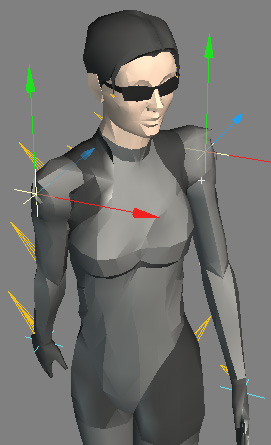
OK, so you got this far and everything is working fine. But, you can't make your character twist. She can bend forward and back and side to side, but how to Twist? A couple of ways to handle it. One way is to add a couple more Goal objects, one for each Shoulder. Assign the Nulls to the Upper Arm Bones and there you go, now you can move the shoulders forward and back without affecting the position of the Hands or Head.
 Twisting
with Shoulder Nulls
Twisting
with Shoulder Nulls
You also be really sneaky and setup a simple Set Driven Key system. Tell the Heading of each Spine bone to be driven by the rotation of the Head Null. Gradually weaken the influence of the Null as you go down the Spine so your character will twist more at the shoulders and less at the waist. If you don't know what a Set Driven Key is, don't worry, I'll have a tutorial on it soon. Note: I wouldn't recommend using Set Driven Key unless you just want to play around with it, it has some major kinks to work out still and it doesn't seem to mix well with IK.
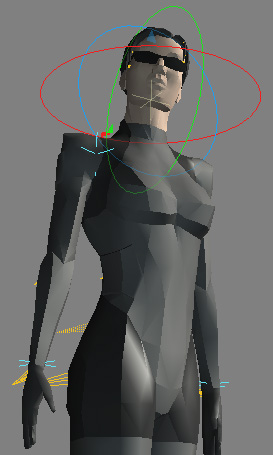 Twisting
with Set Driven Key
Twisting
with Set Driven Key