Installing &
Running
the Game
GamePlay
Tutorial

Gameplay Tutorial
After the opening screen you'll see some early 90's graphics (Esc or mouse click to skip this part)
You'll come to the Main Screen:
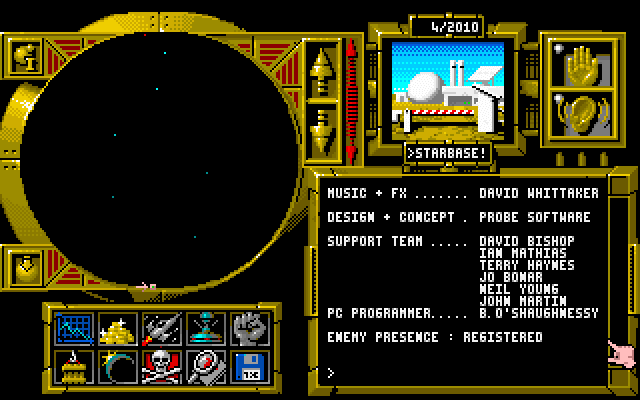
The round visual area (top left) doesn't do much at first. Later, it'll show an overall visual of your colonized planets, the enemies colonized planets, and the relative danger - represented by a big ugly face in the screen - your in. The ball with the down arrow on the bottom corner left will bring your view back to your main, or starbase.
Moving
to the right you see gold up and down arrows, then a skinny reddish
thingy. The arrows click through the planets. Click on the thingy to
scroll through same.
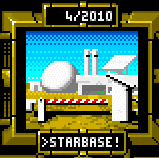
Next is a visual of the selected planet. In this example it's your main
planet, or Starbase.
The open hand on the right will pause the game.
Click on the ear to silence the lame sound effects.
Below the planet visual is the message screen. You'll be getting transmissions on a bunch of stuff, including ditties from the enemy.
Below the round screen is a set of eight icons. You'll see these on most of the screens.
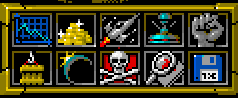
 brings
you to the overall stats screen. (This, and most screens will be covered
later)
brings
you to the overall stats screen. (This, and most screens will be covered
later)
 brings
you to where you buy stuff: ships, food & mineral processors, etc.
brings
you to where you buy stuff: ships, food & mineral processors, etc.
 shows
the status of all your units. This is where you launch, travel and land
your ships.
shows
the status of all your units. This is where you launch, travel and land
your ships.
 is
used to operate your terraformer.
is
used to operate your terraformer.
 goes
to the Army's "recruiting and training"
goes
to the Army's "recruiting and training"
 takes
you to the Loading Dock.
takes
you to the Loading Dock.
 is
to the selected planet's surface. Here's where you put your food and
mining units.
is
to the selected planet's surface. Here's where you put your food and
mining units.
 if
it's your planet, your trained and equipped platoons are listed, ready
to be put aboard the battle cruisers. If it's on the enemies planet,
it's where the battle takes place
if
it's your planet, your trained and equipped platoons are listed, ready
to be put aboard the battle cruisers. If it's on the enemies planet,
it's where the battle takes place
 is where you contact your spies. For a price, you'll get info on the
bad guy.
is where you contact your spies. For a price, you'll get info on the
bad guy.
 to save/load a savedgame or to start a new game.
Next:
2: Getting Started