|
|
Render > Modeler
Wire
|
Modeler Wire
|
|
|
|
|
Modeler Wire creates an on-screen wireframe preview of a scene, either a single frame or an entire animation. The wireframe of each surface has the same color as the shader assigned to that surface. You can save the output of a Modeler Wire render, or record it to a video device.
Using Modeler Wire
Unlike other rendering operations that work only in the perspective window, the modeler wire render occurs in the active window.
To use Modeler Wire:
-
1
-
Set the following options:
|
|
See Animation on page 397.
|
- If you want to Modeler Wire render an entire animation, open the Render Globals window (Render > Globals), and set Animation ON. If you want to Modeler Wire render a single frame, set Animation OFF.
|
|
See Output Image on
page 369.
|
- If you want to save the Modeler Wire output, open the Global Quick Rendering Parameters window (Render > Quick render
 ), set Output Image ON, and click Save. ), set Output Image ON, and click Save.
|
|
See To record a Quick Render
animation to a video device: on
page 364.
|
- If you want to record the Modeler Wire output to a video device, open the Global Quick Rendering Parameters window (Render > Quick render ), set Record ON, and click Save.
-
2
-
Select Render > Modeler wire. The background of the active window changes to the background color, and all surfaces are displayed as colored wireframes.
-
3
-
If you are Modeler Wire rendering a single frame, click anywhere to close the Modeler Wire render.
-
If you are Modeler Wire rendering an entire animation, the
Modeler Wire render will close automatically when the
animation ends.
To open the Render Model Wire Options window:
- Select Render > Modeler wire .
Render Model Wire Options
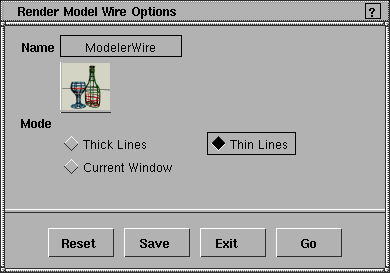
Mode
-
- Determines the appearance of objects in the Modeler Wire rendered image. The default setting is Thin Lines.
| Thick Lines
| thick wireframe over the background color
|
| Thin Lines
| thin wireframe over the background color
|
| Current Window
| surfaces (and the background) appear exactly as they do in the modeling windows (for example, smooth lines, Shade, hulls, CVs)
|
|


