|
This option is available to all Studio|PowerAnimator products, including Alias|Wavefront Web|Animator.
Purpose
You can choose from a variety of controls to export, create, and edit Virtual Reality Modeling Language (VRML) files.
Export VRML Options
After creating a model, select File > Export > VRML1- . The following option box is displayed. . The following option box is displayed.
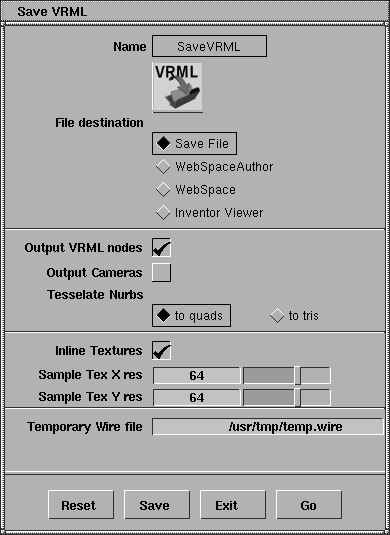
File destination
Select one of the following destinations for the file:
Save File
-
- Outputs Inventor format directly to a file. If Output VRML nodes is toggled on, the file created is VRML-tuned Inventor.
WebSpaceAuthor
-
- Outputs the file and automatically launches the WebSpaceAuthor VRML program.
WebSpace
-
- Provides a direct preview by automatically launching WebSpace Navigator.
Inventor Viewer
-
- Previews the file automatically by launching the Inventor file viewer, ivview.
Other controls
Output VRML nodes
-
- If ON, the file created is VRML-tuned Inventor.
Output Cameras
-
- Version 7 cameras are output and converted to Inventor cameras. These cameras are then converted to Viewpoints in a VRML scene.
Tessellate NURBS
|
|
Tessellation is NURBS to
polygon conversion.
|
-
- Determines how the NURBS surface model is tessellated on output. Select from the following types of polygons:
- Quadrilateral (use to quads
)
- Triangular (use to tris
)
-
- The mesh density is determined by the rendering parameters set for the object in the Render Stats window (Windows > Information > Render stats), depending on the subdivision type.
In-line Textures
-
- Lets you specify how textures are stored in the VRML file.
-
- When OFF, texture image files are referenced in the VRML file with a full path (for example, where a texture is referenced in the VRML file it would look like:
-
- /usr/u/aldemo/user_data/demo/pix/foo.rgb
-
- When ON, all data contained in the texture files is included in the VRML file.
Sample Tex X res and Sample Tex Y res
-
- These two sliders let you set the X and Y resolution that procedural textures are sampled to.
Temporary Wire File
-
- The location and file name of the temporary transfer file.
Alias to Inventor (AlToIv) command line options
All options available from the File > Export > VRML1
graphical interface are accessible from the command line options of the AlToIv
standalone program (see the online Standalone Utilities guide.)
|


