@4x.png)
Best Work Essay - 3
Sakura Breakout
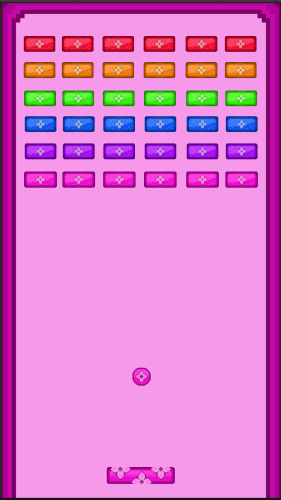
I created this 2D game for one of my program assignments. The assignment was for everyone to create their own personal version of the old arcade game Arkanoid. The game needed to have basic functionality, including a working ball, a moving paddle, bricks that break, a score, and a win or lose condition. I’m proud of both the coding in my version of the game, along with the visuals (sprites). This game took me around a week to create from start to finish. I had a lot of coding issues throughout, some of which were that the code worked perfectly fine, but Unity glitched out, and I unfortunately had to rebuild everything multiple times.
Beginning this project, I started by writing down in my sketchbook the list of deliverables for this assignment, along with my own personal additions I wanted for my game. The checklist included a moving paddle, a moving ball, breaking bricks, a respawn code, lives, score, sounds, custom sprites, and bricks that took different amounts of hits to break. I also created sketches of the different designs I could do for the custom sprites. These designs included the paddle, bricks, ball, and game background. Once I finished my sketches and notes, I started moving on to the game. Our program teacher would teach us some of the code for our games throughout the week as our lessons, which I did use in my final product, but I ultimately ended up creating most of my code and editing a lot of the original.
I started by creating basic placeholder items for my game so I could create the functionality first, as a game that functions is better than a game that's pretty, but broken. I created basic rectangles for my boundaries, paddle, bricks, and a basic circle for my ball. ON the boundaries, I added 2D box colliders to prevent the ball from going out of the play area, and I made it so the floor boundary was invisible to make it into a killbox later on. For the ball, I used the class code to add velocity on the game startup, to make the ball get thrown upwards rather than just falling. I also added a rigidbody component and a 2D circle collider onto the ball to add physics.
The next item I started working on was the paddle. I added a 2D polygon collider onto my paddle so the ball wouldn’t fall through it, and I edited the poly gon collider to be uneven on the top to add some randomness to the ball bounces. I added the class code from a previous game we made to the paddle for the movement, but changed the X-axis limitations so the paddle could move across the whole game area without going off the screen. I also added code so that when the ball collided with an object, if the collision was on a brick, the score would go up by one point. This code also added a score to the game screen on startup.
Next, I started working on the bricks. I added 2D box colliders to the bricks and added our class Destroy Brick code, but ultimately edited most of it because I wanted my destroy brick functionality to be different than the one we made as a class. I changed my code so that when there was a collision, the bricks would only break when hit by the ball, and if their hit points had reached zero. I used an If Statement to find the tag of the object that collides with the brick, and if the tag was “Ball,” then the code would run. Another If Statement would be run, and if the hit points of the specific brick hit were zero, the brick would be destroyed. If the hit point of the brick wasn’t zero, then the brick's hit points would decrease by one.
The last item for mechanics was the killbox, lives, and respawn. I used the respawn code from a previous game we made, but edited it so that on game startup, the player's lives would be shown as 3. When the ball collided with the killbox, the lives would be taken down by one, and the ball would get reset to the spawn point position, and once again thrown upwards to give the player time to react to the respawn. Once the ball hits the killbox for the 4th time, the game ends, and a death screen appears saying “Game over!” and has two options: quit or restart. I made some edits to my mechanics using critiques from our class playtesting. Most of the ideas were already on my list, but they were still helpful overall.
Finally, with all the mechanics working properly, I started working on my sprites (the game visuals). I went into Adobe Photoshop and created a canvas that was 64 pixels long and 32 pixels tall for my custom bricks. When deciding on what visuals to make, I went with a cherry blossom theme because our cherry blossom trees in our backyard had just bloomed. The bricks have a cherry blossom flower in the center, framed by a gradient border on a dual-tone background. I made the first one pink and used Photoshop's hue and saturation editor to change the color for the other bricks, instead of having to remake the brick multiple times just to have the same outcome. I made 6 color bricks, pink, purple, blue, green, orange, and red. Moving on to the paddle, I made a 64-pixel-long and 16-pixel-high canvas for it. I created the background using the same design for the bricks, and copied the cherry blossom design from my bricks and pasted it onto the paddle. I pasted the flower three times, and had two half-flowers on the top, and one half-flower on the bottom, as the flowers were taller than 16 pixels. The last sprite was the ball, created on a 64x64 pixel canvas. I created my ball to look like the bricks, but as a circle instead. I started by making the circular gradient border, adding in the dual-tone background, and pasting the same cherry blossom flower onto the ball. The flower from the bricks was too small, but since I was unable to size it up, I had to remake the flower. I started by counting the measurements of the flower petals, and remade them on a 3 times bigger scale. I also remade the center of the flower and re-added the shading on the petals. Once I finished the ball, I exported all of my assets for the game and imported them, replacing all the placeholder items.
If I were to make this again, I would try to have better managed my time so I could have added in sound effects and maybe some power-ups.
Overall, this game turned out almost exactly how I wanted it to. The visuals are perfect, and the game functions well. I’m very happy with the result of this game. It’s a great milestone for me as this was my first completed 2D game, and the first game I have completed using the Unity Engine!