Last edited on: 11/01/2002
COMPARISON

| Download | Info and support | Screenshots | QuickBasic and MS-DOS |
V-Builder is a dos like interface program which may be used with QuickBasic. It can add windows, buttons, progress bars (version 3) and more. It also have some more futures. It generates Basic code for you (which is editable with QuickBasic 4.5 or PDS). To see some of the examples click screenshots menu.
* * *
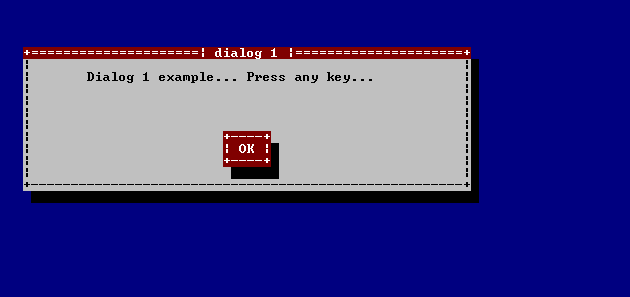
Here is what it takes to write a window Yourself using Basic language:
rem This method of making windows is copyright by P. Stapor!
rem Code generated by V-window Build,
SCREEN 12
SCREEN 0
COLOR 15, 9
CLS

REM main code...
LOCATE 1, 1
COLOR 0, 0
PRINT ""
LOCATE 5, 5
COLOR 15, 4
PRINT "+=====================| dialog 1 |=====================+"
LOCATE 6, 5
COLOR 0, 7
PRINT "|                                                      |";
COLOR 0, 0
PRINT " "
LOCATE 7, 5
COLOR 0, 7
PRINT "| Dialog 1 example... Press any key...                 |";
COLOR 0, 0
PRINT " "
LOCATE 8, 5
COLOR 0, 7
PRINT "|                                                      |";
COLOR 0, 0
PRINT " "
LOCATE 9, 5
COLOR 0, 7
PRINT "|                                                      |";
COLOR 0, 0
PRINT " "
LOCATE 10, 5
COLOR 0, 7
PRINT "|                                                      |";
COLOR 0, 0
PRINT " "
LOCATE 11, 5
COLOR 0, 7
PRINT "|                                                      |";
COLOR 0, 0
PRINT " "
LOCATE 12, 5
COLOR 0, 7
PRINT "|                                                      |";
COLOR 0, 0
PRINT " "
LOCATE 13, 5
COLOR 0, 7
PRINT "|                                                      |";
COLOR 0, 0
PRINT " "
LOCATE 14, 5
COLOR 0, 7
PRINT "|                                                      |";
COLOR 0, 0
PRINT " "
LOCATE 15, 5
COLOR 0, 7
PRINT "|                                                      |";
COLOR 0, 0
PRINT " "
COLOR 0, 7
LOCATE 16, 5
PRINT "+------------------------------------------------------+";
COLOR 0, 0
PRINT " "
LOCATE 17, 6
COLOR 0, 0
PRINT " "
COLOR 15, 9
REM end...
REM buttons...
LOCATE 12, 30
COLOR 15, 4
PRINT "+----+"
LOCATE 13, 30
PRINT "| OK |";
COLOR 0, 0
PRINT " "
COLOR 15, 4
LOCATE 14, 30
PRINT "+----+";
COLOR 0, 0
PRINT " "
LOCATE 15, 31
PRINT " "
COLOR 15, 9
COLOR 15, 9
REM copyrights of Builder (Please do not remove this copyrights.)
DO
LOOP WHILE INKEY$ = ""
CLS
SCREEN 12
PRINT "REMOVING THIS COPYRIGHTS YOU ARE WORKING AGAINST THE AUTHOR OF BUILDER! "
PRINT "THIS FILE WAS CREATED USING WINDOWS-BUILDER FOR QUICKBASIC..."
PRINT "COPYRIGHTED BY PETER STAPOR @ 18/7/2002"
PRINT "press any key to exit... "
DO
LOOP WHILE INKEY$ = ""
And here is the tutorial that tells you how to create such window in V-Builder:
THE EASIEST WINDOW TUTORIAL
===========================
1. Open builder and go into command prompt.
2. Write 'open#' to open file in which the data will be written.
NOTE!: any file that has the same name will be overwritten!
3. Write a name of the file (example abc.bas (any extension will work))
4. write full$ so your program will run in full screen when running in
Windows
5. Write 'start<@>'
6. Write 'desktop color#' (for text you can choose 15 and for background
9)
7. Write 'MODULE<$>'
8. Write 'window start#' (choose 5 and 5 again)
9. Write 'window color#' (choose 0 for text and 7 for background)
10. Write 'window frame#' (application name: dialog1 frame: ===================
(frame text color: 0 background color: 7 | needed: 5
11. Write 'saveX'
12. Write 'saveXcopy'
* * *
Advantages:
|
* * *
Copyright by V-Builder Software Inc. 'V-Builder', 'V-indows Builder' and 'V-Builder Software Inc.' are the trademarks and products of V-Builder Software Inc.
Warning: V-Builder program is Copyrighted By Peter Stapor @ 9/28/2002. Unauthorized reproduction, decompiling or changing this program, or any part of it, may result in severe civil and criminal penalties, and will be prosecuted to the maximum extent possible under the law.
'Windows', 'MS-DOS', 'PDS' and 'Q(uick) Basic' are the trademarks and products of Microsoft Company.