| SCRIPTS
Stealth
Night Vision Goggles (a script that actually makes them work well in
Beta versions 2.4+!)
stealth_nvg.txt (ya, this is the file,
heavily annotated, but read below to see how to use it)
Introduction
Night Vision Googles (NVG) do not get used much since Beta 2.4.
They tend to be so bright and washed out on most maps, they are largely
ineffective (see Figure 1). While the players are highlighted in black
as they are supposed to be, things are so bright movement is treacherous
once people find out where your sniper's nest is. The solution is
quite simple and many players use their own version of this script already.
See Figure 2 to see the script in action.
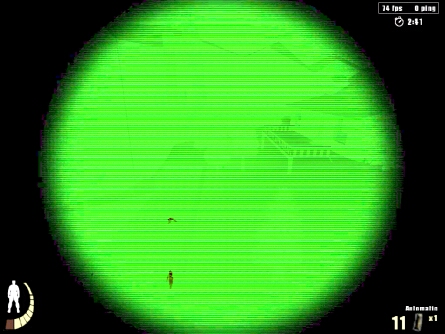
Figure 1: "Normal" NVG in Beta 2.4+
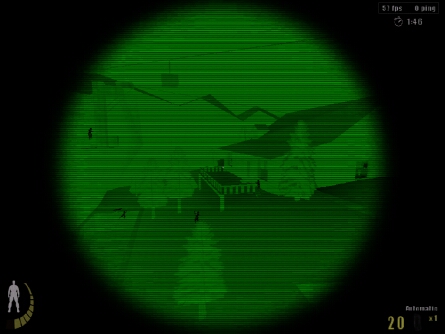
Figure 2: "Stealth" NVG in Beta 2.4+
What it does
The script is only ONE BIND that
toggles the following simultaneously:
-
ut_itemuse - night vision goggles (on/off)
-
r_gamma - screen brightness (dark/light)
-
cg_crosshairRGB - colour (white/green)
Any of these three things can be adjusted in the script to customize to
taste and hardware setup. For example, your video card may be brighter
than most so you might want to adjust the the dark gamma setting to be
even darker. See reference guides in the script itself (open in notepad).
Besides the bind (below), here is the actual script that makes it go:
-
set sm_00 "set sm_f vstr sm_01; r_gamma 1.500000; ut_itemuse; cg_crosshairRGB
0_1_0_1; ut_echo STEALTH MODE OFF"
-
-
set sm_01 "set sm_f vstr sm_00; r_gamma 0.500000; ut_itemuse; cg_crosshairRGB
1_1_1_1; ut_echo STEALTH MODE ON"
-
-
vstr sm_00
How to make it work (recommended)
1) rename the script to something .cfg - e.g., nvg.cfg and put it into
the.../q3ut2/ folder
2) if you do not have an autoexec.cfg file, create one - and put the
following line in it:
This will automatically execute the script every time you launch UrT.
3) Change the bind to an unused key (in this case "X" is used), this
line:
-
bind X "vstr sm_f" //delete key toggles "stealth mode" on and off
Something close to your movement keys is preferred, you will find you turn
stealth nvg on and off a lot.
READ THIS BEFORE TRYING TO USE THE SCRIPT
You might wonder why such a script is not already widespread...well...here
is why
When you die NVG turns off but gamma will remain dark and your crosshair
will remain white (ugly). Sometimes pressing the stealth_nvg key
will not activate everthing simultaneously - e.g. due to some other process
running at the exact same time. This is futher complicated by the
fact that the command ut_itemuse cannot be scripted to operate
specifically on the NVGs. Thus, pressing your stealth_nvg key
(let's say DEL, for sake of argument) will turn on whatever item is "current",
e.g. silencer (that may be why your gun is so loud...). So when you
fire up the game for the first time with the script active, you may get
some odd looking results if the NVG are not the current item. Thus, you
need to know what key is bound to ut_itemuse, and which is
bound to ut_itemnext. That is, you may have situations
where the settings get all backwards/out of sync.
Solution(s)
a) Before using the DEL key (in this case) make sure the NVG is the
"current" item (use ut_itemnext to check);
b) After each death when stealth mode was ON - toggle it OFF while
you wait to respawn to keep the toggle in sync
c) If b) doesn't work and toggle gets out of sync, press your usual
item_use
key to resynchronize
The script works, just be patient. |