Tutorial: Bot Optimization
Urban Terror Mod (Quake 3)
by: moc_mr_fitz
last updated Nov 12/01
[moc_mr_fitz HOME]
links | contact
Introduction
Ever notice your terrain map or map with a large open area bogs
down incredibly when you play with bots - even though your r_speeds
are low and your fps high? This tutorial is for Quake 3 mappers who want
bots to
run faster - that is - use LESS CPU on their maps.
This tutorial is meant to be a more visual companion to a somewhat
more detailed text-only tutorial
on bot optimization at the Team Huh Quake 3 site. While this
tutorial should be useful to all Quake 3 mappers (mods included)
wanting further details on bot optimization, it focuses on the issue of
optimizing maps with at least one large open area (including terrain)
in particular. The mapfile for this tutorial can be found here
Concepts
-
clip brushes - these are brushes which have one of many different
types of /common/*.clip applied to all sides of a brush which also
makes the brush invisible. Clips known to assist in reducing
bot cpu usage are botclip (treated as solid by bots), playerclip
(treated as solid by players but player can still shoot through it), and
fullclip (treated as solid by everything) - others may work
but have not been tested here
-
bspc (not to be confused with bsp)- this is the program which
creates your aas file (comes with most map editors - e.g. gtkBuild) - it
is where all the areas and clusters are defined
-
.aas - this is the output file created by bspc which allows bots
to navigate maps: e.g. mymap.aas
-
area - bspc divides the map into areas which are used by bots to
make "decisions" about where to go - also called "reachability areas"
-
cluster - a group of areas - used for bots to more efficiently make
their decisions - if they are too large the bots take up more cpu than
necessary which will slow down the map - sometimes quite noticeably - a
good goal is to have about 400 areas per cluster - bspc creates
clusters automatically - but does not necessarily create them efficiently
-
clusterportal - a 6-sided brush with the clusterportal texture
applied to all sides - this is used to manually create clusters during
the bspc process
-
-optimize - the key you should always use to run bspc to create
as small an .aas file as possible
-
bot_testclusters 1 - console command that allows you to move around
in map and see where clusters are located (and whether manual clusterportalization
actually worked)
-
bspc.log - the log file usually located in /Quake III Arena/ produced
after bspc is run - details the number and size of clusters
Step 1 - square off everything: botclip OR playerclip
OR fullclip
Some of the most significant gains in making bots run smother is to
clip as much of your map as possible, especially in large open areas.
That is, brush planes are the source for creating areas in bspc
- thus you want to "trick" bspc into thinking the map is smoother (less
complex) than it actually is visually in-game. In the case
of objects inside the map, you cannot simply put clip in front of an object,
the clip should surround the object. Some good rules of thumb
are:
-
remember to clip axially - this means at 90 degree angles - this
means boxes and rectangles which are straight up and down
-
anything that is a set to contents detail should often be surrounded
by a clipbrush
-
models and some prefabs should usually be clipped since they
have complex geometry
-
anything that will not be accessed by players or bots should be
clipped - this includes putting in a "false clip ceiling" since the sky
is usually much higher than where players and bots can actually access
-
rough surfaces - clip these with botclip so players can still walk
on or beside these clipped objects - this could include terrain surface
(but remember you don't want bots walking on air too much) (see figure
1)
-
any complex geometry that is mostly visual (e.g. complex columns,
light fixtures, complex trim)
-
read the tutorial here
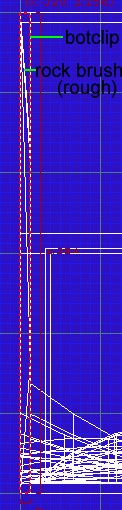 figure 1
 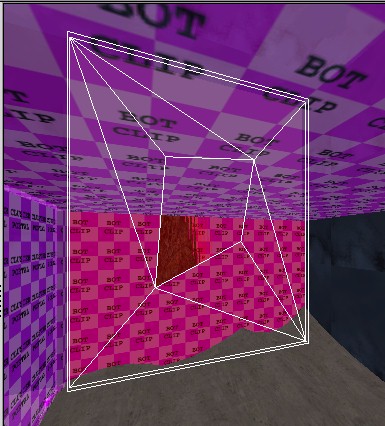 figure 2
Step 2 - manually create area clusters: clusterportals
There is much to know about clusterportals and the rules for using
them. You should go here
and read the "step two" there carefully. They are placed somewhat
like areaportals but the good news is that clusterportals do NOT break
up brushes in the vis calculations like say a hint brush portal.
You have to seal off part of the map with your clusterportal brush - e.g.
all
the windows and doors in a building (even if they have glass already) to
seal off the building. The full list of rules for applying clusterportals
is here but some key ones
are:
-
clusterportals must touch on all sides any of: structural brushes,
playerclip brushes, botclip brushes.
-
clusterportals should run parallel to the z axis, that is, only
straight up and down not horizontil (e.g. within a hole in a floor)
-
clusterportals need to by symmetrical such that both in-game faces
of the portal are exactly the same shape - thus they cannot touch
an angled clip or structural brush - that is, the clip or structural brushes
that surround the areaportal brush cannot be angled on the x axis or the
y axis (see figure 3)
-
clusterportal brushes cannot have anything sticking through them
- this includes train entities and teleporters that would move between
the clusters
-
clusterportals should not be more than about 32 units thick
-
place clusterportals so the map is cut up into about 400 reachablility
areas per cluster
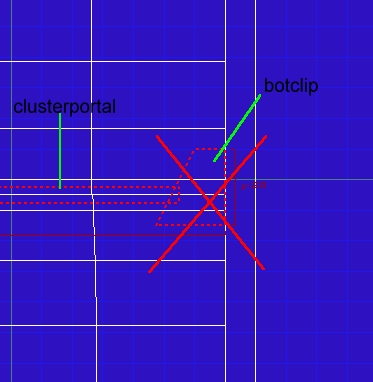
figure 3
Thus, place clusterportal brushes in your map to seal off areas according
to the above rules. Clipping and placing clusterportals in doorways,
windows, and hallway entrances may be all you need to do - a relatively
simple step to add to the speed of you map! If you have large open
areas though this may not be enough - read step 3.
Step 3 breaking up large area clusters - combining
botclip and clusterportals
Maps with large open areas, like terrain, make for additional challenges
- but these challenges are realively easy to resolve with some creative
brushwork. Essentially you create a grid of large clusterportal
brushes between botclip "posts/girders". The basic idea
is shown in figure 4 with cluster 1 separated from cluster 2 by a box of
clusterportal brushes which meet at botclip posts/girders - note that all
these brushes go from "floor" to "ceiling" sealing off the clusters entirely.
Since the botclip posts are relatively small, gameplay is not effected
for the bots, they simply walk and shoot around the posts/girders.
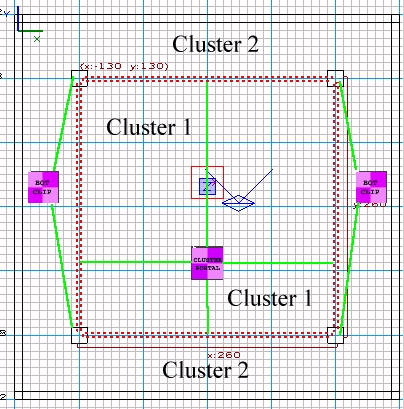
figure 4
Consider an example where you simply need to split up a large open area
that creates a very large single cluster, into two relatively even
sized clusters. It is actually much simpler to bisect (crosscut)
the cluster with a single clusterportal than to put a box in the middle.
I have created a simple
map
with an undulating patchmesh floor - this creates a lot of areas fast even
without any other brushes in the map. We will cut the map in half
with a clusterportal as in figures 5 and 6. Just to be safe, place
some botclip posts on the sides similar to figure 4, but have them butt
up against the side sky brushes in this case (would "flush" be a better
word?). Also notice I have created a "false ceiling" with botclip.
While you may want a tall skybox for visual elements and so people don't
leave the map in spectator mode you should put a false ceiling in to cut
down the size of the areas and clusters (remember they are 3-dimensional).
The botclip on the floor is placed between two patch meshes and over laps
them by 8 units each - thus bots will appear to walk on air here but this
is a relatively narrow and thin brush and the effect will not be noticeable
when playing the bots.
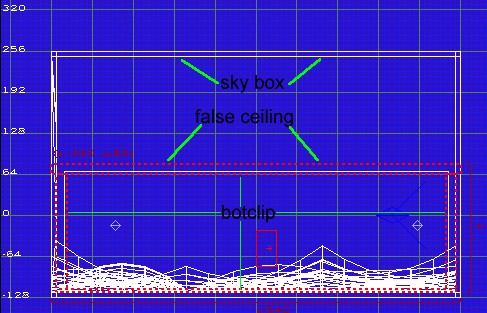
figure 5
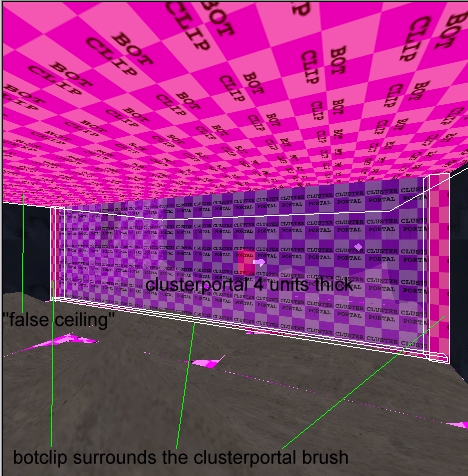
figure 6
Step 4 checking your manual clusterportalization: bspc.log
(in /Quake III Arena/)
There are at least three things you will want to check:
-
Are there areas in the map that appear solid to bots in game that
should not (this is bad)?
-
Did your clusterportals actually work?
-
How much did your working clusterportals reduce bot CPU usage?
There are a couple of ways to check each. Again, read the tutorial
here
for more details but the basics are:
-
enter the game and run your map with bot_testclusters 1 (pull down
the console and type this) - this tells you which cluster you are standing
in - thus in figure 7 the player is in cluster 1 and in figure
8 the player is in cluster 2 (green box
upper left)- the clusterportal is working! As you walk around watch
for the upper left message to turn red
- if it does it means a brush in the area is creating a solid brush
for bots - that is, they will not walk there - so you will want to replace
the brush.
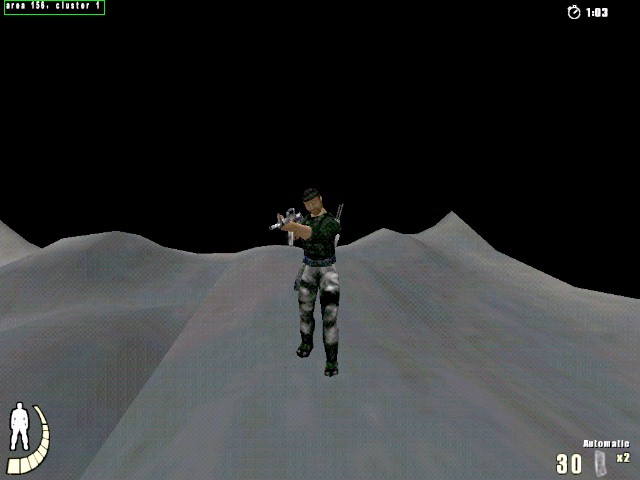
figure 7
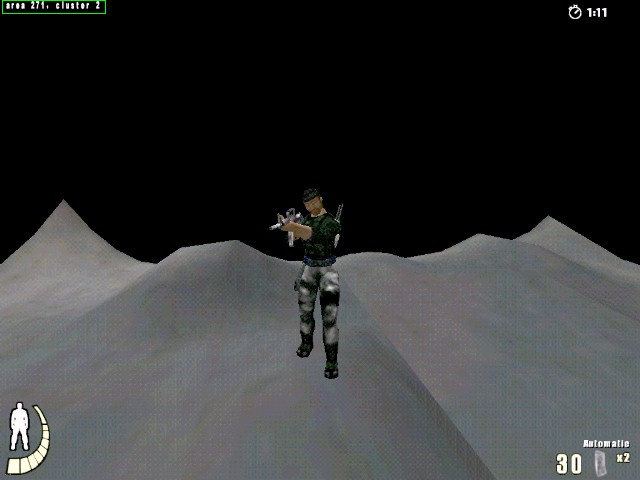
figure 8
-
read the bspc.log file (I have renamed the bspc.log file and included
it in the mapfile) - that
is, run bspc before you insert the clusterportals, rename
the bspc.log file after you run it, then run bspc again after
you have inserted the clusterportal(s) - go to the bottom of the file and
you will see the section that lists the clusters and the number
of reachability areas in each cluster - it also lists the CPU
usage. For example here is the before and after for the mapfile
I included (this is only a section of the whole output):
Before inserting the clusterportal
in figures 5 and 6:
...cluster 1 has 281 reachability areas
281 total reachability areas
237726 AAS memory/CPU usage (the lower the better)
AAS data optimized.
writing C:\Games\Quake III Arena\baseq3\maps\clusterportal2.aas...
note: 281reachability areas is not a large cluster worth
splitting in real life, this is just for demontration purposes
After inserting the clusterportal
in figures 5 and 6:
...cluster 1 has 123 reachability areas
cluster 2 has 136 reachability areas
259 total reachability areas
109422 AAS memory/CPU usage (the lower the better)
AAS data optimized.
writing C:\Games\Quake III Arena\baseq3\maps\clusterportal.aas...
Notice that:
-
there are now two clusters
-
each clusters has roughly the same number of reachability areas (123, and
126 - 400 max should be your goal)
-
the memory/CPU usage is roughly halved from 237726 to 109422
-
the aas is optimized (that is, bspc was run with the -optimize key)
REMEMBER
Clusterportals can be tempermental in that, no matter how well they
are constructed bspc may choose to ignore them - if this is the case -
try a different configuration.
Contact - please report
any errors or omissions
[email protected]
Urban Terror sites - with thirdparty maps
(6th floor for other UT mapping tutorials)
Just a counter, click at your discretion