 |
DIGITAL ARTIST and PHOTOGRAPHER
John Boretos |
|
|
 |
|
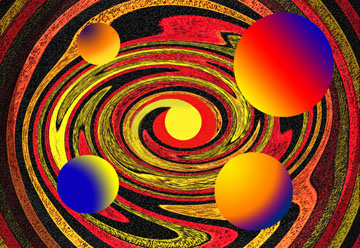
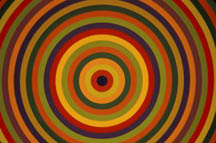
Cosmic Color began as a photograph of a large art piece found hanging in the National Museum of Art, Ottawa (see photo). The progressive steps involved were: 1.) Noise Filter, Add Noise, Gaussian Noise, 2.) Filter, Distort, Twirl at 500 angle to get center complete, 3.) Add yellow circle in center using Elliptical Marquee and Fill, 4.) Select outer area and vignette with Image, Brighten minus 50, 5.) Add 4 circles using Elliptical Marquee tool with shift key depressed and sized via Edit, Transform, Scale, 6.) Filled each circle using the Gradient tool and custom color setting on gradient scale using sliders, 7.) Moved the circles around to get bright side facing center using the Transform Tool, Rotate. |
|
MEMBERS |
COMMENTS |
|
I didn't learn
anything about doing digital imaging on a photograph from |
 |
What a dynamic creation. I recently watched on TV an astrological
programme and the pictures were no half as good asa these. After looking
a thnis picture for a while it acquired a sense if depth. Remarkable.
|
 |
|
 |
|
 |
Out of this world! |
 |
Composition, colors, proportitions, everything is very fine in this image and it gives a feeling of movement, it is not static. It proofs what a powerful and wonderful tool we have in our hands ( to be used for whatever we want to create.) So we come to the question of creating. I asked myself about the message in this image. What does it want to tell us? What is the intention? To compete with readymade fractial software? It is this question we should ask ourselves in the very beginning when we make use of Photoshop or similar softs. |
|
|