
 Intro Intro |
Gameplay |
 Email
C64 LS Game Email
C64 LS Game |
Manual |
Other
versions |
Play
it now!
|
Laser
Squad Revived! |
Gameplay:
You are in control of a squad of futuristic armored marines. Before your mission starts, you select what degree of armor and type of weaponry each soldier has then control their actions in turned-based but action packed missions-- assasinating enemies, destroying data banks, etc.. If you don't like to read manuals, and would rather wing it, learn more about basic gameplay in the C64 Laser Squad gameplay primer below. (Take a look at the official manual, though, for details on mission objectives if nothing else.)
2 players: Laser Squad is the predecessor of the famed XCom games series. You will find that it even has one advantage over XCom, you can play against a friend!
C64 Laser Squad Primer to Gameplay (basic elements only):
1. Select your mission. (First, cycle through unscrupulous ancient pirates' intro screens by pressing the space bar. Game is freeware now.) Detailed Mission descriptions are in the txt manual.
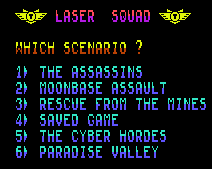
2. Set up your Marines' armor and weapons.
This part is a bit tricky-- but very easy once you understand how it works.
Armor selection: . Use the up and down controls to select the type of armor and press fire when you are satisfied with your choice. The cursor will then cycle to the next available soldier.
Weapon selection: Use your joystick's up and down movement to select OBJECT(weapon and ammo) and soldiers. Under OBJECT, use your joysticks right left movement to cycle through the various weapons and ammo. Once you have the weapon or ammo that you want to issue under OBJECT use downward joystick movement to move the cursor to the soldier(s) that you want to issue the selected object to and use your joysticks right movement to issue it and left movement to retract it.
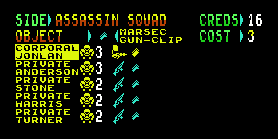
Push the fire button when you are finished issuing weapons. Push to the left to go back to weapon setup.
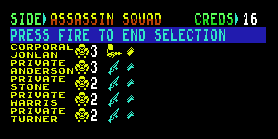
Tip: Before pressing the fire button ending the setup phase, but after setting everyone up, save a snapshot file using Vice. In this way you can load the snapshot file later and play the same senario without setting up weapons.
3. Press the joystick/gamepad button to end weapon setup and place the marines on the battle ground using the cursor. Note that the marines can only be placed on the "D" tiles designated for them. In this case the blue "D" tiles cannot be used for placing marines.
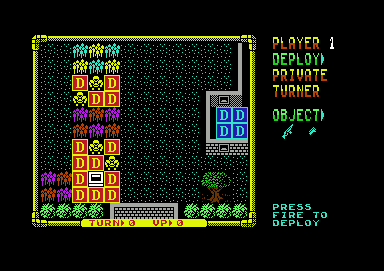
4. Select players with the cursor, use the fire button to cycle through menu options. Important: First put their weapons in their hands ("change"), and than "load" them.
5. Move them around (think remote control), fire weapons, open doors, pick up, drop items, etc.... menu will list all options, all pretty intuitive. Each player has a limited amount of "action points" so think before you do. The rest is pretty easy to figure out and it's all in the manual.
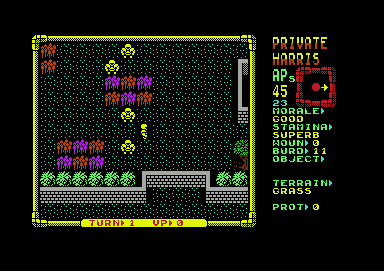
Tip: for the first mission-- load two guys up with rockets and blast the place to the ground. You will usually get your target on the third or fourth rocket. Move other men in front of the two with rockets for cover before ending each turn.
