|
Catalogue:
Design:
Feedback:
|
Site History
This page is for anyone who is interested in creating their own geneology site, or for anyone who is interested in web design in general. Below is the chronology of the developement of this site.
February 2001
Origins Once we knew that we had to design a web site for our assignment, I wanted to do something that would be of value outside of being an exercise in design. The genesis of this web site was a bunch of old photos we had at home, plus some I received from my relatives. I already had a scanner and was familiar with using it, so this was a good opportunity to do something with it.
One weekend when I was home I was talking to my dad, we got to talking about my web site and we sketched down a rough draft of our family tree.
March
Design Ideas I began looking at web sites, trying to decide which style to use, in terms of colour and navigation. This was going to be my third web site. My first site had also been a college assignment and had consisted of just three pages (home, CV and hobbies). For it I used a warm spectrum of colours based on red. My second site was just one page designed for the work internal web site. It was very simple (b+w), with a series of links with descriptions, and the company logo in the top right-hand corner. For this site I wanted to make the design in keeping with the b+w photos that were the centre peice of it - so I wanted a very simple, minimalist look. I wanted to experiment with a black and white web site, so I had to decide between having a predominantly black background or a predominantly white background, accompanied with contrasting text. I liked web sites which used a lot of black, but I felt that the black background would be too dark for the subject matter. So a white background it was.
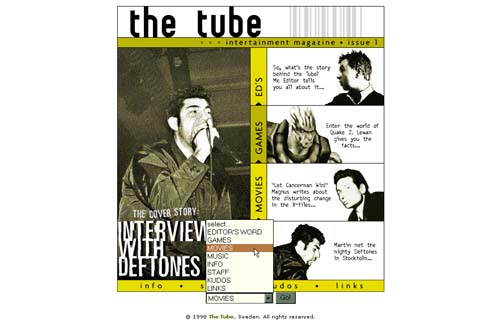
I decided that a good way to get design ideas was to look at what was out there already. So I had a look at some sites recommended by www.coolhomepages.com. Very little struck me as what I was looking for. The only site that struck me as inspirational was a site I found called the tube (http://www.truedesigns.com/tube) The tube used mainly white but it also used some colour (two shades of green) so I had to rethink my decision to try black and white. I liked the idea of using two shade of a colour as roll-overs, but decided to go ahead with the black and white motif, and maybe experiment with the use of a little colour later on.
Scanning photos While I was looking at a good design for the site, I had some donkey work ahead of me in the form of scanning in the photos and preparing them for the pages. The scanner I have at home is an Agfa Snapscan 1212. The settings I chose were based on my desire to create good quality (printable) images. So I selected 300 dpi (dots per inch), saving the images in a .TIFF format, and saving them as large images (200%) to retain detail and allow for the images to be enlarged if desired. As I learned when purchasing my digital camera, the world of measuring computer graphics is not very standardized. One fact which I held before my eyes was the 72 dpi rule. This is simply that computer web browsers are incapable of displaying images at better than 72 dpi, so hosting images of this detail on websites (unless they are going to be printed) is a waste of time.
Working on the Images Once I had the 16 photos scanned in I was ready to begin preparing them for the web site. I wanted each picture cleaned up and in two sizes: a small version in lower quality on the page (300 x 300 pixels), and a large, quality, printable version (800 x 800 pixels). This involved converting the images into JPGs, which are images in a compressed, web-friendly format.
April
Designing the layout I decided that a side bar containing the table of site contents was the navigation technique to go for, for many reasons: 1) It is a familiar design element for web users 2) It creates order and flow within a site 3) It offers a standard look and feel to the site pages.
I began by working on a rough template to base the other pages on. I used Macromedia Dreamweaver as the Web design tool - this was an opportunity to learn more about this application. The template was comprised of the background colour (white) and the page divided into a simple table. In the left hand column I began to put together the table of contents (Home, Farmyard, Haymaking, etc). I left the larger right-hand column for the page contents.
Going live with web-site live The weekend before the assignment was due for completion I took a look around for a ISP to host my site on the internet. I chose www.geocities.com, not for any good reasons other than it offered 15 Mega bytes of space, and I guessed that it would be a fairly reliable server. I logged on to geocities and created an email address and a web space: www.geocities.com/kylegariff. It offered ftp as a way to copy over my web pages, so I used this since ftp is a faster internet transport protocol than http. I copied over the images to a folder called "images".
Testing the site Once I had the pages and images copied over, I began to test the site. This involved finding broken links, missing graphics, and text that needed to be re-written or re-formatted. I had to edit the problem pages on my local machine and then copy them over and over-write the original on the geocities site.
|