|
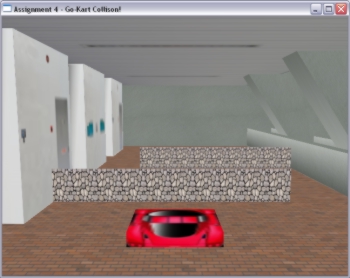
The Start of the Game with the go kart in view and the
2 obstacle
walls MOVING left and right
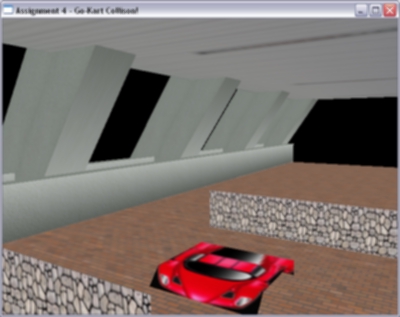
Another camera view of the go-kart clearing the first
obstacle
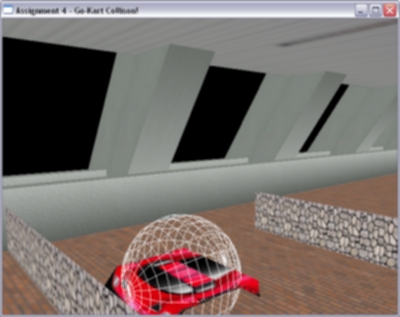
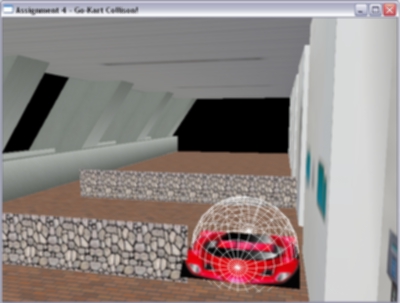
The Bounding Sphere can be viewed by the user if he
pressed the button 'C' during his game. Note that I have selected to
maximise the go-kart's dimensions to the diameters of the sphere instead
of squeezing the whole go-kart within the sphere
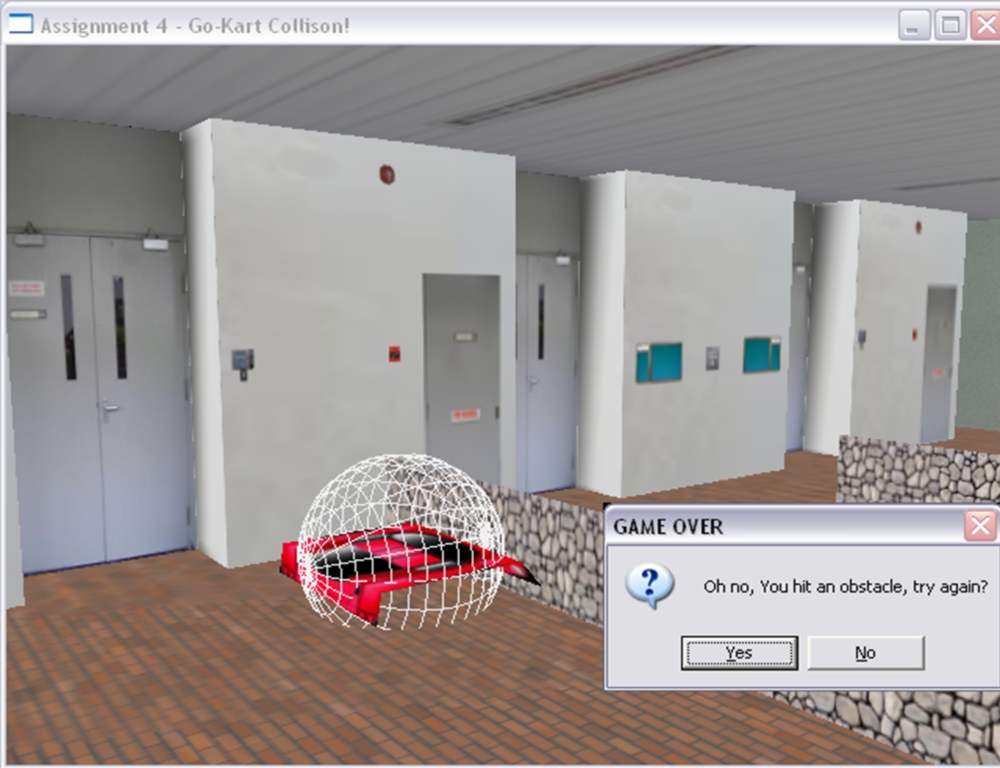
When the player HITS the obstacle, he lost the game
and will be given a chance to restart. This demonstrates collision detection
between a sphere and a polygon (the obstacle). There will also be a
crashing sound effect when the go-kart hits the moving obstacle wall.
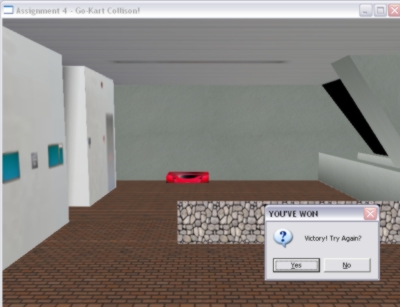
When the go-kart collides with the back wall, the player
wins!
An applause sound-effect will also be triggered to congratulate the
player.
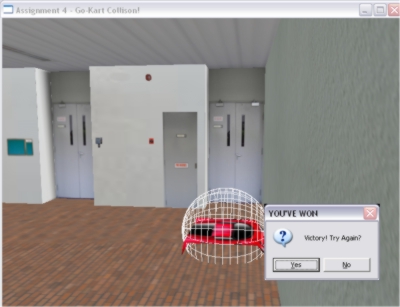
The victory prompt will be triggered by a collision
of the sphere
with the back wall of the scene.
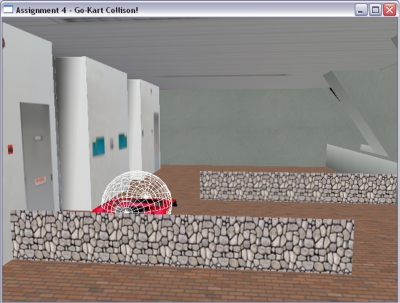
Success in clearing Obstacle 1
A limitation of the bounding sphere binding a rectangular
object can be seen here as the moving obstacle pierces into the go-kart
without collision detected. Hence, this could be improved if a bounding
box was used instead of a bounding sphere to remove this situation from
happening. (More Discussions on the left column).
|
Collision
Detection
is
very important in games to provide the gamer a feeling of realism and
in this assignment, we are tasked to create a small simple game that
demonstrates Collision Detection using the scene from Assignment 3.
Approach
Used
The
core requirement is do a sphere-polygon collision detection between
an object and
a plane. I have chosen to do a bounding sphere on my simple go-kart
constructed by 3 Quads (and a Ferrari texture map) and let it collide
with the back wall of my scene.
As concepts in this assignment will be a crucial part of my Game Demo
which will involve a 3D environment, I spent a lot of time and effort
on this and divided it into 3 development stages of development.
Devt Stage 1:
Understand bounding sphere-plane collision and its algorithm.
Devt
Stage 2:
Developed a bounding
sphere and use the back wall of my corridor scene as the targeted plane
for collision.
Devt Stage 3:
Create a very simple
Go-Kart within the bounding sphere and create a simple game (see storyline
below) with 2 more planes(that move left and right) acting as obstacles
for the player to avoid hitting before reaching the end of the corridor
to claim victory. Add some sounds to indicate collisions.
Some
quick facts of my project:
1. Language and APIs used: OpenGL in C++
2. Number of polygons used for the Go-Kart: 3
3. Modelled after: Corridor outside LT 12 and 13
4. Collision Detection Method used: Bounding Sphere-Polygon
Game Storyline
"
You are Agent 443, man with a mission.
Your mission is to eliminate enemy Kling-on troops hiding in the LT
at the end of the corridor.
To accomplish this, you must safely guide the remote-controlled go-kart
down the corridor of LT 12 and LT 13 to strike it into the back wall
of the corridor, thus releasing lethal toxic gases invisible to the
naked eye. However, your mission will not be easy. Your go-kart MUST
NOT touch the 2 moving obstacles that continually move left and right.
Remember,
in this mission, timing is very important and it is paramount that you
succeed. Good Luck!
This
message will self destruct in 5 seconds... "
Key
Controls in this Game:
The Main keys that demonstrate collision detection
in this assignment would
be the direction keys of the go-kart and the button 'C'
that shows the bounding
sphere of the go-kart.
1. Go-Kart Movement (New)
Move Forward: Up Arrow
Move Backward: Down Arrow
Move Left: Left Arrow
Move Right: Right Arrow
2. Observer/View Controls
(Edited)
Look Around/ View Direction: Mouse Direction
Move Forward: W
Move Backward: S
Move Left: A
Move Right: D
3.
Lighting Controls
Gradual
Day to Night: Press down button 'N'
Gradual Night to Day: Press down button 'M'
Turn Lights On: Press 'L' button once
Turn Lights Off: Press 'O' button once
4.
Others
Show BOUNDING Sphere: Press 'C' once (New)
Bump Mapping On/Off: Press 'B' once
Interesting
Observations:
As
mentioned in our Game Programming lecture, bounding spheres cannot best
represent rectangular objects and at the same time, bounding boxes are
rather awkward in representing rounded objects in a game.
Bounding Sphere or Bounding
Box??
In
this simple demonstration, the limitations of using a bounding sphere
is obviously seen. I needed to decide if I should include the whole
Go-Kart into the bounding sphere or not. Including the whole Go-Kart
within the sphere would leave the Go-Kart making "Phantom Hits"
with the wall. On the other hand, if i have protuding edges out of the
sphere to remove the Phantom Hits, I would have a situation where my
obstacle can slice into a small part of my go-kart (at its edges) before
the collision is detected.
Dynamic Polygon (Obstacles)
vs. Static Polygon (Back Wall)
In
my game, I decided to use the second alternative proposed above. This
method of fitting the length and the breadth of the go-kart to the diameter
of the sphere worked for the collision detection with the back wall
which was static and expected to collide in one direction in alignment
with a primary axis.
However,
the vulnerabilities of such a method is seen in a diagonal collision
with an obstacle in my game. Some parts of the go-kart will pierce into
the moving wall.
Possible
Improvements
This
simple demonstration has proved concepts but can be further improved
with other features like using AABB or OBB instead of sphere-polygon
detection, or including an interesting soundtrack and having a few more
levels of difficulty to challenge the player.
Conclusion:
This
assignment allowed me to get my hands dirty into the world of collision
detection and has allow me to make an informed decision in choosing
the best method of collsion detection to be implemented into my Game
Demo.
Not only that, this assignment demonstrated the pros and cons of a sphere-polygon
collision detection, further enhancing the lessons taught in class and
leaving me with a very deep impression of the importance of collision
detection in almost every game nowadays.
Hope you enjoy enjoy playing my collision detection game! ;)
<---Download
Code and Executable--->
If you have difficulties downloading
the file, please feel free to contact me at: [email protected]
Credits
and Acknowledgments:
1.
I wish to thank Dr Edmond
C. Prakash for this opportunity to do some valuable hands-on on
the concepts learned in lecture. Doing this assignment allowed me to
experience personally potential problems and benefits a game programmer
can experience in using the sphere-polygon collision detection method.
Thank you sir!
2.
To DigiBen, ([email protected]) from www.gametutorials.com for
without his well-explained tutorials and sample codes, I may not have
gone so far. Parts of my code on initialisation of the window and OpenGL
was coded with close reference to his sample codes.
4.
Other Important References I could not do without:
The OpenGL
Redbook
OpenGL Website
|