| Finding A Room |
 |
 |
| LINKS |
 |
 |
 |
 |
|
|
|
|
|
| Now that you are a registered Filetopia user, the fun really begins To find a room & add it to your favourites, click on CHAT in the top icon bar of the Filetopia window. Click on EDIT FAVOURITES ... a window will appear, like the one pictured below |
 |
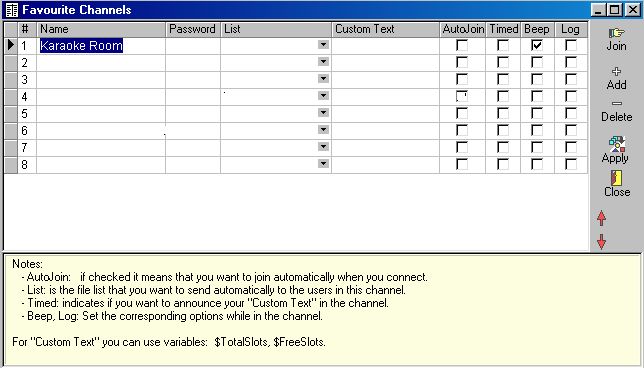 |
| 1. Click on ADD (on the right) 2. Type in the room name you want to add. Begin by adding Karaoke Corner. Put a tick under BEEP and AUTOJOIN then APPLY (a password is NOT required) 3. Close window (icon on right) 4. Now open CHAT ... go to favourites & check the room has been added 5. When you enter Karaoke Corner ... it will show something like this |
 |
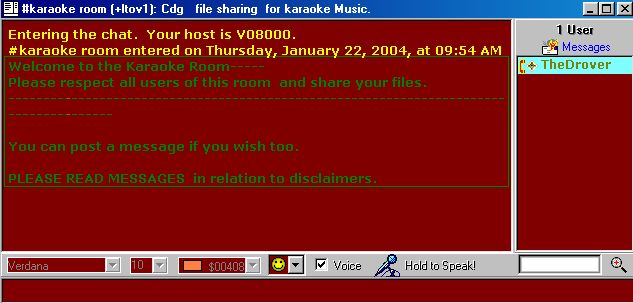 |
| People in the room are listed (right) as shown e.g TheDrover You are now ready to communicate throught text and download a person's sharing folder to obtain the files you want. |
| To find other rooms, click on CHANS ( icon at top of Filetopia screen ) Look for MUSIC and select the genre you are interested in. By double clicking on a room name in the channels, you will automatically be taken to that room. By right clicking anywhere on the screen and selecting ADD TO FAVOURITES, the room will be added to your chat rooms under favourites. |
| EXCITED YET? You are now ready to start downloading & sharing songs / CDG files at will. Go to our Sharing Files page to find out how. |
 |