| Registering Yourself |
 |
 |
| LINKS |
 |
 |
 |
 |
 |
|
|
|
|
|
| WELCOME! This page is designed to help you through the steps of registration. We strongly suggest you print this page before you begin registering yourself. Now just follow the Wizard as it takes you through the steps outlined below. GOOD LUCK !! |
| STEP ONE |
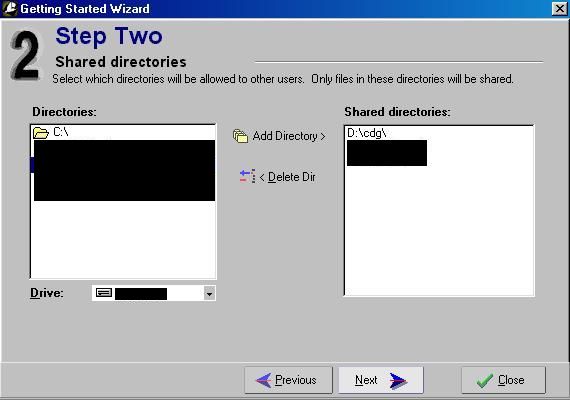
| STEP TWO |
| STEP THREE |
|
|
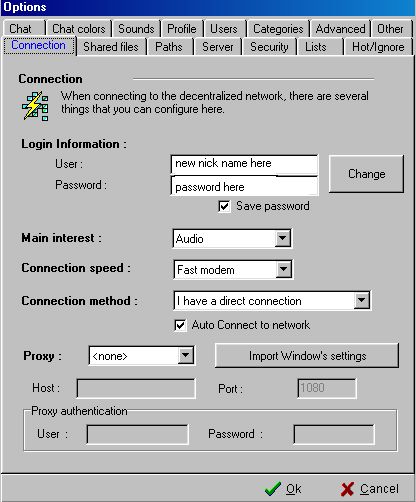
| * Type in a user name and password * Set connection speed to your specific PC connection * Connection Method ... set to I have Direct Connection * Set PROXY at None NOW HIT NEXT |
* In the LEFT WINDOW locate the folder on your drive that you wish to share - click on ADD TO DIRECTORY ... it should then appear in the RIGHT WINDOW NEXT |
| * Select FREE SHARE MODE NEXT |
| STEP FOUR |
|
| * Select NOVICE or EXPERT mode ... we suggest you select EXPERT CLOSE ... You are now registered and ready to begin hours of fun in Filetopia ... Well Done & Enjoy |
 |
 |
|
 |
 |
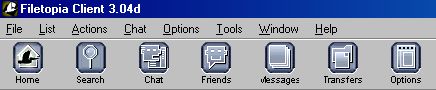
| NOVICE mode icons |
| EXPERT mode icons |
| You are now a registered user of Filetopia ... Well Done! By working through the other links (TOP LEFT) you will learn how to find & share music files, join a chat room, talk to friends online etc. When you enter the Karaoke Corner Di & TheDrover will be happy to work through further details with you and offer any help we can. |
|
|
|
|
 |
 |