| FINDING & ADDING FRIENDS |
 |
| LINKS |
 |
 |
 |
 |
 |
|
|
|
|
|
 |
 |
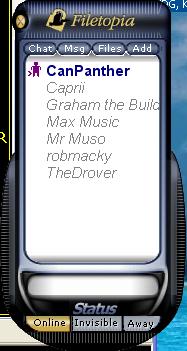 |
| Adding a friend to your list is easy, but first you need to know the exact nickname they use. To add a name to your friends list, simply click once on the Friends icon (yellow smiley face) at the top of the Filetopia window. |
| Your Friends list will appear like this 1. Click on ADD (top right) and type in user's nic. A request will be sent to them to accept 2. In this window you can also set your online status and make your own AWAY messages (bottom right) This away message will show in the room at intervals you set 3. To close friends window, click on the top icon again |
 |
| You can also add a contact in a room by right clicking on their name and selecting add to friends |
|
 |
|