|
Ultimate Tutorials |
|
|
|
The First thing you will need to do is Download mIRC from the downloads page.
Now before we can start Downloading anything we will need to install and configure mIRC.
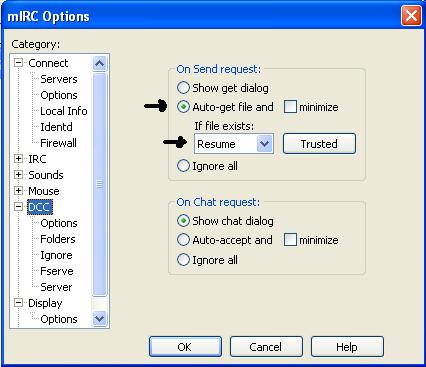
After you have installed mIRC run it. It should then come up with the settings box from there enter your desired username and password. Once you have done this select DCC from the menu on the left. You should have the following on screen.
From here select Auto-get file and change the dropdown box to resume.
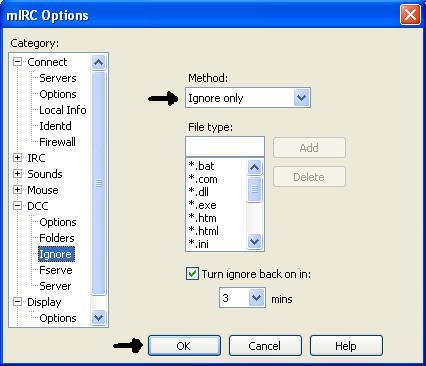
Now select Ignore from the menu on the left. You should get the following screen.
Now select ignore only under method and then click OK.
Now we are ready to download something. Head over to IRCSpy
In the following Example i searched for Nero. When the search is complete you should change display offline bots to say no and sort the results by slots.
Now select the Packet Number to the left of the file name.
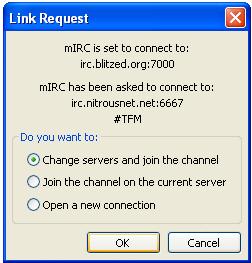
Then you should get the following message.
Just Click OK to bring up the chat window. Now simply press Control + V then Enter
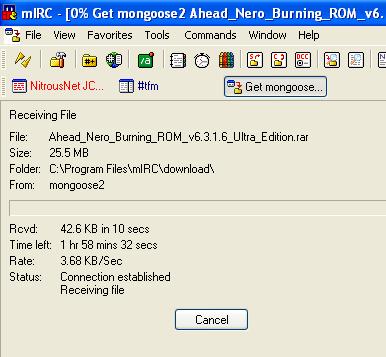
Now your Download should Start.
Congratulations. After the download is finished you will be able to select open from the download screen. |

|
|
|
|
Copyright 2004 Ultimate Tutorials. All Rights Reserved. |